Threads Scheduler and Cross-Posting Guide
Prices and features last checked: August 2026
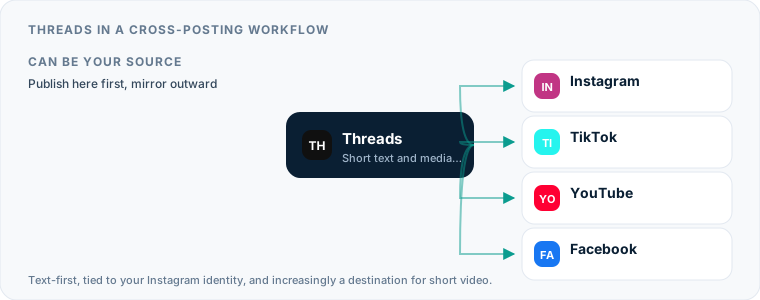
Selecting a Threads scheduler requires an understanding of how Meta built Threads on top of the Instagram graph while maintaining a distinct, conversation-focused text feed. Because your identity on Threads is tied directly to your Instagram account, your audience across both networks frequently overlaps, yet their expectations for what belongs in their feed are entirely different.
Setting up an automated publishing queue for Meta’s microblogging platform lets you auto post threads, queue updates, and mirror video content without spending your day inside the mobile app. The challenge lies in knowing which content formats translate well between visual networks and text feeds, and which ones feel completely out of place when published without adjustments.
How Publishing to Threads Works Today
Publishing to Threads differs from traditional social media management because of the platform’s origin as an offshoot of Instagram. While Instagram relies heavily on visual assets like photos, carousels, and short videos, Threads prioritizes short written statements, links, and casual conversation.
The Text-First Feed versus Visual Platforms
When Meta launched Threads, it established a environment dominated by text. Images and video are fully supported, but the platform’s layout gives priority to short statements and threaded discussion.
If you publish a post containing only an image without text, it often performs poorly compared to a well-crafted line of commentary accompanying that same image. Captions that were written for Instagram—often filled with extensive hashtag blocks and calls to “tap the link in bio”—look out of place on a feed built for inline links and immediate textual reactions.
Account Identity and Audience Overlap
Because a Threads account is connected to an Instagram profile, your followers on Instagram are regularly prompted to follow you on Threads as well. This creates a high degree of audience overlap between the two networks.
If you post the exact same visual content and caption to both channels at the exact same time, your core audience sees identical posts side-by-side in their feeds. To make cross-posting work between these networks, you must change how you format your messages or rely on tools that adapt content automatically based on where it is being sent.
Using Native Features to Schedule Threads Posts for Free
Meta has built basic publishing options directly into the Threads web interface and Meta Business Suite, allowing creators to schedule Threads posts without paying for additional software.
Web Scheduling vs Meta Business Suite
Through the Threads website, you can write a post, attach media, and select a future publication time. Meta Business Suite also offers scheduling options for accounts connected to a professional Instagram profile.
- Threads Web: Ideal for quick, single-post scheduling directly from your desktop browser.
- Meta Business Suite: Useful if you manage multiple Meta assets, such as Facebook Pages and Instagram professional accounts, from a centralized dashboard.
Limitations of Meta’s Built-In Tools
While free, native tools have clear boundaries that limit their usefulness for broader content operations:
- No Cross-Platform Mirroring: Native tools do not automatically publish your Threads posts to outside platforms like Bluesky or X.
- No Source-to-Destination Automation: You cannot configure Meta Business Suite to take a newly published video from Instagram and mirror it to Threads as a standalone post without setting up each post individually.
- Basic Queue Options: Native scheduling lacks flexible queue slots or bulk asset importing, requiring you to manually set the date and time for every piece of content.
Choosing a Third-Party Threads Scheduler: Account Requirements
Connecting a third-party Threads scheduling tool to your account requires an understanding of Meta’s Graph API permissions and account types.
API Permissions and Authentication
Meta controls third-party access to Threads through the official Threads API. When you connect a publishing tool, you grant it permission to create posts, upload media, and read account statistics on your behalf.
This connection requires periodic re-authentication. If your access token expires or if you change your Instagram security settings, your scheduled queue will stop publishing until you re-link the service.
Account Setup: Personal vs Professional
Unlike Instagram, which previously restricted API access strictly to Business and Creator profiles, the Threads API allows third-party tools to connect to public accounts. However, if you use a third-party tool that handles both Instagram and Threads simultaneously, your Instagram account usually must be set to a professional profile (Business or Creator) to allow cross-platform API actions.
Using Threads as a Source to Automate Threads Posts Elsewhere
When you publish on Threads first, you can use that content as the trigger to automate Threads posts into other channels across the web.
Extracting Text for Other Microblogs
Threads posts consist primarily of text, links, and short media clips, making them ideal source content for platforms with similar structures like Bluesky or X. A text post written for Threads can easily pass to another text-based network without requiring heavy editing.
When choosing a source-to-destination workflow, make sure your tool strips out platform-specific handles. A mention of an Instagram user on Threads will not map correctly to a handle on another network, leaving broken text references if passed through unedited.
When Text Sources Break Down on Visual Networks
Passing a text-heavy Threads post to a visual-first platform like Pinterest or an Instagram Feed rarely works well. Visual platforms require high-resolution image assets or vertical video containers. If your tool attempts to push a text-only status update from Threads into a network designed for visual assets, the post will either fail at the API level or look like an unformatted screenshot.
Configuring Threads as a Cross-Posting Destination
Most creators treat Meta’s microblogging app as a target channel, taking content created elsewhere and attempting to cross post to Threads.
Mirroring Short Videos from Other Platforms
Short vertical videos designed for Reels or TikTok fit well into the Threads feed. When published on Threads, video posts play natively in line with user text.
If you produce short-form video on Instagram, automated tools can handle distribution for you. Postpari builds a pipeline that takes short videos published on your Instagram source account and mirrors them to your connected destination accounts, Threads among them. Rather than uploading the file repeatedly, the post transfers automatically once published on your main feed.
For detailed steps on connecting these specific channels, read our guide to direct video mirroring from Instagram to Threads.
If Your Video Starts on TikTok Instead
Not every creator publishes to Instagram first, and the tool that suits you depends on which app you actually open when a video is ready. A mirroring flow that reads from an Instagram source cannot help a creator whose first upload goes to TikTok — there is nothing on the source account to mirror. For that workflow you want a service that watches TikTok directly and fetches the file before the watermark is applied, which is a different product category with different trade-offs. We walk through both shapes, and what the caption loses on the way across, in our guide to cross-posting from TikTok to Threads.
Adapting Text for Multi-Platform Distribution
Sending social media to Threads requires watching your character counts and media handling. Text written for short-form microblogs can usually be pushed to Threads without truncation, but lengthier updates will fail if they cross Meta’s text thresholds.
- When pushing content from long-form networks, use a tool that lets you shorten text or truncate long captions automatically.
- If your source post relies on complex image carousels, verify how your cross-posting setup converts multi-image uploads for Meta’s API.
If your strategy relies heavily on multi-platform scheduling, compare your setup against our guides for configuring an Instagram scheduler, managing a dedicated Bluesky scheduler strategy, or establishing a broader framework for social media cross-posting.
Technical Limits, Media Formats, and Content That Breaks on Threads
Every social platform processes text, aspect ratios, and file sizes differently. When you send content through an API, minor formatting mismatches can result in failed uploads or broken posts.
| Feature / Limit | Threads | Instagram Reels | Bluesky | X (Standard) |
|---|---|---|---|---|
| Max Text Length | 500 characters | 2,200 characters (caption) | 300 characters | 280 characters |
| Video Aspect Ratios | 9:16, 1:1, 16:9 | 9:16 vertical | 9:16, 1:1, 16:9 | 9:16, 1:1, 16:9 |
| Inline Web Links | Fully supported | Text only (Not clickable) | Fully supported | Fully supported |
| Hashtags | Single tag selection | Multiple tags supported | Multiple tags supported | Multiple tags supported |
| Image Limit Per Post | Up to 10 items | Up to 10 items | Up to 4 items | Up to 4 items |
Character Limits and Link Previews
Threads grants up to 500 characters per post for standard profiles. If a cross-posting system attempts to send a 1,000-character Facebook update or a long Instagram caption to Threads without truncating it, Meta’s API rejects the post outright.
Links pasted into Threads generate rich visual cards automatically. However, if your post already contains multi-image attachments, some third-party tools may fail to generate the link preview card alongside the images.
Video Aspect Ratios and Container Limits
Vertical video (9:16 aspect ratio) performs best on mobile screens. While Threads permits landscape video (16:9) and square formats (1:1), landscape videos render with thick black bars above and below the frame on mobile devices.
Keep your file parameters standard: MP4 or MOV formats, standard frame rates, and compressed audio tracks. Files containing unusual codecs or oversized resolution containers will fail during API processing.
Managing Multiple Threads Profiles Without Account Confusion
Managing several brand profiles on Threads requires careful account authorization, especially since Threads identities are linked directly to Instagram accounts.
Authentication and Profile Switching
Because Threads authentication uses Meta’s single sign-on structure, your browser or scheduling app can easily assign a post to the wrong account if you are logged into multiple Instagram profiles simultaneously.
- Session Isolation: Use separate browser profiles (or dedicated incognito containers) for each brand when authenticating your third-party tools.
- API Token Verification: Before queueing posts, double-check that the token authorization lists the exact Instagram handle connected to your target Threads account.
Main and Secondary Account Architecture
If you operate a primary brand handle alongside secondary or regional accounts, avoid broadcasting identical content to all of them at once. Running multiple profiles effectively means targeting distinct regional audiences or product lines.
For short video creators using Postpari, higher subscription tiers let you link several destination accounts across platforms—including backup accounts or multi-brand setups—allowing a single Instagram source video to populate your entire account network simultaneously.
Building a Threads Scheduler Workflow That Runs Without Daily Attention
To run a consistent publishing system, build an automated workflow that balances native engagement with background content distribution.
Source-to-Destination Rules
Rather than filling out a manual content calendar for every day of the month, set up automated pipelines based on asset type:
- Short-Form Video Pipeline: Publish your short vertical video directly to Instagram. Let an automated pipeline mirror that video asset straight to Threads, TikTok, and YouTube Shorts.
- Short-Text Pipeline: Draft micro-updates in a scheduling tool like Buffer or Publer, setting them to queue across Threads, Bluesky, and X simultaneously.
- Long-Form Article Pipeline: When publishing blog content, use RSS or API integrations to trigger a short link update on your microblogging channels.
Balancing Automation with Live Engagement
Automation keeps your feed active, but text-based platforms rely heavily on real-time interaction. A profile that auto-posts without monitoring replies can quickly look like a bot.
Set aside dedicated time to respond to comments on your published posts, answer questions in your thread replies, and participate in ongoing discussions across your feed. Use automated scheduling to handle background content delivery so your actual time on the platform can be spent talking directly to your audience.
What the platforms themselves document
Publishing rules change without notice, and every network is the only authority on its own. These are the pages we check this guide against. If one of them contradicts this page, it is right — tell us.
- Meta: Threads API — Threads
Where Postpari fits: Postpari lists Threads among the networks it works with. It does not publish a platform-by-plan matrix, so confirm Threads is available on the plan you are considering before you rely on it.
Frequently asked questions
Can you schedule posts directly inside the Threads web app?
Yes, Meta allows users to schedule posts directly from the web interface on threads.net. You can compose a post, attach media, select a date and time, and queue the content for future publication without using external software.
Does cross-posting content to Threads require a professional Instagram account?
The official Threads API allows publishing to personal and public Threads profiles. However, if your third-party scheduling tool handles both Instagram and Threads simultaneously, your linked Instagram account typically needs to be a Business or Creator profile to allow broad API access.
Why do link previews sometimes fail when sending posts to Threads via a scheduler?
Link previews usually fail if the post combines multiple media types that conflict with Meta's formatting rules, such as attaching several images alongside an external web link. They can also fail if the destination URL blocks Meta's web crawlers from scraping open-graph metadata.
Can third-party tools publish multi-reply threads automatically?
Some third-party tools support multi-post thread creation through the API, allowing you to queue a main post along with sequential replies. However, simpler source-to-destination mirroring tools usually publish only the main initial post and its attached media.
Does automating posts to Threads lower your reach on Meta's algorithm?
Meta does not penalize posts simply because they are delivered through the official Threads API. However, posts that retain visible watermarks from competitor platforms, feature incorrect aspect ratios, or contain captions written for different networks often receive lower audience engagement.