Postpari vs Repurpose.io: Which One Fits Your Workflow?
Prices and features last checked: August 2026 · Sources: postpari.com , postpari.com , postpari.com , repurpose.io , repurpose.io
BestCrossPosting.com is operated by the team behind Postpari. We benefit when readers sign up, so treat our Postpari recommendations as the recommendations of an interested party — and check our claims against the sources we link. Full disclosure · How we compare products
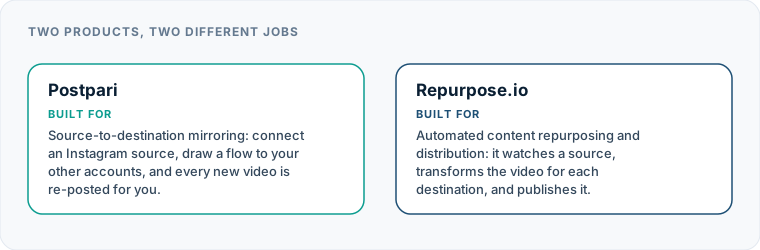
When evaluating postpari vs Repurpose.io, the decision comes down to one basic choice: do you need to transform your media files during publishing, or do you simply want to mirror clean short-form video from one source to every other network? Both platforms eliminate the grueling work of manual multi-network distribution, but they approach the task with entirely different architectures.
If your workflow requires automatic watermark removal, video aspect ratio conversion, and continuous cloud storage backups, Repurpose.io justifies its higher entry cost; if you publish finished video to Instagram and want it automatically mirrored elsewhere without overpaying for media processing, Postpari is the practical winner. Deciding whether Postpari or Repurpose.io belongs in your daily operations requires looking past generic feature lists and examining how each tool handles raw video input, platform connections, and subscription costs.
The Short Version: Postpari vs Repurpose.io
The debate between these two platforms represents the most critical comparison on this site because both tools operate on the same fundamental principle: true hands-off automation driven by a source trigger. Unlike standard scheduling dashboards where you must log in, upload a file, write captions, and pick a calendar slot for every network, both of these tools sit in the background and publish content automatically whenever you upload a new video to your primary channel.
The real divergence lies in content transformation and entry pricing. A direct Repurpose.io comparison highlights a system built as a multi-directional conversion engine. It takes video or audio from various sources, strips watermarks, resizes portrait footage into landscape (or vice versa), and backs up the original files to cloud storage repositories. However, that processing engine comes at a premium, making it one of the most expensive entry-level tools designed for individual creators.
Postpari takes a focused, lightweight approach. It acts as a dedicated mirror system: you connect your social profiles, set your Instagram profile as the primary source, and whenever you publish a short-form video on Instagram, Postpari passes that exact content along to your destination profiles. Because it does not perform heavy server-side video rendering or audio extraction, Postpari costs a fraction of its competitor at entry. If you are exploring a broader Repurpose.io alternative to lower your software overhead, this structural distinction is the first thing to consider.
| Workflow Need | Repurpose.io | Postpari |
|---|---|---|
| Primary Mechanism | Multi-source transformation & routing | Instagram-to-destination mirroring |
| Media Handling | Resizes footage, strips watermarks | Passes clean source video directly |
| Cloud Storage Integration | Backs up assets to Drive or Dropbox | Direct distribution only |
| Entry Cost Tier | High relative cost for creator tools | Low relative cost entry tier |
| Backfill Capability | Workflows for historical content | Drips existing Instagram posts out |
| Secondary Account Support | Connects multiple target profiles | Connects main and backup accounts |
| Feature | Postpari | Repurpose.io |
|---|---|---|
| Starting price | $9/mo | $35/mo |
| Free plan | No | Yes |
| Free trial | 7 days | 14 days |
| Source-triggered mirroring | Yes | Yes |
| One post to several destinations | Yes | Yes |
| Schedule posts for a chosen time | Yes | Yes |
| Backfills older posts | Yes | Not verified |
| Several accounts on one network | Yes | Yes |
| Reformats content per platform | Not verified | Yes |
| Removes source watermark | Not verified | Yes |
| Visual calendar | Not verified | Not verified |
| Analytics | Yes | Not verified |
| Approval workflows | Not verified | Not verified |
| Networks listed | 9 | 12 |
Postpari
Source-to-destination mirroring: connect an Instagram source, draw a flow to your other accounts, and every new video is re-posted for you.
- From
- $9/mo
- Free plan
- No
- Trial
- 7 days
- Source-triggered mirroring
- Yes
- One post to several destinations
- Yes
- Schedule posts for a chosen time
- Yes
- Backfills older posts
- Yes
- Several accounts on one network
- Yes
- Reformats content per platform
- Not verified
- Removes source watermark
- Not verified
- Visual calendar
- Not verified
- Analytics
- Yes
- Approval workflows
- Not verified
Repurpose.io
Automated content repurposing and distribution: it watches a source, transforms the video for each destination, and publishes it.
- From
- $35/mo
- Free plan
- Yes
- Trial
- 14 days
- Source-triggered mirroring
- Yes
- One post to several destinations
- Yes
- Schedule posts for a chosen time
- Yes
- Backfills older posts
- Not verified
- Several accounts on one network
- Yes
- Reformats content per platform
- Yes
- Removes source watermark
- Yes
- Visual calendar
- Not verified
- Analytics
- Not verified
- Approval workflows
- Not verified
“Not verified” means we could not find the vendor stating it on their own site. It is not a claim that the product cannot do it.
What Each Product Is Actually For
Understanding what these platforms are built to accomplish keeps you from buying features you will never touch or expecting capabilities that a tool was never designed to deliver.
Repurpose.io: Media Transformation and Archival Pipeline
Repurpose.io is built for creators who record content on one platform—such as TikTok or Zoom—and need that media altered before it lands on other channels. If your primary recording habit involves filming directly inside an app that applies a platform watermark, you cannot simply cross-post that raw file to alternative networks without displaying another brand’s logo. Repurpose.io solves this by processing the file in transit, removing the watermark, and reformatting the dimensions to fit each destination.
It also serves as a digital storage pipeline. Creators who stream long-form video or record podcasts can set up rules that automatically send finished broadcasts to cloud drives, extract audio tracks for podcast feeds, or splice long streams into snippets. It is a heavy-duty media router meant to sit at the center of a multi-format content strategy.
Postpari: Instagram-First Video Mirroring
Postpari is designed for publishers who already produce clean, unwatermarked video assets and upload them directly to Instagram. In our detailed Postpari review, we outline how its architecture centers on source-to-destination distribution without altering the underlying video. You build a visual connection from your main Instagram account to your destination accounts, hit publish on Instagram, and let the system replicate the post across your digital footprint.
Postpari is intentionally stripped of unnecessary media editors and rendering engines. It assumes you edited your video in a dedicated app like CapCut, Premiere, or DaVinci Resolve before uploading it to Instagram. By focusing purely on distribution rather than file manipulation, it provides a fast, efficient pipeline for creators who want maximum output with minimal software clutter.
Where Repurpose.io Takes the Win
A objective comparison that concludes with a single tool winning every category is useless. Repurpose.io has clear, specific advantages for workflows that demand file conversion and archival backup.
Automatic Watermark Removal and Cropping
If your creative process involves filming and editing directly within TikTok, your saved videos will contain a bouncing watermark. Repurpose.io shines here by automatically stripping that watermark before pushing the video to YouTube Shorts, Instagram Reels, or Pinterest. Furthermore, if you produce horizontal video on YouTube and want to reframe it into vertical format for mobile apps, Repurpose.io offers automated cropping settings to adjust aspect ratios without opening a desktop video editor.
Multi-Source Inputs and Cloud Storage Backups
While Postpari relies on Instagram as the source trigger, Repurpose.io allows you to build workflows originating from diverse platforms, including TikTok, YouTube, audio feeds, and live streams. Crucially, it integrates directly with Google Drive and Dropbox. Every time you post a video on a social network, Repurpose.io can archive a clean copy directly into your designated cloud folder. For creators who want an automated backup of their media library without manually downloading files, this feature alone justifies the higher cost.
Repurpose.io Pipeline: [ Source Video ] ──> [ Watermark Removal ] ──> [ Aspect Ratio Crop ] ──> [ Destinations + Cloud Backup ]
Where Postpari Is the Better Choice
For creators who prepare clean video files prior to publishing, paying for heavy server-side media processing is a waste of capital. Postpari offers distinct advantages in cost, operational focus, and multi-account management.
Unmatched Cost Efficiency for Mirroring
Because Repurpose.io processes, renders, and stores heavy media files, its subscription pricing reflects those infrastructure expenses. It stands as one of the most expensive entry points among creator distribution tools. Postpari, by contrast, operates purely as a distribution mirror. Its entry tier sits at a fraction of Repurpose.io’s base subscription. If you already upload clean video to Instagram, paying several times more for transformation features you do not use makes little financial sense.
Lean Instagram-Centric Distribution
When comparing Repurpose.io vs postpari for everyday simplicity, Postpari’s focused setup wins. You do not need to configure complex transformation rules, select output aspect ratios, or set up cloud folder connections. You connect your Instagram source, line up your target destinations, and walk away. For publishers who view social channels as direct extensions of their Instagram presence, Postpari provides a direct path without unnecessary software layers.
Multi-Account Flexibility and Backfill Features
Postpari natively accommodates creators who run secondary presence strategies. You can route content from your primary Instagram source to multiple destination accounts on the same platform, such as maintaining a primary account alongside a backup profile. Additionally, Postpari includes a backfill feature that allows you to drip existing Instagram posts out to newly connected destinations over time, helping you populate a new channel without uploading dozens of videos by hand in a single day. Higher tiers even allow mirroring public Instagram accounts that you own or manage across your brand portfolio.
Postpari Pipeline: [ Clean Instagram Video ] ──> [ Postpari Mirror Engine ] ──> [ All Connected Social Profiles ]
Postpari vs Repurpose.io: Understanding the Pricing Models
Comparing subscription software requires examining structure rather than just matching raw numbers, especially since vendors update exact dollar amounts frequently. In our overall index of social media cross-posting comparisons, we consistently highlight how pricing mechanics impact long-term sustainability for creators.
Repurpose.io operates at the upper pricing tier of creator-focused automation software. Its cheapest plan is priced significantly higher than competing single-purpose tools. That higher price reflects the computational power needed to strip watermarks, render new video assets, and manage cloud connections. Repurpose.io offers a trial period and a limited free allowance to let users test its transformation engine, but running it ongoing requires a substantial commitment relative to simple scheduling tools.
Postpari bases its pricing model on a low-cost entry tier designed specifically for single-creator setups. Rather than charging high baseline fees to cover video rendering costs, Postpari keeps its base tier extremely affordable. Upgrading to higher tiers scales your mirror capacity, allowing you to connect additional destination accounts, increase your daily fair-use publication caps, or copy public Instagram sources. If your goal is strictly low-overhead distribution, Postpari keeps your fixed software costs minimal.
Supported Social Networks and Destinations
Both platforms support the major networks required for modern short-form video strategies, but their channel mechanics differ in key areas.
Postpari supports a wide footprint of modern consumer and professional channels, including:
- TikTok
- YouTube
- Facebook (Pages)
- Threads
- X (formerly Twitter)
- Bluesky
A critical operational detail for Postpari users: Facebook distribution publishes to Facebook Pages, not personal profiles. This aligns with standard platform API guidelines and business workflows. Furthermore, Postpari excels at multi-account routing, allowing you to publish to several accounts on the same network—such as a primary channel and a regional or backup profile—from a single Instagram post.
Repurpose.io supports a similarly broad spectrum of video destinations but extends its input connections to include audio podcast RSS feeds, Zoom records, Google Drive folders, and Dropbox. How Repurpose.io cross posting functions across these channels depends heavily on the selected source: a video starting on YouTube can be reformatted for TikTok, or an audio track from a podcast feed can be converted into an audiogram video for Facebook.
How Automation Depth Differs Across Platforms
The term “automation” gets thrown around loosely in social media marketing, but these two services approach trigger-based publishing from distinct operational angles.
Trigger Mechanics: Repurpose.io: [ Multi-Source Input ] ──> [ Rules Engine ] ──> [ Format Render ] ──> [ Scheduled / Instant Push ] Postpari: [ Instagram Post ] ──> [ Direct Mirror ] ──> [ Instant Push / Drip Backfill ]
Repurpose.io uses a rule-based engine. You build individual “workflows” that specify a source profile, a destination profile, and a action type (such as “convert full video to short snippet” or “publish full video direct”). Once a workflow is enabled, Repurpose.io monitors the source, processes new media through its cloud servers, and pushes the modified output to the destination. You can set workflows to publish automatically or hold posts in a queue for manual approval.
Postpari functions on a direct source-to-destination mirror flow. You map your primary Instagram profile directly to your destination networks. When a new video post goes live on Instagram, Postpari detects the update and mirrors the post across your target profiles subject to standard platform posting speeds and daily fair-use limits. There are no intermediate rendering queues to configure. If you need to populate a new target account with historic content, Postpari’s backfill mode lets you set up an automated drip schedule to distribute older posts systematically.
Critical Gaps: What Neither Tool Will Do for You
Before selecting either software, you must understand the operational boundary lines. Neither Postpari nor Repurpose.io is a full-suite social media management dashboard, and choosing either one expecting standard agency features will lead to frustration.
When reviewing our round-up of the best cross-posting tools, we emphasize that source-to-destination automation engines intentionally leave out core management modules:
- No Visual Content Calendars: Neither tool offers a drag-and-drop visual planning grid to preview how your grid will look over the coming month.
- No Analytics or Performance Reporting: Neither platform tracks impressions, engagement rates, audience demographics, or follower growth. You must view analytics directly inside each native social platform.
- No Unified Social Inbox: Neither service aggregates comments, direct messages, or mentions from your destination profiles. Community management must be handled natively or through dedicated messaging platforms.
- No AI Writing or Hashtag Generators: Neither tool includes AI prompt generators, caption expanders, or hashtag research modules.
- No Client or Team Approval Workflows: Neither tool provides multi-user permission roles, draft approval links for clients, or internal team messaging threads.
- No Still Image or Carousel Mirroring: Postpari’s Terms of Use specifically govern short-form video mirroring from Instagram sources. It does not publish still photo posts or multi-image carousels.
If your marketing strategy requires deep analytics, client sign-offs, image scheduling, or community moderation from a single login, you need a conventional management platform like Buffer, Later, or Hootsuite. But if your goal is strictly to publish short video assets across every video network without repeating manual uploads eight times a day, Postpari and Repurpose.io remain the two most capable source-driven engines available.
Your decision comes down to your production setup. If you record in third-party camera apps with embedded logos, require audio-to-video conversion, or want automated cloud backups, pay the premium for Repurpose.io. If you produce clean, edited video files, post them to Instagram, and want them automatically mirrored to the rest of the web at a fraction of the cost, Postpari is the clear operational choice.
Which one should you pick?
There is no single winner here, because these tools are not trying to do the same job. Match the row to your own situation.
| If your situation is | Pick | Why |
|---|---|---|
| You need the video resized and de-watermarked for each network | Repurpose.io | It advertises automatic resizing and watermark removal. Postpari does not, and we will not imply otherwise. |
| You just need one account mirrored to the rest | Postpari | Same job, a fraction of the entry price, and less setup between signing up and the first automated post. |
| You want to try before paying anything | Repurpose.io | It offers 10 published videos free with no card. Postpari requires a card for its trial. |
| You need Snapchat, Twitch, Drive or Dropbox in the flow | Repurpose.io | Postpari does not list those destinations at all. |
| You need to fill a new account from an old one | Postpari | Backfill is a published feature on every Postpari plan. We could not verify an equivalent on Repurpose.io. |
Frequently asked questions
What is the main difference between Postpari and Repurpose.io?
The core difference lies in video transformation and entry cost. Repurpose.io removes watermarks, resizes video aspect ratios, converts audio feeds, and backs up media to cloud storage, but charges a higher monthly fee. Postpari directly mirrors clean short-form video from an Instagram source to destination accounts without file editing, offering a far more affordable entry tier.
Can Postpari or Repurpose.io publish to Facebook personal profiles?
No, neither tool supports cross-posting short video content directly to personal Facebook profiles. Due to platform API rules, automated distribution on Facebook is strictly supported for Facebook Pages.
Does Postpari remove TikTok watermarks when cross-posting?
No, Postpari does not render or edit video files in transit, so it does not strip watermarks. To maintain high-quality posts across networks using Postpari, you should upload clean, unwatermarked video files directly to your primary Instagram account.
Which tool is better if I want to save copies of my videos to Google Drive?
Repurpose.io is the clear choice for media archival. It features built-in integrations that automatically back up every video published on your social channels directly to connected Google Drive or Dropbox folders. Postpari focuses solely on platform distribution and does not offer cloud storage sync.
Do either of these platforms include analytics or social inbox features?
No, neither platform provides analytics tracking, engagement metrics, or a unified inbox for responding to comments. Both platforms are specialized background distribution tools designed to move content across networks rather than manage community interactions.