How to Cross-Post from Instagram to TikTok Automatically
Prices and features last checked: August 2026
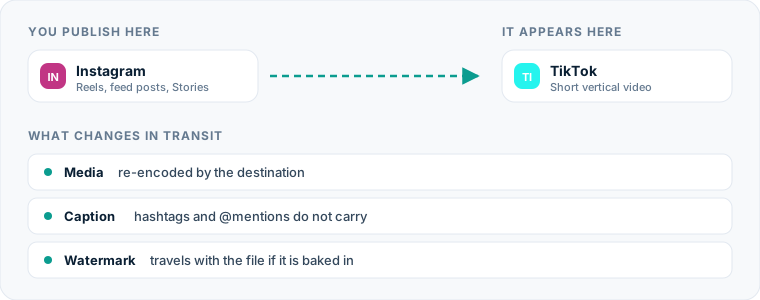
Moving short videos from instagram to tiktok allows you to reach a new audience without editing every Reel twice. The most efficient way to publish Instagram Reels on TikTok is to connect both accounts to an automated cross-posting service that detects new uploads and mirrors them instantly. Instead of downloading video files to your phone, stripping watermarks, and re-typing captions, a continuous feed pipeline handles the media transfer behind the scenes.
If you publish vertical video regularly, doing this work by hand quickly becomes a friction point in your publishing process. Automating the connection between your primary channel and secondary profiles keeps your media pipeline moving without manual intervention.
One source account, one destination. Add the rest of your networks to the same flow.
The fastest way to move content from Instagram to TikTok
To automatically post Instagram content to TikTok, you set up a dedicated source-to-destination pipeline. Modern cross-posting platforms run quietly in the background: whenever you post a Reel on Instagram, the platform fetches the original file, processes the caption, and uploads it directly to your TikTok account.
If you prefer traditional scheduling tools where you assemble each post by hand on a calendar, an Instagram scheduling tool or a general TikTok scheduler will let you queue videos individually. However, direct account mirroring removes the planning stage entirely.
+-------------------+ +-------------------+ +-------------------+ | | | | | | | Instagram Reel | ---> | Cross-Posting | ---> | TikTok Video | | (Source Post) | | Automation Engine | | (Destination) | | | | | | | +-------------------+ +-------------------+ +-------------------+
By connecting your profiles at the API level, content moves automatically within minutes of publication. You publish once on Instagram, and your secondary platforms update without extra effort.
The manual workflow for publishing Reels on TikTok
If you do not use automated tools, moving a video from Instagram to TikTok requires a multi-step manual process every single time you post.
Step 1: Exporting from Instagram
First, you create and post your Reel within the Instagram app. Once published, you must download the video file back to your device. If you save the video directly from the Instagram native viewer after publishing, Instagram bakes a visible watermark and account handle directly into the video frames.
Step 2: Cleaning the video file
To remove that watermark manually, you must copy the post link, open a third-party downloading site in your browser, paste the link, clear pop-up ads, and download the raw MP4 file back to your camera roll or desktop drive. Alternatively, you must save the unedited project file from your mobile video editor before adding native Instagram text and stickers.
Step 3: Re-uploading to TikTok
Finally, you open the TikTok app or desktop creator center. You select the clean MP4 file, re-write or copy-paste your caption, re-select target hashtags suitable for TikTok search, select a thumbnail frame, choose a sound track if your original audio did not carry over, and tap publish.
Doing this for every video requires active attention every time you post a Reel.
Why manual reposting from Instagram to TikTok drains your time
The primary issue with manual publishing is not the difficulty of any individual step—it is the context-switching and operational overhead.
Manual Workflow: [Create Reel] -> [Publish IG] -> [Download File] -> [Strip Watermark] -> [Open TikTok] -> [Paste Text] -> [Publish TikTok]
Automated Workflow: [Create Reel] -> [Publish IG] ------------------------------------------------------------------------> [Auto-Posted to TikTok]
When you manage several social accounts, repeating a seven-step sequence for every upload consumes a significant amount of time over the course of a month. If you manage client accounts, those manual minutes multiply across every handle in your portfolio.
Beyond time, manual transfers create friction points where posts get delayed or forgotten entirely:
- File management clutter: Your mobile device fills up with duplicate video files, exported drafts, and screen recordings.
- Irregular publishing schedules: If you publish an Instagram Reel at 8:00 PM, you might not get around to manually uploading it to TikTok until the next afternoon, missing peak viewing windows.
- Typos and formatting errors: Copying text back and forth between mobile apps frequently results in missing tags, truncated lines, or broken spacing.
- Mental fatigue: Reminding yourself to cross-post turns content creation into administrative maintenance.
Automating this route removes human error and guarantees that every piece of short-form video gets distributed everywhere it belongs.
How automated Instagram to TikTok publishing works
Automated cross-posting changes your role from active distributor to system supervisor. Rather than managing files, you configure rules for how media flows between platforms. Understanding the fundamentals of our guide to cross-posting on social media will help you structure these connections effectively.
When you use a source-to-destination tool like Postpari, Instagram acts as your primary engine. You produce and publish your Reel inside Instagram using its native cameras, filters, or text options.
Once your post goes live:
- Detection: The cross-posting service detects the new Reel on your connected Instagram profile via platform integrations.
- Extraction: The engine retrieves the highest-resolution media file available directly from the source, bypassing the watermarked consumer download layer.
- Parsing: The caption text is extracted, sanitized, and formatted according to your pre-set rules.
- Delivery: The engine sends the video file and processed caption to TikTok through its official API, publishing it as a native video.
This entire pipeline runs in the background. You never have to handle file downloads, manage local storage, or open secondary apps to complete the posting process.
Setting up your Instagram-to-TikTok automation flow
Setting up an automated flow takes only a few minutes. Here is how to configure the distribution pipeline step by step.
Step 1: Connect your source and destination accounts
Log into your cross-posting tool and authorize your Instagram account as the source. Next, authorize your TikTok account as a destination. You can review available account connections across various platforms in our overview of the best cross-posting tools.
Step 2: Establish the directional flow
Define the direction of media transfer. Draw a direct line from your Instagram account (source) to your TikTok account (destination). This ensures content only flows in one direction, preventing duplicate loops. If you run multiple brands or backup accounts, you can direct a single Instagram source to publish to a primary TikTok handle as well as a secondary backup account simultaneously.
+-------------------+ | Instagram Source | +---------+---------+ | +---------------+---------------+ | | v v +-------------------+ +-------------------+ | Primary TikTok | | Backup TikTok | | Destination | | Destination | +-------------------+ +-------------------+
Step 3: Set handling rules for captions and backfill
Decide how you want captions to transfer. You can set the system to mirror your captions exactly as written, append specific default tags, or strip out platform-specific elements like Instagram handles.
If you have an existing library of Reels on Instagram that never made it to TikTok, configure backfill settings. Tools like Postpari can drip your historical Instagram posts out to TikTok over time, building up your destination profile without flooding the platform with dozens of posts at once.
What happens to the video file during transmission
When cross-posting short video content, maintaining visual quality is crucial. Different methods handle rendering, aspect ratios, and watermarks differently.
| Handling Vector | Manual Download/Upload | Native App Re-creation | Source-to-Destination Automation |
|---|---|---|---|
| Visual Resolution | Often compressed by double-rendering | Native camera quality | Original source file resolution |
| Watermarks | Present unless removed via third-party sites | None | Clean file extracted automatically |
| Aspect Ratio | Preserved (typically 9:16) | Preserved (typically 9:16) | Preserved (typically 9:16) |
| Processing Speed | Slow (requires manual intervention) | Slowest (requires manual editing) | Fast (background processing) |
| Device Storage Used | High (stores files locally) | Moderate (stores project files) | Zero local storage required |
When you send a video automatically through a dedicated mirroring flow, the system pulls the clean MP4 asset generated when you rendered the Reel. It bypasses the overlaid visual graphics that Instagram adds when a user clicks “Save to Device.”
Because both Instagram Reels and TikTok videos rely on vertical 9:16 aspect ratios, your framing remains identical. The full-screen composition, framing, and display clarity carry over without black bars, stretching, or pixelation caused by screen recording.
How captions, hashtags, and mentions translate across platforms
Captions require special attention when moving content between networks. Instagram culture and TikTok search engine mechanics handle text differently.
Hashtags and Search Keywords
Hashtag strategies vary between networks. On Instagram, creators often place large clusters of hashtags at the bottom of a caption or in the comments. On TikTok, captions double as indexing copy for search, where concise, highly targeted keywords and three to five hyper-relevant tags perform best.
When configuring an automated flow:
- Keep your primary Instagram caption descriptive and keyword-rich so it serves TikTok search equally well.
- Place core topics early in the first line of the caption.
- Avoid using massive blocks of generic tags that dilute search relevance on TikTok.
Account Mentions and Handles
User handles rarely match perfectly across platforms. An @mention written for an Instagram profile will point to a non-existent account or an entirely different user if copied directly to TikTok.
Instagram Caption: “Great session with @johndoe_fit! Check out his program #fitness” | v (Automated Cleaning / Adaptation) | TikTok Caption: “Great session with john doe fit! Check out his program #fitness”
Automated tools handle this by letting you format your source captions cleanly. It is best practice to write person names explicitly in your caption body rather than relying strictly on tag handles, or use automation rules that clean out invalid handle characters before sending the payload to TikTok.
Platform-specific considerations on TikTok
While the physical video file translates easily from Instagram to TikTok, platform rules and features differ.
Native Audio vs. Embedded Audio
When you publish an Instagram Reel, the audio track is embedded directly into the exported MP4 video file. When that file reaches TikTok via automated cross-posting, TikTok reads it as an “Original Sound” attached to your account.
If your video relies on a trending TikTok sound track, an automated upload containing pre-baked audio will not automatically link to that trending sound page on TikTok. For original voiceovers, talking-head videos, podcasts, and custom music, embedded original audio works perfectly. If your strategy relies entirely on trending TikTok music, you may occasionally need to adjust sounds manually within TikTok.
Account Types and Privacy Controls
Ensure your TikTok profile is set to a public account. Commercial or private settings on TikTok can restrict how API integrations deliver content:
- Business Accounts: May face restrictions on using certain commercial sound tracks embedded in imported files.
- Personal/Creator Accounts: Offer maximum flexibility for original audio imports and standard cross-posting pipelines.
Feature Compatibility
Interactive elements native to Instagram—such as clickable story link stickers, interactive polls, or Instagram broadcast channel invites—do not work when rendered into a static video file on TikTok. Keep visual elements clean by keeping interactive overlays centered within the frame so they do not overlap with TikTok’s right-hand UI buttons (like, comment, bookmark, share).
Common mistakes on the Instagram-to-TikTok route
Even with automated tools handling the transfer, avoiding these common operational mistakes ensures your feed remains clean and readable.
1. Cross-posting content with burned-in platform watermarks
Publishing videos containing visible Instagram watermarks or end-cards makes content look recycled and unpolished. Audiences notice platform logos immediately. Ensure your automated cross-posting workflow extracts the clean, raw source video rather than relying on basic device downloads.
2. Leaving Instagram-specific language in captions
Captions that say “Link in bio to shop on my Instagram Shop,” “Swipe up,” or “Check my IG Story” look out of place on TikTok. Write neutral captions that make sense regardless of where the video is viewed. Phrases like “Link in bio” work across every platform without modification.
3. Ignoring safe zone margins
Instagram Reels and TikTok overlay their UI buttons (profile icon, heart buttons, comment icons, caption text) in slightly different positions on the screen.
+-----------------------+ | Top Header | | | | +---------------+ | <— Keep text, faces, and main visuals | | SAFE ZONE | | inside the central 9:16 area. | +---------------+ | | | <— Avoid bottom and right edges where | UI Buttons (Heart) | captions and icons overlap. +-----------------------+
If you place burned-in text captions or subtitles too close to the bottom or right edge of your video in Instagram, TikTok’s native interface elements will cover them up. Keep key text and visual focus points within the central safe zone of the 9:16 frame.
4. Over-tagging handles
Tagging Instagram collaborators using their @handle inside the caption text will leave broken links on TikTok if those handles do not exist on both networks. Spell out guest names or use general titles in the main text body so the caption remains readable on every platform.
5. Over-filtering and double-compression
Applying heavy native filters inside Instagram and then running the file through secondary mobile processing before sending it to TikTok leads to visual degradation. Keep your original edit clean so the file retains its quality when transmitted through the delivery pipeline.
What the platforms themselves document
Publishing rules change without notice, and every network is the only authority on its own. These are the pages we check this guide against. If one of them contradicts this page, it is right — tell us.
- Instagram Platform: content publishing — Instagram
- TikTok — no public documentation URL we could verify. Check the rules inside the app rather than trusting a third party on them, including us.
Does Postpari do this? Postpari is built around exactly this shape of flow: Instagram as the source, TikTok as a connected destination.
Frequently asked questions
Can I automatically post my Instagram Reels to TikTok without a watermark?
Yes. When you use a dedicated automated cross-posting service like Postpari, the system connects directly to the underlying media file of your Instagram Reel. This allows it to fetch and publish the clean, high-resolution original video directly to TikTok without adding watermarks or end-cards.
Will my original audio from my Instagram Reel transfer over to TikTok?
Yes, any voiceover, spoken dialogue, or background music mixed directly into your video file transfers to TikTok as an original sound track. However, if you selected a trending music track natively inside the Instagram audio library, it renders as part of the raw audio file rather than linking to a corresponding trending sound page on TikTok.
Does automated cross-posting from Instagram to TikTok affect video quality?
Automated cross-posting preserves original video quality far better than manual workarounds. Because the media is transferred directly between platform APIs as a high-definition MP4 file, it avoids the double-rendering compression that occurs when saving videos locally to a phone camera roll.
Can I cross-post older Instagram Reels to my TikTok account automatically?
Yes, using backfill features found in automated tools, you can queue up your historical library of Instagram Reels to publish to TikTok on a set schedule. This allows you to repurpose your existing video library over time without manually re-uploading individual files.
Do Instagram captions and hashtags carry over to TikTok automatically?
Yes, your caption text transfers over to TikTok along with the video file. However, because user handles and specific hashtag strategies differ between platforms, it is best practice to keep captions descriptive, place key search keywords early in the text, and write universal copy that works across all short-form video platforms.