How to Cross-Post from Instagram to Threads Automatically
Prices and features last checked: August 2026
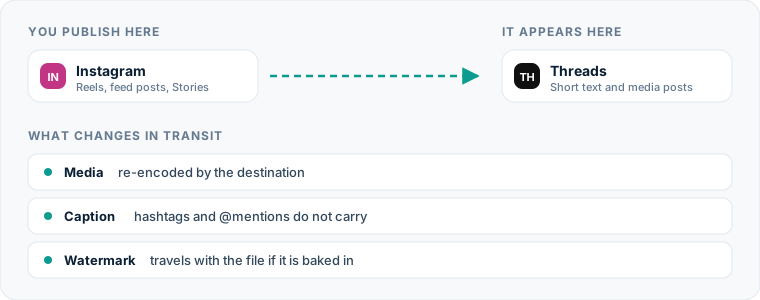
Moving short video posts from instagram to threads should not require downloading files, copy-pasting text, and re-uploading media from your phone every single day. To post Instagram content to Threads automatically, connect your Instagram business or creator profile as a source account within an automated distribution platform, which detects new video uploads and mirrors them directly to your Threads profile without manual intervention.
By replacing manual uploads with a direct server-to-server connection, your short-form videos publish across both networks instantly. If you already maintain a content queue using an Instagram scheduling tool, establishing an automated distribution pipeline allows you to expand your reach onto Meta’s text-focused platform without expanding your daily workload.
One source account, one destination. Add the rest of your networks to the same flow.
The fastest way to route content from Instagram to Threads
The simplest path from Instagram to Meta’s conversation network relies on source-to-destination mirroring. Instead of logging into multiple apps or scheduling posts individually across different dashboards, an automated pipeline listens for new published posts on your primary account and transfers the video and text directly to your destination account.
When you publish a short video on Instagram, the automation tool detects the new upload via official application programming interfaces (APIs). The system extracts the clean video file and caption, processes the media to fit destination specifications, and publishes a new post on Threads within minutes.
This passive distribution model means you only press publish once on Instagram. Your content reaches Threads automatically, maintaining your publishing schedule across both platforms without requiring you to manage a secondary Threads scheduler dashboard.
The manual process: How creators handle cross-posting today
Understanding why automation matters requires looking at the step-by-step reality of manual distribution. Today, most creators who repost short video content from Instagram to Threads follow a tedious multi-step routine on their mobile devices:
- Open Instagram, film or import media, write the caption, add hashtags, select cover frames, and publish the Reel.
- Wait for the video to process on Instagram’s servers.
- Open the published Reel, tap the menu, and download the video file to the mobile device camera roll.
- Open a notes app or return to Instagram to highlight and copy the exact text caption.
- Exit Instagram and open the Threads application.
- Tap the composer icon, select the downloaded video from the device gallery, and wait for the local upload to complete.
- Paste the caption into the text box, adjust broken formatting, remove excessive hashtags, and re-tag user handles.
- Tap publish and confirm the post renders correctly on the profile feed.
This sequence must be repeated for every single video published. If you publish daily across multiple accounts, this workflow creates significant operational friction.
Why manual reposting limits your growth
The primary hidden cost of manual distribution is context switching. Switching between media creation, file management, and platform publishing fractures your concentration and consumes time that would be better spent on production or audience engagement.
Manual workflows also introduce severe technical bottlenecks. Downloading videos from Instagram often bakes native platform watermarks or visual elements into the saved file. Saving files repeatedly to local storage fills device memory with duplicate high-definition video files. Furthermore, manual execution leads to human oversight; busy days result in skipped uploads, causing inconsistent posting schedules on destination platforms.
Relying on manual execution scales poorly. As outlined in our guide to social media cross-posting, scaling a brand across several networks requires predictable mechanics rather than manual effort.
The automated method for an Instagram to Threads pipeline
Automated media distribution eliminates device-level file management entirely. When an automation platform handles the transfer, all media extraction, file re-encoding, and text delivery occur directly between cloud servers.
Platforms designed for automated distribution operate as active conduits. They check your source account for new publications, parse the media payload, format the text block according to the destination’s rules, and send the data directly to the secondary platform.
| Distribution Method | Setup Complexity | Daily Effort Per Post | Video Processing Location | Character Limit Handling |
|---|---|---|---|---|
| Manual Mobile Upload | None | High (5-10 minutes) | Local Device Storage | Manual Truncation |
| Scheduled Native Posting | Moderate | Medium (3-5 minutes) | Cloud Web Dashboard | Manual Truncation |
| Automated Mirroring Flow | Low (One-time) | Zero (Automated) | Cloud Server-to-Server | Automated Truncation |
Choosing between manual tools and continuous sync systems depends on your operational model. Dedicated multi-platform tools allow you to connect accounts once and let background processes handle continuous media delivery.
Setting up your automated publishing flow
Establishing a automated pipeline from Instagram to Threads requires connecting your profiles inside an automation tool and configuring how media transfers from source to destination.
Step 1: Connect your source and destination accounts
Log into your distribution management platform and authenticate your Instagram creator or business profile as the primary source account. Next, authorize your Threads account as a destination. Most modern tools utilize official Meta OAuth connections, ensuring secure authentication without storing account passwords.
Step 2: Establish the directional pipeline
Construct a distribution flow that routes content strictly from Instagram outward to Threads. In specialized mirroring tools like Postpari, this direct source-to-destination connection ensures that any video published on your main account triggers an immediate transfer downstream.
Step 3: Configure post rules and backfill settings
Define how the system handles incoming posts. You can select whether new uploads trigger immediate publishing or enter a queued drip schedule. If you have an established library of past Reels, some automation tools offer backfill features that slowly drip older Instagram posts onto your Threads profile over time, populating a new channel without spamming followers.
When selecting platform software, evaluate options from our index of the best cross-posting software options to ensure the service supports your specific target networks and volume requirements.
How short video files translate across platforms
Moving short video files between networks requires understanding how destination platforms handle aspect ratios, bitrates, and audio tracks.
Visual dimensions and aspect ratios
Instagram Reels and Threads short videos both default to vertical 9:16 aspect ratios (1080x1920 pixels). Because both platforms operate within Meta’s infrastructure ecosystem, vertical videos transferred directly from Instagram render natively on Threads feeds without black bars, awkward cropping, or side letterboxing.
Audio track preservation
When you download an Instagram Reel manually through the app interface, royalty-restricted native audio tracks or trending sounds are frequently stripped or muted from the downloaded MP4 file. Automated server-to-server mirroring bypasses local app export restrictions, keeping the underlying audio file intact during transfer so your video retains its voiceovers, original music, and environmental audio when appearing on Threads.
Compression and resolution
Re-uploading a video file multiple times locally degrades visual quality due to repeated video re-encoding. Cloud distribution systems process source video files directly from Instagram’s original host servers, preserving high resolution and frame rates without subjecting the file to double-compression artifacts.
How captions, hashtags, and mentions transfer
Video files transfer intact, but text handling requires specific attention due to structural differences between Instagram and Threads.
Instagram Source Caption (Up to 2,200 Characters) ├── Extended storytelling & narrative text ├── Tagged accounts: @instagram_user └── Wall of hashtags (#reels #video #tech #growth) │ ▼ Automated Transfer Logic Threads Destination Post (Up to 500 Characters) ├── Primary narrative text (truncated if > 500 chars) ├── Untagged handles / converted plain text └── Cleaned topic references
Character limit constraints
Instagram permits captions up to 2,200 characters, whereas standard Threads posts enforce a 500-character cap. When an automated system transfers a long-form Instagram caption to Threads, text exceeding 500 characters is automatically truncated. To prevent mid-sentence cutoffs, place your core message and call-to-action within the first 400 characters of your Instagram caption.
Hashtags versus topic tags
Instagram users routinely append ten to twenty hashtags to the end of a caption to aid discovery. On Threads, heavy hashtag clusters appear spammy and clutter the clean reading experience. Automated tools often clean or strip long hashtag lists during the transfer, allowing your core caption to stand out clearly.
Account mentions and profile handles
User handles do not always match across social platforms. Tagging @person on Instagram may inadvertently mention an inactive or entirely different user on Threads. When cross-posting automatically, review whether critical account tags need plain-text replacement or manual adjusting on high-visibility posts.
Technical and structural considerations for Threads
While both platforms reside under Meta’s corporate umbrella, Threads operates as a text-first public conversation channel rather than a visual feed.
Differences in user intent
Instagram users scroll primarily for visual entertainment, whereas Threads users engage with text commentary, opinion threads, and quick updates. Videos posted to Threads perform best when paired with strong, conversation-starting opening lines in the caption.
API rates and fair-use limits
Automated automation networks interact with official Meta APIs. These system interfaces impose fair-use rate limits to prevent platform spam. While high-volume publishing is governed by platform fair-use caps, typical posting frequencies (1-5 posts daily) operate well within standard API boundaries without interruption.
Supported media types
While platforms like Postpari focus specifically on mirroring short video content from Instagram sources, other traditional schedulers like Buffer, Later, or Publer offer manual compose-and-schedule tools for images, link posts, and text-only updates. Ensure your distribution system aligns with the specific media formats you produce most.
Common mistakes when transferring posts from Instagram
Automating your distribution removes daily manual labor, but setup errors can lead to awkward formatting. Avoid these common implementation mistakes on the Instagram-to-Threads route:
Failing to account for text truncation
Writing 1,500-word Instagram essays causes Threads cross-posts to cut off mid-thought. Keep primary caption hooks concise so the complete message displays properly on text-limited platforms.
Retaining platform-specific call-outs
Captions containing phrases like “Swipe up,” “Check my story,” or “Tap the link in my bio” make no sense on Threads. Threads allows direct, clickable links inside post captions. Adapt your language so your call-to-action applies universally across platforms.
Relying on Instagram’s native audio library
Using native copyrighted audio tracks directly inside Instagram’s editor can result in silent videos when transferred outward. Film and edit videos with original audio or licensed tracks embedded into the file prior to uploading to Instagram.
Tagging Instagram-only accounts
Blindly copying handle tags often results in dead links or incorrect tags on Threads. Keep tag mentions to a minimum in automated captions, or reserve account tagging for manual replies in the comment section.
Running manual uploads alongside automation
If you set up an automated distribution pipeline, stop uploading videos to Threads manually. Running manual uploads while an automated system is active creates duplicate posts on your feed, cluttering your profile and confusing followers.
What the platforms themselves document
Publishing rules change without notice, and every network is the only authority on its own. These are the pages we check this guide against. If one of them contradicts this page, it is right — tell us.
- Instagram Platform: content publishing — Instagram
- Meta: Threads API — Threads
Does Postpari do this? Postpari is built around exactly this shape of flow: Instagram as the source, Threads as a connected destination.
Frequently asked questions
Can I cross-post from Instagram to Threads automatically for free?
Yes, some social media management tools like Buffer or Publer offer limited free tiers that allow you to schedule posts across multiple platforms. However, automated source-to-destination mirroring that auto-detects new Instagram uploads usually requires a paid plan or a specialized automation tool.
Will my short videos lose visual quality when cross-posted from Instagram to Threads?
No, automated distribution tools process video files directly between servers, preserving original resolutions and 9:16 aspect ratios. Manual downloading and re-uploading on mobile devices is what typically causes double compression and quality loss.
What happens if my Instagram caption is longer than 500 characters?
When automatically transferred to Threads, captions exceeding the 500-character limit are automatically truncated at the character boundary. To prevent broken text, keep key message points within the first 400 characters of your Instagram post.
Do clickable links work in Threads post captions?
Yes, Threads supports fully functional, clickable hyperlinks directly inside post captions. Unlike Instagram, which limits links in captions, any web links included in your mirrored caption will be active and clickable on Threads.
Do I need a Meta business account to automate posting between Instagram and Threads?
Most automated tools require an Instagram Business or Creator account connected to a Facebook page to access Meta's official publishing APIs. Standard personal Instagram profiles generally do not support automated API cross-posting.