How to Cross-Post from TikTok to Threads Automatically
Prices and features last checked: September 2026
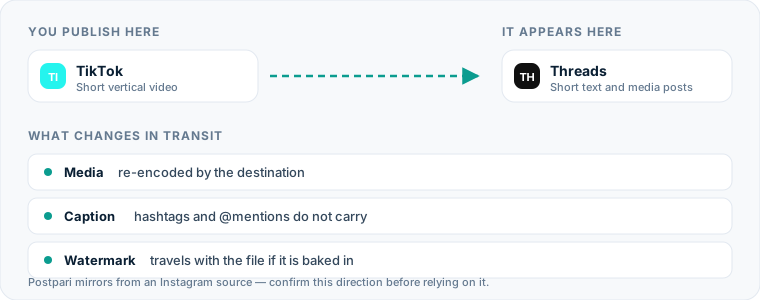
Going from TikTok to Threads automatically takes a tool that watches your source account for new videos, pulls the file, reshapes the caption, and publishes both to Threads on your behalf. Automating the route removes the manual download, keeps a competitor’s watermark off the copy that lands on Threads, and handles the character limit without you touching your phone for every upload.
Setting up this distribution route lets you publish your short-form video once on TikTok and immediately reach the text-and-media feed on Threads. However, because both platforms handle video files, captions, and account tags differently, understanding how the underlying media transfers work ensures your content looks intentional on both networks.
One source account, one destination. Add the rest of your networks to the same flow.
The Quick Answer: How to Automate TikTok to Threads Cross-Posting
If you want to know to move posts from TikTok to Threads without manual effort, you have two primary architectural options: automated distribution pipelines and compose-and-schedule tools.
Direct trigger engines monitor your feed for new publications. When you publish a video on TikTok, the system captures the raw MP4 file, strips any platform-specific branding, converts the caption format, and pushes the post out to your connected profile via the Meta API.
Alternatively, if your publishing already runs through a central hub, the flow can start somewhere other than TikTok. Postpari draws its flow from an Instagram source out to your other connected accounts, so Threads is fed by the post you were making anyway — a good fit if Instagram is where you actually publish first, and the wrong shape if TikTok is. If you would rather compose and schedule ahead of time, Buffer and Publer offer conventional multi-channel calendars instead. For a deeper look at the architectures, read our guide to cross-posting on social media.
The Manual Method: Exactly What You Do Today
Moving content between these platforms manually requires a repetitive six-step workflow for every video you create:
- Publish your video on TikTok: You upload, edit, add music, write your caption, and hit publish inside the application.
- Retrieve the video file: You open your published video, tap the share icon, and select the option to save the video to your device’s local camera roll.
- Remove the watermark: Because native downloads contain a bouncing watermark and end-frame logo, you must upload the file to a web-based watermark removal tool to extract the clean MP4.
- Extract your text: You retype or copy the caption from your TikTok upload, or dig the original out of the notes app you drafted it in.
- Open Threads and start a post: You open the Threads application, tap the compose button, select the cleaned video file from your media library, and wait for local rendering.
- Reformat and post: You paste your original caption into the text box, manually strip out irrelevant viral hashtags like
#fyp, fix broken@mentions, check that the total text is within length limits, and tap post.
If you publish once a day, performing this routine requires opening three separate tools and handling file downloads 30 times every month.
Where the Manual Method Costs You More Than You Think
While manually saving and uploading files costs nothing upfront in software fees, the hidden operational costs accumulate quickly:
- Production Friction: Spending five to ten minutes transferring a single post breaks your workflow. Over several months, this administrative drag leads creators to skip cross-posting altogether, abandoning potential audience growth on newer networks.
- Storage Bloat: Saving high-bitrate 1080x1920 video files to a phone or desktop fills local disk space rapidly. Managing hundreds of duplicate video files across multiple folders creates digital clutter.
- Metadata Decay: When you save a video file from an app, you often strip original creation timestamps and spatial metadata. Captions pasted blindly from one platform to another retain platform-specific tags that look out of place to a fresh audience.
- Quality Degradation: Re-encoding a video file that has already been compressed by one social network—and then sending it through a web-based watermark stripper before uploading it to a second network—results in visible compression artifacts and washed-out color profiles.
The Automated Method for TikTok to Threads Workflows
Automating this pipeline replaces manual file handling with server-side processing. When you post from TikTok to Threads automatically using a dedicated service, file transfers and text transformations happen in the background within minutes of your initial post going live.
The system relies on cloud webhooks. When your source platform registers a new public post, it alerts your automation server. The server fetches the original source video prior to watermark overlay, converts the text stream according to your pre-set rules, and sends an authenticated API request to publish the video directly to your account.
| Feature / Step | Manual Route | Automated Workflow Route |
|---|---|---|
| Media Transfer | Download to phone, run through stripper, re-upload | Direct server-to-server file fetch and push |
| Watermark Removal | Requires third-party web utility | Processed automatically in cloud pipeline |
| Caption Transfer | Copy and paste manually | Transferred and transformed automatically via rules |
| Time Spent Per Video | 5 to 10 minutes | 0 minutes after initial configuration |
| Local Device Storage | Consumes gigabytes of mobile storage | Zero local storage required |
| Posting Latency | Delayed until manual action is taken | Typically published within minutes of original upload |
To evaluate how different automation services handle direct distribution versus scheduled posting, read our review of the best cross-posting tools.
Setting Up Your TikTok Threads Automation Flow
Setting up an automated connection between your accounts requires configuring a clear trigger-and-action pipeline. Follow these operational steps to build the path correctly:
Step 1: Establish Your Source Account Connection
Connect your primary video source account inside your chosen automation platform. If you use a tool that ingests from TikTok directly, grant it permission to read your public video feed. If your tool draws from an Instagram source instead — the shape Postpari’s own terms describe — you connect Instagram as the origin, and Threads is fed from there rather than from TikTok. That distinction decides which tool fits: a TikTok-first creator wants a tool that monitors TikTok, and an Instagram-first creator does not.
Step 2: Authenticate Your Threads Profile
Connect your destination profile using official account authentication. You will log in to Meta’s secure portal to authorize your automation service to publish media, upload video files, and write text updates on your behalf.
Step 3: Configure Caption Transformation Rules
Set up text parsing rules before enabling live publishing. Configure your pipeline to truncate captions that exceed text boundaries, strip specific hashtag groups automatically, or append a default signature string to every incoming thread.
Step 4: Define Trigger Conditions and Mode
Select whether posts should publish instantly upon detection or enter a review queue. Automatic publishing pushes content live as soon as the source post is detected. If you prefer to review captions before they hit your feed, select a draft mode if your platform supports it.
Step 5: Test the Destination Output
Publish a test video on your source account. Monitor your target profile to confirm that the media plays smoothly, the audio remains synchronized, and the text formatting renders cleanly without broken syntax. If you also cross-post to other Meta channels, review our dedicated guide on cross-posting from TikTok to Instagram to align your video workflows across platforms.
What Happens to the Video File Across Platforms
Moving vertical video from one platform to another involves technical transformations that affect visual presentation and playback quality:
Aspect Ratio and Canvas Dimensions
Both platforms natively support vertical 9:16 aspect ratio video (1080x1920 pixels). Vertical video fills the entire screen on mobile devices on both feeds. If you upload a horizontal 16:9 video, Meta’s feed will letterbox the content, adding black bars above and below the video player.
Watermark Stripping Mechanics
TikTok adds a moving logo watermark containing the creator’s handle to all natively saved videos. Uploading video files containing watermarks to competing networks provides a poor viewer experience. Automated repurposing services bypass this issue by querying the platform’s media storage servers directly before the visual watermark is baked onto the compressed video file.
Compression and Bitrates
Source video files are compressed during their initial upload. When an automated engine transfers the video, it pulls the highest-quality intermediate stream available to prevent multi-generational compression loss. Threads accepts MP4 and MOV containers encoded with standard H.264 video and AAC audio codecs.
Video Length Constraints
TikTok allows longer video formats, supporting uploads spanning several minutes. However, short-form video content performing best on conversational feeds typically runs under 60 seconds. Keep your source video duration within standard short-form video constraints to avoid API rejection errors on destination networks.
What Happens to Captions, Hashtags, and Mentions
Text handling requires active formatting adjustments because audience norms and technical limits vary significantly between networks.
A caption written for TikTok, and the same caption after a transformation rule has run over it:
| Text | |
|---|---|
| Source, on TikTok | Check out this quick editing tip! 🎥 Tagging @creator_friend for the inspiration. #fyp #editing #contentcreator #viral #foryou |
| Destination, on Threads | Check out this quick editing tip! 🎥 Tagging Sam for the inspiration. #editing |
The rule dropped the discovery tags, kept the one topical tag, and replaced a handle that does not exist on Threads with a plain name.
Character Limits and Formatting
TikTok allows up to 4,000 characters in its video descriptions, encouraging long-form SEO descriptions filled with keywords. Threads caps posts at 500 characters for standard profiles. If your source caption exceeds 500 characters, an automated system without custom truncation settings will cut off your text mid-sentence or fail the API delivery request entirely.
Hashtag Mechanics and Indexing
Hashtag usage differs sharply across platforms:
- TikTok: Uses dense clusters of discovery tags (
#fyp,#foryou,#viral) to signal content topics to the recommendation engine. - Threads: Employs a single tag per thread structure or relies on direct full-text search indexing.
Including a block of five or six generic viral tags in a thread looks spammy and clutter-filled. When you establish your automated flow, configure caption rules to filter out broad promotional tags while retaining core topic terms.
Account Mentions and Handles
Username handles are rarely identical across different social networks. An @mention written for a user handle on TikTok will either tag the wrong individual on Threads or render as plain, unlinked text. Automation flows strip the @ symbol or drop platform-specific handles entirely unless you manually replace them with the target network’s exact handle structure.
Threads-Specific Considerations for Short-Form Video
To optimize your content once your TikTok to Threads automation is running, adjust your content presentation to suit the unique mechanics of Meta’s conversational network:
Text-First Feed Context
Unlike video-first feeds where the visual plays automatically without required context, users consume content on Threads text-first. A standalone video published without accompanying commentary receives lower interaction than a post featuring a strong text question or key takeaway written above the clip. Treat the first line of your text caption as the primary hook.
Conversational Replies Over Simple Comments
Engagement on text-based networks thrives on threaded discussions rather than short emoji reactions. Structure your caption to prompt replies. Asking an open-ended question in your video description encourages users to join the conversation, driving distribution across connected feeds.
Direct Instagram Cross-Posting Options
Because Threads is tightly integrated into Meta’s ecosystem, creators frequently link their Instagram content directly to their profile. If your primary publishing workflow centers on Meta’s core apps, read our guide on mirroring content from Instagram to Threads to understand direct internal posting pipelines.
Common Mistakes to Avoid When You Repost TikTok to Threads
When creators build an automated pipeline to repost from TikTok to Threads, small configuration errors can hurt post performance. Avoid these five common setup mistakes:
- Leaving Native Watermarks Intact: Uploading video clips featuring visible competing logos lowers viewer retention and makes your profile look unmaintained. Always use automated watermark removal pipelines.
- Transferring Obsolete Hashtag Blocks: Pushing blocks of generic hashtags (
#fyp,#foryoupage) onto text-focused feeds damages readability. Filter out discovery tags during transfer. - Ignoring Text Length Boundaries: Failing to set up auto-truncation rules for long descriptions causes delivery errors when captions cross the 500-character limit.
- Publishing Unformatted Video Links: Sending a link to a video rather than uploading the raw native video file reduces engagement significantly. Always publish direct MP4 media files so videos auto-play in the feed.
- Neglecting Destination-Specific Analytics: Assuming video performance translates equally across platforms leads to misaligned content strategies. Monitor your performance using a dedicated TikTok scheduling tool alongside native Threads publishing options to track reach and engagement metrics independently across both channels.
What the platforms themselves document
Publishing rules change without notice, and every network is the only authority on its own. These are the pages we check this guide against. If one of them contradicts this page, it is right — tell us.
- Meta: Threads API — Threads
- TikTok — no public documentation URL we could verify. Check the rules inside the app rather than trusting a third party on them, including us.
Does Postpari do this? Worth knowing before you sign up: Postpari's Terms of Use describe mirroring from an Instagram source. If TikTok is where you publish first, check with Postpari that your direction is supported before you rely on it.
Frequently asked questions
Can I post TikTok videos directly to Threads without downloading them manually?
Yes, you can use automated distribution software to mirror video posts directly to your profile. These services monitor your feed, fetch the clean video file directly from the cloud server, strip watermarks, and publish the media and caption automatically without requiring manual downloads to your local phone storage.
Will my TikTok caption fit within Threads character limits automatically?
TikTok allows up to 4,000 characters in descriptions, while standard Threads posts cap text at 500 characters. If your caption exceeds the destination limit, you must configure your cross-posting tool's truncation settings to trim excess text, or your post may fail to publish due to API validation rules.
What happens to video watermarks when automatically cross-posting?
Automated repurposing tools bypass the standard watermarked download provided in app share menus. Instead, they extract the raw video file from the cloud source before platform logos are applied, delivering a clean, unbranded vertical MP4 directly to your destination feed.
How do hashtags work when cross-posting short video content between feeds?
TikTok relies on multiple broad discovery hashtags, whereas Threads uses text-search indexing and supports single-topic tagging patterns. When setting up automated reposting, it is best practice to filter out viral tags like #fyp and keep only essential topic-specific terms.
Do user @mentions carry over correctly between platforms?
User handle tags do not transfer automatically because account names vary between platforms. An @mention tagged in a TikTok caption will either link to an unrelated account or render as plain text on Threads, so you should adjust or strip handle tags in your caption conversion settings.