Best Instagram Scheduler for Cross-Platform Publishing
Prices and features last checked: August 2026
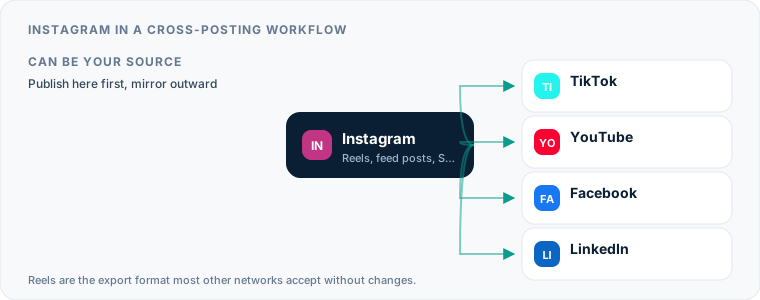
Choosing an Instagram scheduler depends on whether you treat the platform as a final destination or as the launchpad for a wider network. The best approach for cross-platform publishing is to use Instagram as your primary source, editing and uploading vertical videos directly in Meta’s ecosystem before automatically mirroring them outward to other platforms.
When you publish a Reel directly on Instagram, you get access to native audio tools, clean video exports, and a reliable base file. If you rely on a manual workflow, uploading that same clip to four or five platforms every day quickly becomes an unsustainable chore. An effective scheduling setup eliminates those repetitive uploads by letting you schedule Instagram Reels natively or routing your published posts through automated tools to distribute them everywhere else.
Choosing an Instagram Scheduler for Cross-Platform Publishing
The modern Instagram ecosystem revolves around three distinct media types: Reels, grid posts (including carousels), and Stories. Each format serves a different purpose, but short-form vertical video dominates reach. Because Instagram enforces strict rules on media dimensions, file sizes, and audio tracks, your choice of an instagram scheduler determines how easily that content moves across the web.
+------------------+ +-------------------+ | Instagram Reel | —> | Automated Trigger | +------------------+ +-------------------+ | +-------------------------+-------------------------+ | | | v v v +------------------+ +-------------------+ +-------------------+ | TikTok Account | | YouTube Shorts | | Facebook Page | +------------------+ +-------------------+ +-------------------+
Traditional social media management tools operate on a push model. You draft a caption, attach a video, pick five social accounts, and click publish. That model works well if every platform receives unique copy or subtle formatting tweaks. However, if your primary goal is distribution efficiency, a pull-based or mirroring workflow is much faster. In a push model, a standard tool like Buffer, Later, or Metricool requires you to log into a calendar interface, upload a high-resolution video file, and configure individual settings for each platform.
In a source-first model, Instagram acts as the master distribution channel. You edit your video, publish it directly inside the Instagram app or through its native planner, and let automation engines handle the secondary distribution. This setup preserves your primary workflow within Instagram’s native mobile interface while keeping your secondary profiles populated with fresh content.
How Native Instagram Post Scheduler Features Compare to External Apps
Meta offers built-in publishing controls directly inside the Instagram app and through Meta Business Suite. If you operate a Creator or Business account, you can schedule posts, carousels, and Reels up to several weeks in advance without installing third-party software.
The native instagram post scheduler works well for simple operations. It preserves video quality, supports native audio selection, and allows you to add location tags, alt text, and account tags. For single-platform creators, this free built-in tool covers almost every standard publishing need.
| Feature / Capability | Native Instagram Planner | Third-Party Push Schedulers | Source-Based Automation |
|---|---|---|---|
| Primary Focus | Instagram & Facebook Pages | Multi-network calendar planning | Automatic secondary mirroring |
| Reels Support | Full native feature set | Standard video upload | Post-publish automated pull |
| Stories Support | Limited / Basic | Push notification reminders | Not widely supported |
| Cross-Platform Routing | Facebook Page only | Manual account selection | Automated source-to-destination rules |
| Setup Complexity | None (Built-in) | Medium (Connect accounts) | Low (Set trigger once) |
The limitation of native scheduling becomes obvious the moment you want to reach audiences outside Meta’s walled garden. Native tools will let you cross-post a Reel to a connected Facebook Page, but they will not send that content to YouTube Shorts, TikTok, or LinkedIn. Once you need to move content outside Meta, reliance on the native planner forces you back into manual downloads and manual secondary uploads.
Picking the Best Instagram Scheduler for Account Permissions and API Access
Third-party social management software connects to Instagram through Meta’s official Graph API. Understanding how this API works helps explain why certain accounts get access to fully automated publishing while others are stuck with manual app notifications.
To use any best instagram scheduler effectively, your profile must meet specific account requirements set by Meta:
- Account Type: Your account must be converted to a Business or Creator profile. Personal Instagram profiles do not have access to the Graph API for automated posting.
- Facebook Page Connection: Your Instagram profile must be linked to an official Facebook Page that you manage.
- API Permissions: You must grant third-party tools access to read content, manage media, and publish posts on your behalf.
Tools like Hootsuite, Publer, and SocialPilot rely on these API permissions to publish content directly to your grid. When you schedule a post inside these platforms, the tool stores your video and text on its own servers, then sends a payload over the API at your designated publication time.
API connections occasionally expire or lose authorization when Meta updates security settings or when you change account passwords. Maintaining an instagram scheduling tool requires occasionally re-authenticating your social accounts to keep automated queues publishing on schedule.
Using Instagram Auto Posting to Push Content Elsewhere
When you establish Instagram as your creative source, every video published there can trigger downstream activity across your other accounts. Using instagram auto posting to pull content directly from your primary profile gives you a clean, hands-off workflow.
Because Instagram enforces strict video standards, a published Reel usually serves as an ideal master file for other short-form video platforms. When you post a Reel, automated repurposing platforms monitor your feed, extract the published video, clean up metadata where possible, and upload it to destination networks.
If you are expanding your video reach across short-form platforms, you can review our dedicated breakdown on how to send your Instagram Reels to TikTok without spending time on manual uploads. The same source video can simultaneously populate your Google properties, as described in our guide on publishing Reels over to YouTube Shorts.
Using Postpari as a source-based mirroring tool demonstrates how efficient this strategy can be. You log into Postpari, connect your Instagram profile as the source, and draw a flow line to destinations like TikTok, YouTube Shorts, a Facebook Page, Threads, or X. From that point on, whenever you publish a short video on Instagram, Postpari automatically detects the new post and mirrors it outward to every connected network.
+-------------------+ | Instagram Source | +-------------------+ | v +-------------------+ | Postpari Engine | +-------------------+ | +------------------+--------------+--------------+------------------+ | | | | v v v v +---------------+ +---------------+ +---------------+ +---------------+ | TikTok Target | | Shorts Target | | Threads Target| | Facebook Page | +---------------+ +---------------+ +---------------+ +---------------+
This source-first workflow offers distinct advantages over traditional calendar scheduling:
- You edit and produce content in a single app interface rather than juggling multi-channel software.
- You take advantage of native trends, stickers, and text overlays available inside Instagram’s native camera editor.
- You avoid uploading large, redundant video files to external dashboard tools.
- Your secondary channels stay consistently active without requiring daily platform switching.
Receiving Feeds from Other Networks via Instagram Cross Posting
While using Instagram as a source platform yields the cleanest results, some creators prefer to edit on external software or treat another video network as their primary home. Using secondary platforms to feed content into Instagram requires careful attention to platform formatting rules.
If you produce videos elsewhere and send them to Instagram via automated secondary posting, your source files must strictly match Instagram’s technical limits. If a destination platform receives a video with an unsupported aspect ratio or an incompatible codec, the API request will fail, leaving your schedule incomplete.
Automated distribution services handle incoming content differently depending on the media type. Tools like Repurpose.io specialize in taking videos from secondary platforms, removing visible watermarks, and re-uploading them to Instagram. However, when Instagram receives incoming video streams from external sources, audio licensing rules apply strictly. If your incoming video uses audio that is copyrighted or restricted on Meta’s network, the post may be muted or blocked upon arrival.
Carousels and single image posts can also be routed into Instagram using traditional tools like Metricool, SocialBee, or Buffer. These platforms let you construct single posts that distribute across Instagram, Pinterest, and LinkedIn simultaneously, provided the original image fits Instagram’s standard square or vertical image canvas.
Technical Limits When You Schedule Instagram Reels, Feeds, and Stories
Understanding the technical boundaries of each Instagram format prevents upload errors and broken layouts when cross-posting across platforms.
+------------------------------------------------------------------------+ | INSTAGRAM FORMAT DIMENSIONS | +------------------------------------------------------------------------+ | | | +------------------+ +------------------+ +------------------+ | | | | | | | | | | | Reels | | Square Feed | | Portrait Feed | | | | 9:16 | | 1:1 | | 4:5 | | | | (1080x1920) | | (1080x1080) | | (1080x1350) | | | | | | | | | | | +------------------+ +------------------+ +------------------+ | | | +------------------------------------------------------------------------+
Reels Specifications
Reels demand a 9:16 vertical aspect ratio (1080x1920 pixels). While you can upload horizontal clips, Meta will letterbox the video, leaving wide black margins above and below your content. High-performing short-form video requires full-screen vertical real estate.
Caption length for Reels allows up to 2,200 characters, but display constraints truncate long captions after the first few lines. When you schedule Instagram Reels that move to platforms like X or Bluesky, long captions will exceed target character limits, causing text truncation on destination channels.
Feed Posts and Carousels
Feed posts support three primary aspect ratios: 1:1 square (1080x1080), 4:5 portrait (1080x1350), and 1.91:1 landscape (1080x566). The 4:5 portrait ratio occupies the maximum vertical space available in the mobile main feed.
Carousel posts allow up to 20 images or videos in a single post when published natively. However, API restrictions on third-party tools sometimes enforce lower frame counts depending on the service tier you use. If you build carousels in a third-party scheduler, test your multi-slide uploads to ensure the platform preserves your slide order and visual layout.
Instagram Stories
Stories use the 9:16 vertical format (1080x1920) but expire after 24 hours. Because Stories rely heavily on interactive native elements—such as poll stickers, question boxes, link tags, and slider graphics—they resist standardized automation.
Most scheduling software handles Stories through push notification systems rather than true automated publishing. The tool stores your image or video and sends a mobile notification to your phone at the designated time, reminding you to post the media manually and overlay interactive stickers inside the app.
Common Breakage Points During Cross-Posting
Moving media across platforms introduces specific technical friction points:
- Visible Watermarks: Publishing a video containing a visible watermark from a competing platform makes your content look unpolished. Using clean original video files avoids this issue.
- Audio Muting: Adding trending music tracks natively inside one app can lead to copyright strikes or automatic muting when that same clip is pushed to another platform.
- Tagging Errors: Account handles rarely match across networks. Mentioning
@usernameon Instagram will tag an incorrect or non-existent profile if copied directly to TikTok or YouTube. - Aspect Ratio Distortion: Cropping a 1:1 square Instagram feed post into a 9:16 vertical format without adjusting the visual composition results in cut-off text or awkward whitespace.
Managing Multiple Accounts with an Instagram Scheduling Tool
Managing multiple Instagram profiles—such as a personal brand, a corporate presence, or secondary niche accounts—requires a publishing system built for multi-account management. Logging in and out of individual profiles inside the native mobile app leads to publishing errors and missed schedule slots.
When you scale up your network presence, our comprehensive analysis offers actionable steps on our guide to managing multiple Instagram profiles without getting bogged down in manual account switching.
Using an agency-focused dashboard like SocialPilot, Hootsuite, or Publer allows you to manage separate workspaces, assign posting permissions to team members, and view distinct content calendars for each account. These platforms charge based on connected social profiles or active user seats, making them well-suited for agency environments managing diverse client portfolios.
If your setup focuses on maintaining backup profiles or cross-pollinating brand channels, automated mirroring provides an alternative to multi-account management dashboards. For instance, Postpari allows you to connect a main Instagram account alongside a secondary backup account. When you publish a video on your primary feed, the platform automatically mirrors that post over to your secondary profile, keeping your backup account populated with fresh content automatically.
+-----------------------+ | Main Instagram Profile| +-----------------------+ | v +-----------------------+ | Postpari Automation | +-----------------------+ | +-------------------------+-------------------------+ | | v v +-----------------------------+ +-----------------------------+ | Backup Instagram Profile | | External Destination | +-----------------------------+ +-----------------------------+
For creators sitting on an extensive archive of legacy videos, our strategy breakdown covers best practices for reposting your older Instagram content to maintain steady engagement without constant manual re-uploads.
Building a Low-Maintenance Publishing System Around Instagram
To build an efficient cross-platform publishing system, organize your workflow into three distinct operational phases: content batching, native primary publishing, and automated distribution.
+------------------------------------------------------------------------+ | EFFICIENT PUBLISHING PIPELINE | +------------------------------------------------------------------------+ | | | 1. BATCH PRODUCTION | | Record vertical videos in bulk using high-resolution camera gear. | | | | 2. NATIVE INSTAGRAM SCHEDULING | | Edit clips natively, apply sound, and schedule posts in Meta. | | | | 3. AUTOMATED MIRRORING | | Distribution engine detects published Reels and routes to destinations.| | | +------------------------------------------------------------------------+
Phase 1: Production and File Preparation
Record your short-form video content in batches. Keep your raw master files saved on your primary drive or mobile device in native 1080x1920 vertical format. Avoid adding platform-specific burned-in text or app watermarks during initial editing—save those native additions for the final publishing step.
Phase 2: Primary Channel Scheduling
Upload your prepared video files directly into Instagram or Meta Business Suite. Use the native instagram post scheduler to set your publishing cadence for the upcoming week or month.
By scheduling your master posts natively inside Meta’s platform:
- You retain full access to high-quality native audio libraries.
- Your videos publish cleanly without passing through intermediate compression algorithms.
- You avoid paying for high-tier multi-profile calendar subscriptions if your primary objective is simple syndication.
Phase 3: Secondary Distribution Automation
Configure your automated repurposing rules once and leave them running. Connect your primary Instagram account to a source-to-destination service like Postpari, or use automated rule engines like Repurpose.io or Publer.
Establish clear destination routing:
- Rule 1: Push every new Instagram Reel to your TikTok account.
- Rule 2: Convert every new Instagram Reel into a YouTube Short.
- Rule 3: Route every published Reel to your Facebook Page feed.
- Rule 4: Pass video posts through to secondary text networks like Threads or X.
Once these automated rules are active, you spend zero time logging into secondary accounts, re-uploading file attachments, or re-typing captions. You focus entirely on creating high-quality video content for your primary source channel, while your underlying software engine keeps your secondary platforms continuously updated.
Evaluation Criteria for the Best Instagram Scheduler in a Multi-Platform Setup
Evaluating scheduling software requires understanding that tools are built on two distinct operational models: compose-and-schedule dashboards and source-to-destination automation pipelines. Knowing how these architectures function helps you select software that fits your existing media pipeline without adding unnecessary manual overhead.
Compose-and-Schedule vs. Source-to-Destination Mirroring
Traditional management platforms focus on manual draft creation. You upload assets to a centralized calendar, draft tailored captions for individual channels, and set future publication times. Tools like Buffer, Metricool, Publer, and Later operate on this model, providing visual planners, social inboxes, and performance analytics. They work well if your strategy relies on publishing customized text and distinct image carousels across specific channels.
Automated pipelines approach distribution differently. Instead of manually loading files into a calendar, platforms like Postpari and Repurpose.io connect destination accounts directly to a primary source feed. When you publish a short-form video to Instagram, the software detects the new post and mirrors it across your linked channels without requiring manual composition for every upload. When evaluating different cross-posting tools, base your decision on whether your workflow requires hand-tailoring every post or distributing finished video assets across multiple platforms automatically.
| Architecture Type | Primary Use Case | Key Capabilities | Representative Tools |
|---|---|---|---|
| Compose-and-Schedule | Hand-crafted posts, distinct captions per channel, agency approvals | Visual calendars, social inboxes, channel-specific text edits | Buffer, Later, SocialPilot, Hootsuite |
| Source-to-Destination | Automated video distribution, cross-platform mirroring | Source monitoring, automated publishing, backfilling archives | Postpari, Repurpose.io |
| Queue & Recycling | Evergreen content rotation, category schedules | Category-based queuing, automated content recycling | SocialBee, Publer |
How Profile Types Impact Your Instagram Post Scheduler Connections
The mechanism your tool uses to connect to Instagram depends entirely on your account type. Meta restricts backend API access based on profile classification, which determines whether posts publish directly or fall back to manual push notifications.
Account Restrictions Across Personal, Creator, and Business Profiles
Personal Instagram profiles lack access to Meta’s Official Graph API. As a result, software cannot auto-post content directly to a Personal profile.
Creator profiles offer partial access to API functions. You can auto-post Reels and single feed images, but establishing a third-party API connection often requires linking the Creator profile to a Facebook Page inside Meta Business Suite.
Business profiles provide full access to Meta’s publishing API. Third-party applications can verify credentials, upload media directly to Meta’s servers, and schedule content without requiring device-level notifications.
Reconnecting Broken Meta API Authorizations
API disconnects usually occur when Meta updates access tokens or when permissions between Facebook Pages and Instagram profiles decouple. If your software stops publishing, follow these steps to restore the connection:
- Open your Instagram profile settings on a mobile device and confirm your account status is set to Creator or Business.
- Log into Facebook on a desktop browser and verify that your Instagram profile is linked to a Facebook Page where you hold full control administrative permissions.
- Open Meta Business Suite, navigate to Integrations, and ensure your scheduling app retains active publishing access.
- Log into your publishing software, remove the disconnected Instagram account, and initiate a fresh OAuth login sequence to generate a new long-lived access token.
API Hard Limits: What You Can and Cannot Schedule Directly Today
Third-party applications must operate within the strict limits set by Meta’s Official Graph API. Understanding what the API permits prevents unexpected publishing failures.
Native Audio, Cover Selection, and Interactive Elements
Meta limits how external software interacts with native app elements:
- Trending and Commercial Audio: You cannot select audio from Instagram’s native music library via a third-party scheduler. Videos scheduled via API must have audio embedded directly into the file prior to upload.
- Cover Frame Selection: While some compose-and-schedule tools permit uploading a separate static image file as a cover thumbnail, selecting a specific frame directly from a video file depends entirely on the app’s API implementation.
- Interactive Stickers and Polls: Interactive elements such as Q&A stickers, polls, link stickers, and countdown timers are unavailable through Meta’s public publishing API.
- Collaborator Tags: Direct collaborator invites cannot be attached via standard API requests during automated scheduling; they must be managed inside the app after publication.
Workarounds for API-Restricted Features
If your post relies heavily on native features, use a hybrid workflow. Platforms that offer push notification modes allow you to stage the video asset, thumbnail, and caption inside the scheduler. At the designated post time, the tool sends a notification to your phone, transfers the media into the Instagram app interface, and pastes your saved caption into the clipboard, letting you add native audio tracks, stickers, or tags manually.
If your objective is pure automated distribution across short-form video platforms, using a dedicated short-form video scheduler to push pre-edited videos with embedded audio avoids native API blockages entirely.
Caption and First-Comment Workflows for Multi-Destination Posts
When cross-posting content from Instagram to platforms like TikTok, YouTube Shorts, X, and LinkedIn, text formatting and hashtag placement require careful management to prevent broken posts.
Placing Hashtags in Captions Versus First Comments
Adding hashtags to the first comment is a common strategy to keep Instagram captions clean. However, this workflow handles differently depending on your automation stack:
- Compose-and-Schedule Tools: Dedicated compose dashboards like Buffer and Publer include optional fields to schedule a first comment alongside the primary post. This requires a direct API call that publishes the comment immediately after media verification.
- Automated Mirroring Tools: Source-to-destination pipelines focus on transferring the primary post data (video file and caption body). When mirroring content, hashtags stored inside a first comment on Instagram will not transfer to destination networks. To ensure tags cross-over to TikTok, YouTube, or X, place them at the end of the main caption body.
Managing Character Limits and Handle Mentions Across Platforms
Different networks enforce distinct text rules. What works inside an Instagram caption can break when pushed to secondary destinations:
- Character Restrictions: Instagram allows up to 2,200 characters per caption. If an automated workflow sends that text to X (280-character limit), the text truncates mid-sentence unless the tool truncates it gracefully.
- Platform Handles: Tagging
@usernameon Instagram does not translate across networks. If that handle does not exist on X or LinkedIn, it renders as unlinked plaintext or tags an unrelated account. - Link Formatting: Hyperlinks placed inside Instagram captions do not render as clickable URLs. When building cross-platform publishing workflows, structure your captions so links appear cleanly on destination networks like Facebook Pages, X, and LinkedIn, where inline links are fully interactive.
Managing Multiple Accounts Safely with an Instagram Scheduling Tool
Operating several Instagram accounts through a single dashboard requires maintaining account integrity to avoid triggering automated security checks.
API Tokens Versus Unofficial Browser Automation
The safest way to publish content to multiple accounts is through tools that use Meta’s official OAuth API endpoints. Official API connections authenticate each profile independently using encrypted tokens. Because media is uploaded through Meta’s approved backend endpoints, managing five or ten client profiles inside a unified dashboard like SocialPilot, Metricool, or Postpari does not trigger IP flags or device fingerprint challenges.
In contrast, tools that rely on browser scraping or unauthorized mobile API emulation route login sessions through automated browser instances. Platform security systems monitor device signatures, cookie states, and IP locations. When an unauthorized tool switches rapidly between multiple accounts from a single IP address, platform flags often lock accounts or demand identity verification. Always verify that your chosen platform relies on official Meta API integrations.
Network Redundancy and Secondary Account Workflows
For creators and brands operating primary and secondary channels (such as regional hubs or niche brand extensions), modern tools allow you to manage multiple social media accounts simultaneously without duplicate upload steps.
By setting up source-to-destination automation pipelines, you can designate a main Instagram profile as your central asset hub. When a new Reel goes live on your primary account, the system automatically mirrors that short video to your secondary Instagram channels or backup profiles on other platforms. This maintains active distribution across your entire account network without forcing you to log in and out of multiple profiles daily.
What the platforms themselves document
Publishing rules change without notice, and every network is the only authority on its own. These are the pages we check this guide against. If one of them contradicts this page, it is right — tell us.
- Instagram Platform: content publishing — Instagram
Where Postpari fits: Postpari lists Instagram among the networks it works with. It does not publish a platform-by-plan matrix, so confirm Instagram is available on the plan you are considering before you rely on it.
Frequently asked questions
Can an instagram scheduler automatically publish Reels without manual approval?
Yes, if you connect a Business or Creator account to a scheduling tool using Meta's official API, the tool can publish Reels automatically. Personal Instagram profiles do not support automatic publishing and require manual notification steps.
Will cross posting Instagram Reels to TikTok lower my view count?
No, platforms do not suppress content simply because it appears on multiple networks. However, including visible watermarks from competing platforms or using mismatched visual aspect ratios can reduce viewer watch time and lower overall engagement.
What account type do I need to schedule Instagram posts?
You need an Instagram Business or Creator account to access built-in scheduling features or connect third-party scheduling software. Converting a personal profile to a professional account is free and can be completed inside the app settings.
Can I schedule Instagram Stories with third-party software?
Third-party tools cannot publish interactive Stories fully automatically due to Meta API limitations. Most scheduling tools handle Stories by sending a mobile push notification that prompts you to finish publishing the story manually within the app.
Why did my automated post fail to publish to Instagram?
Automated posts usually fail due to expired API security tokens, incorrect video file dimensions, or unsupported audio tracks. Re-authenticating your social account connection inside your scheduling tool typically resolves authorization errors.
Why did my scheduled Instagram post fail to publish automatically?
Automatic publishing failures typically happen because your Instagram profile lost its connection to its linked Facebook Page, your Meta access token expired, or your media file violated technical limits. Re-authenticating your profile in your scheduling tool usually fixes token issues.
Can I auto-post Instagram Stories using third-party scheduling tools?
Yes, direct Stories scheduling is supported by Meta's Graph API for Business and Creator accounts on tools that support Story uploads, though interactive elements like stickers, polls, and native links cannot be attached via the API.
Will cross-posting videos from Instagram to other platforms trigger duplicate content penalties?
Social platforms do not penalize account reach simply because a video file exists on another network. However, posts carrying visible watermarks from competing platforms or displaying incorrect aspect ratios often experience reduced performance due to user preference and native recommendation algorithms.