How to Cross-Post from TikTok to Instagram Automatically
Prices and features last checked: August 2026
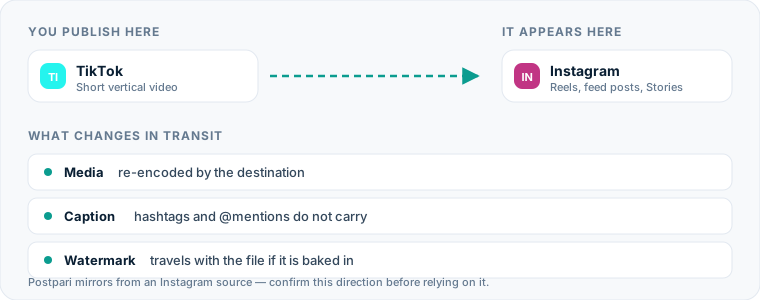
Publishing content from TikTok to Instagram allows you to reach two distinct video audiences without doubling your editing workload. You can automatically post TikTok videos to Instagram by connecting your social accounts through distribution tools that capture published video files and deliver them straight to Instagram Reels.
If you publish consistently on TikTok, downloading videos manually, stripping logos, and re-uploading them to Instagram consumes hours every week. Establishing a direct transfer pipeline handles file delivery, caption mapping, and video formatting in the background while you focus on creating content.
One source account, one destination. Add the rest of your networks to the same flow.
The quick way to cross-post from TikTok to Instagram
Automating this route means establishing a trigger-and-action relationship between your accounts. When you hit publish on TikTok, an automated distribution system detects the new post, retrieves the original video file, cleans any platform overlays, and uploads it to Instagram as a Reel.
To automate this workflow effectively, you must configure a bridge between the two platforms using specialized software.
| Workflow Step | Manual Method | Automated Method |
|---|---|---|
| Video Transfer | Download to phone, run through watermark remover, upload to Instagram | Automated server-to-server file fetch and clean transfer |
| Time Spent | 5 to 10 minutes per post | 0 minutes after initial setup |
| Watermark Handling | Requires third-party web apps or manual cropping | Automatic removal of platform overlays during processing |
| Caption Transfer | Copy and paste manually, adjusting tags line by line | Carried over automatically based on pre-set template rules |
| Publishing Timing | Dependent on when you remember to post | Immediate publication or scheduled delay via queue |
Building an automated pipeline eliminates repetitive file handling, but understanding how the manual process works helps highlight what the software actually handles for you.
The manual method: How you publish today
If you do not use automated routing, moving a short video from TikTok to Instagram requires several distinct manual steps on your mobile device or desktop browser.
1. Save the video file
After publishing your video on TikTok, you open the app, navigate to your profile, tap the video, select the options menu, and save the clip to your camera roll. The saved file includes a bouncing watermark containing the TikTok logo and your account handle.
2. Remove platform watermarks
Because visible logos from competing platforms make a post look second-hand, you must remove the watermark. You either pass the clip through a web-based downloader or import it into a video editor to crop out the edges, which degrades the overall video resolution.
3. Transfer the text content
You copy the text from your original TikTok caption to your device clipboard. You must re-check every mention and hashtag, as handle names rarely match across platforms.
4. Upload to Instagram Reels
You open Instagram, swipe to the Reels creation screen, select the cleaned video from your gallery, paste the adjusted caption, select a cover frame, and publish the video.
Why manually moving clips drains your time
The manual route seems manageable when you only post once a week. However, as your publishing frequency increases, the administrative burden scales rapidly.
Executing this process manually forces you to manage raw files across multiple devices. Video files quickly consume storage on your phone or laptop. Managing multiple versions of the same file—watermarked originals, cropped copies, and unedited master files—leads to messy file structures and accidental uploads of the wrong version.
Manual publishing also breaks your focus. Switching between TikTok, web downloaders, clip editors, and Instagram requires continuous context-switching. If you publish three videos a day, you spend nearly half an hour simply shuffling files back and forth.
Relying on manual uploads introduces human error. It is easy to forget to post a clip, leave a broken @mention in the caption, or publish a video where vital visual elements are cut off by Instagram’s user interface buttons.
How automated post TikTok to Instagram workflows function
Automated distribution relies on API integrations or webhook triggers that watch your primary account for activity. When you configure a tool to automatically post TikTok content to Instagram, the software acts as an intermediary relay.
[ TikTok Post Published ] │ ▼ [ Webhook Triggers Server ] │ ▼ [ Fetch Raw File & Strip Watermark ] │ ▼ [ Format Caption & Map Tags ] │ ▼ [ Publish to Instagram Reels API ]
When you publish a public video on TikTok, the connected system receives a event notification. The service fetches the raw MP4 file directly from the source server. Web-based engines designed for content distribution extract the video stream before the platform adds branding overlays, giving you a clean master file.
Once the system retrieves the file, it processes your caption text according to rules you define. It can pass the caption through unedited, strip out platform-specific hashtags, or append new tags tailored for Instagram. Finally, the tool sends the video file and formatted text directly to the Instagram Graph API, publishing the content as an Instagram Reel.
If you prefer to manage your content schedule visually, organizing posts through a dedicated TikTok scheduling tool or setting up an Instagram scheduling tool provides a central hub for reviewing posts before they go live. If you want to understand how different networks connect behind the scenes, read our comprehensive overview of social media cross-posting.
Different services approach this architecture in distinct ways. Dedicated distribution engines like Repurpose.io specialize in monitoring TikTok as an active source to trigger outgoing webhooks. Multi-platform publish managers like Buffer, Publer, and Metricool rely on unified queues where you schedule content outward to both destinations at once. Other specialized mirror tools, such as Postpari, operate on source-to-destination mirroring rules where publishing on a primary feed automatically mirrors content to secondary connected profiles across supported networks.
Setting up your cross-posting workflow
Configuring an automated route from TikTok to Instagram takes only a few minutes. While user interfaces vary depending on the platform you choose, the underlying setup follows a standard sequence.
Step 1: Connect your source TikTok account
Log into your automation platform and navigate to the connection settings. Select TikTok as your source input. You will be redirected to TikTok to authorize read permissions, allowing the tool to detect when new public videos are published on your profile.
Step 2: Connect your target Instagram profile
Next, add your target destination. Instagram’s API requires you to use a Professional (Business or Creator) account connected to a Facebook Page. Authorize the connection so the tool has permission to publish Reels on your behalf.
Step 3: Define your routing logic
Choose how you want content to move between the accounts:
- Instant Mirroring: Posts are sent to Instagram the moment they go live on TikTok.
- Delayed Queue: Incoming videos enter a queue, publishing to Instagram on a preset schedule to spread out your output.
- Draft Approval: Incoming videos are saved as drafts inside your management dashboard, letting you review formatting before pushing them live.
Step 4: Configure caption transformation rules
Set default rules for text conversion. You can configure the system to remove specific TikTok hashtags (like #FYP), append standard Instagram hashtags, or automatically attach a static call-to-action line at the end of every caption.
If you are currently evaluating software to build this system, review our breakdown of the best cross-posting tools to compare pricing structures and supported network connections.
What happens to the video file
When you repost TikTok to Instagram, the underlying video file undergoes technical checks to ensure compatibility with Instagram Reels.
Resolution and aspect ratio
TikTok and Instagram Reels both use a 9:16 vertical format, typically rendered at 1080x1920 pixels. Because both platforms share the same standard frame dimensions, automated tools do not need to stretch, distort, or letterbox the main video frame during transfer.
Frame rates and bitrates
TikTok supports variable frame rates and compressed audio streams optimized for quick mobile viewing. Instagram Reels prefers constant frame rates (usually 30fps or 60fps) and higher video bitrates. Quality cross-posting software preserves the original video stream’s bit depth while re-encoding the container file to match Instagram’s strict upload criteria, preventing pixelation or audio sync drift.
Audio track conversion
Audio handling is one of the most critical elements of video distribution:
- Original Audio: If your TikTok clip uses voiceover recording or self-produced sound, the audio track translates directly over to Instagram without issue.
- Trending Sounds: If you select a commercial song or a viral sound clip from TikTok’s native audio library, that audio is embedded directly into the exported video file. When published to Instagram, the video will play the embedded audio, but it will not link to the corresponding trending audio page on Instagram.
What happens to the caption, hashtags and mentions
Text elements rarely translate perfectly between networks without custom formatting rules. Understanding how captions are parsed prevents broken text formatting.
TIKTOK SOURCE CAPTION “Check out this workflow! @johndoe #fyp #tiktokhacks” │ ▼ AUTOMATED CONVERSION RULES
- Strip invalid handles (@johndoe -> John)
- Remove platform-specific tags (#fyp -> [removed])
- Append network tags (#instagramreels #contentcreator) │ ▼ INSTAGRAM DESTINATION CAPTION “Check out this workflow! John #instagramreels #contentcreator”
Character limits
TikTok allows captions up to 4,000 characters, while Instagram permits up to 2,200 characters. If your TikTok captions are concise, character caps will not cause issues. However, if you write long-form stories in your TikTok captions, any text exceeding 2,200 characters will be truncated when pushed to Instagram.
User handle mentions
User account handles are rarely identical across social media platforms. If you tag @johndoe in your TikTok caption, that account handle might belong to a completely different user on Instagram—or it might not exist at all. Automation tools pass the handle text through as plain text, meaning tagged handles will not link to active user profiles on Instagram unless you edit them manually.
Hashtag behavior
Hashtags behave differently on each network:
- TikTok tags: Users frequently rely on broad discovery tags like
#FYP,#ForYou, or#Viral. These tags carry no value on Instagram. - Instagram tags: Instagram relies on niche, descriptive tags that categorize content for topic search algorithms.
When setting up your automated route, configure your distribution tool to strip out general TikTok tags and insert targeted tags that fit your Instagram strategy.
Instagram-specific considerations
Publishing content directly to Instagram Reels requires paying attention to platform-specific layout rules that do not exist on TikTok.
Safe zones and UI overlays
Both apps feature visual overlays like comment buttons, share icons, and caption blocks, but their placement differs slightly. Instagram Reels displays a large text overlay in the lower-left corner and action icons along the entire right margin.
+-----------------------------------+ | TOP HEADER | | | | | | SAFE ZONE | | (Keep text/graphics | | inside this box) | | | | | | [Caption Area] (Like) | | [Audio Title] (Comment) | | (Share) | +-----------------------------------+
If you place burned-in subtitles, graphic elements, or callout stickers too close to the bottom third or far right edge of your video on TikTok, those elements will be obscured by Instagram’s native interface buttons once republished. Keep all critical visual elements within the central safe zone of the 9:16 frame.
Profile grid previews
When a Reel publishes to Instagram, it is automatically displayed on your main profile grid as a cropped 1:1 square preview (or a 4:5 vertical preview depending on your feed layout). Always ensure that the center frame of your TikTok video looks clean when cropped down to a square format, as this preview dictates how your video appears to visitors browsing your main Instagram profile.
Common mistakes on this route
Even with automated systems handling your uploads, minor oversight errors can hurt how your videos look to your audience.
1. Publishing with visible TikTok watermarks
Leaving the bouncing TikTok logo on your Instagram Reels makes your profile look like a secondary dump for recycled files. Always ensure your automation tool strips platform watermarks before uploading the file to Instagram.
2. Retaining TikTok-specific interactive elements
TikTok videos often rely on native features like interactive Q&A stickers, poll overlays, or native stitch prompts. When exported as a raw video file, these stickers become static visual elements. They no longer accept viewer taps, confusing users on Instagram who try to interact with them.
3. Ignoring account type requirements
Attempting to connect a personal Instagram profile to an automated cross-posting service causes connection errors. Instagram limits API publishing tools to Professional, Business, or Creator accounts. Switch your Instagram profile type in the app’s account settings before attempting to build an automated workflow.
4. Overlooking sound copyright rules
Using copyrighted commercial music via TikTok’s sound library can lead to copyright strikes or muted audio when that video file is automatically re-published to an Instagram Business account. Stick to original audio tracks, royalty-free audio libraries, or licensed music to ensure your audio stays intact across both channels.
Once Instagram is fed, the rest of the network is cheap
This route is worth setting up first because of what it makes possible afterward, not only because of what it saves today. Once a clean copy of every TikTok video reliably lands on Instagram, that Instagram account becomes a hub the rest of your distribution can hang off — including the mirroring tools whose flows read from an Instagram source and cannot read from TikTok at all. One route solved this way turns into several.
That said, chaining through Instagram is not free. Every hop adds a re-encode and a delay, and a caption that has already been trimmed once for Instagram arrives at the next network shorter still. Where a destination matters enough to be worth its own direct connection, connect it directly. Our guides to cross-posting from TikTok to Threads and from TikTok to Bluesky cover both shapes for those two networks — the direct route and the one that goes by way of Instagram — along with the caption and file trade-offs each one carries.
What the platforms themselves document
Publishing rules change without notice, and every network is the only authority on its own. These are the pages we check this guide against. If one of them contradicts this page, it is right — tell us.
- Instagram Platform: content publishing — Instagram
- TikTok — no public documentation URL we could verify. Check the rules inside the app rather than trusting a third party on them, including us.
Does Postpari do this? Worth knowing before you sign up: Postpari's Terms of Use describe mirroring from an Instagram source. If TikTok is where you publish first, check with Postpari that your direction is supported before you rely on it.
Frequently asked questions
Can you automatically post TikTok to Instagram without watermark logos?
Yes. Automated distribution platforms retrieve the raw video file directly from the source server before platform logos are applied, or they pass the video through cleaning scripts to remove watermarks before uploading the clip to Instagram Reels.
Will cross-posting videos from TikTok affect my reach on Instagram?
Cross-posting itself does not inherently reduce your distribution on Instagram. However, publishing videos with visible watermarks from other networks, incorrect aspect ratios, or broken platform-specific text handles can result in lower audience engagement.
Do handles tagged in TikTok captions automatically link to the same user on Instagram?
No. User handles vary between social networks, so an `@username` handle from TikTok will transfer over as static text. It will not automatically tag the correct user on Instagram unless their handle is identical on both platforms.
Can I cross-post TikTok videos directly to an Instagram personal account?
No. Instagram's platform rules restrict direct API posting and third-party scheduling tools to Professional, Business, or Creator accounts. Personal accounts require manual video uploads through the mobile app.
What happens to trending TikTok audio when published to Instagram Reels?
When a video is automatically cross-posted, the audio from TikTok is embedded permanently into the video file itself. It will play normally on Instagram, but it will be listed as original audio rather than linking to a official trending audio track on Instagram.