How to Cross-Post from TikTok to Pinterest Automatically
Prices and features last checked: September 2026
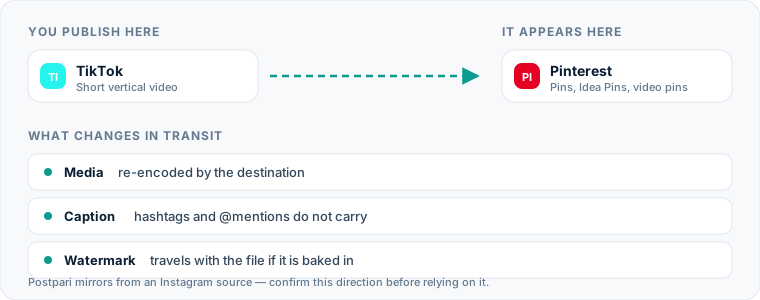
Publishing short-form videos from TikTok to Pinterest transforms quick, fleeting vertical clips into evergreen search assets that drive traffic for months or years. While TikTok relies on a fast-moving algorithmic feed where videos decay in reach within days, Pinterest functions primarily as a visual search engine.
To automatically post TikTok to Pinterest without manual downloading, use a specialized automation service that monitors your video feed, strips the bouncing watermark, extracts your caption, and publishes the media directly to a designated Pinterest Board with an outbound link.
Setting up an automated routing system saves hours of repetitive administrative labor while ensuring your video content builds long-term distribution on both platforms.
One source account, one destination. Add the rest of your networks to the same flow.
Automating Your TikTok to Pinterest Pipeline: The Quick Answer
If you want to repost TikTok to Pinterest systematically, you have two architectures to choose between, and the right one depends on which account you treat as your master copy.
The first is direct source monitoring: the tool watches your TikTok account, and every new public video becomes a Pin. Repurpose.io is the clearest example, and it is the tool to look at first on this route, because it publishes automatic watermark removal as a feature and lists both TikTok and Pinterest among the networks it supports. We say that plainly even though this site is run by the team behind Postpari: on the specific question of stripping a source watermark, Repurpose.io does the job and Postpari does not claim to.
The second is central-hub mirroring: you publish your master clip to one source account, and the tool copies it outward to everything else you have connected. Postpari works this way, and its own terms describe an Instagram source, so a TikTok-first workflow is not the shape it was built around. If Instagram is already where your clean export goes first, reaching Pinterest becomes a side effect of a flow you were going to build anyway.
Either way, the file handling leaves your day. What differs is which account you still have to publish to by hand.
The Manual Method: How You Publish Clips by Hand Today
Understanding the friction of manual posting makes the value of automation obvious. When you publish a video without software assistance, you must execute every step of file management and metadata translation on your own device.
Step 1: Removing the Watermark and Downloading
If you record and edit your video directly inside TikTok, downloading the published clip using the standard app interface hardcodes a moving TikTok logo and your account handle onto the video frame. To remove it manually, you must:
- Copy the public link of your published TikTok video.
- Open a third-party Web browser tool or downloader app to strip the watermark.
- Download the unwatermarked
.mp4file to your mobile camera roll or desktop hard drive.
Step 2: Uploading and Re-formatting for Pinterest
Once the clean video file sits on your local device, you must open Pinterest and manually construct a new Pin:
- Log into your Pinterest Business or personal account.
- Click Create and select Create Pin.
- Drag and drop the downloaded vertical
.mp4file. - Re-type or paste your caption into the Title and Description fields.
- Manually add an outbound destination URL—a step easily forgotten when rushing through administrative tasks.
- Select the appropriate target Board and hit publish.
Doing this for one video is a few minutes of fiddling. Doing it for every video you publish, every week, is the part that quietly stops happening after the first busy month.
The Hidden Cost of Manual Downloads
The primary downside of manual cross-posting is not just lost time; it is operational breakdown. Manual processes introduce friction points that degrade content quality and consistency over time.
| Metric / Feature | Manual Method | Automated Pipeline |
|---|---|---|
| Hands-on time | Several minutes of tapping per post | None after the initial setup |
| Watermark removal | A manual detour through a third-party site | Depends on the tool; some publish it as a feature and some do not |
| Destination Links | Frequently forgotten during manual entry | Pre-configured template rules |
| File Resolution | Compression risk from multi-step downloads | Preserved native file quality |
| Workflow Sustainability | High risk of publisher burnout | Set up once, runs indefinitely |
When you rely on manual file transfers, small delays compound. Downloading files to local drives clutters your mobile storage, degrades video resolution through multiple download-and-upload cycles, and creates friction that often leads creators to abandon cross-posting altogether.
By taking human intervention out of file transportation, an automated pipeline ensures every single piece of short-form media reaches Pinterest without exception.
Software Automation: Replacing Friction with Background Flows
Automated cross-posting replaces local file downloads with cloud-to-cloud transfers. Nothing lands on your phone; the software talks to both platforms directly and the video never passes through your camera roll.
The practical question is not which product has the longer feature list but which of the two architectures above matches how you already work. If TikTok is where your videos genuinely originate, you want a tool that watches TikTok. If your best export goes to Instagram first and TikTok is itself a copy, you want a hub that mirrors outward from there, and Pinterest becomes one more destination on a flow that already exists. Our breakdown of the best cross-posting tools compares the products in both camps, including where they lose to each other. This general pattern is covered in our guide to social media cross-posting.
Setting Up Your Automated TikTok to Pinterest Route
Building a background route between your accounts takes a few minutes to configure. Four things have to be true before the first Pin lands: both accounts are authenticated, the trigger is defined, the formatting rules are set, and the flow is switched on. Do them in that order, because most tools will not let you save a rule that points at a Board they do not yet have permission to publish to.
Step 1: Connect Source and Destination Profiles
Inside your automation software, authenticate both your source account and destination profile. You will need to grant access permissions for reading public video feeds on TikTok and publishing pins to your Pinterest account. If you plan to manage scheduling and draft queues across platforms, incorporating a dedicated TikTok scheduler or a specialized Pinterest scheduler can help organize your wider editorial calendar.
Step 2: Establish the Workflow Rule
Create a new automation workflow. Define TikTok as your source channel and Pinterest as your destination channel. Configure the rule to trigger on every new public post.
Step 3: Configure Link Rules and Destination Boards
Pinterest requires a target Board for every Pin, alongside an optional outbound link. Inside your automation settings:
- Select a default target Board (e.g., “Short Video Tips” or “Recipes”).
- Set a fallback destination URL (such as your homepage, blog, or online shop) so every automated Pin carries an outbound link by default.
- If your tool offers watermark removal, switch it on here. If it does not, plan to feed it the clean original export instead.
Once enabled, test the pipeline by publishing a clip on your source account. The workflow will process the video in the background and deliver it to your target Pinterest Board.
What Happens to Your Video File in Transit
When a video file moves across platform boundaries, file mechanics play a significant role in presentation quality. Understanding how server-side processing handles your media prevents unwanted cropping or visual distortions.
Aspect Ratios and Resolutions
Both TikTok and Pinterest fully support vertical 9:16 video formats (typically 1080x1920 pixels). Because both platforms prioritize vertical orientation, your video geometry remains unchanged during transit.
However, Pinterest accepts video files up to specific file sizes and durations depending on whether the post is classified as a standard Video Pin or a multipage clip. The cloud processor ingests your source file, verifies that the encoding (usually H.264 or HEVC in an .mp4 container) matches Pinterest requirements, and delivers the binary payload smoothly without requiring manual re-encoding on your computer.
Watermark Removal Operations
A platform watermark is a moving overlay and an account handle burned into the video you download from the app. It is not metadata you can switch off afterwards, which is why removing it is a genuine product feature rather than a checkbox every tool has.
Tools that advertise watermark removal handle it during processing. Tools that do not, pass the file through as they found it. Neither behavior is hidden — it is written on the feature page — so read it before you subscribe rather than after your first Pin publishes with a logo bouncing across it. If your tool does not remove watermarks, the workaround costs nothing: keep the export you made before you published to TikTok, because that copy never had an overlay applied.
How Captions, Hashtags, and Mentions Transfer Across Platforms
Text performance varies dramatically between TikTok and Pinterest. A caption designed to drive immediate comments on a social feed rarely matches the SEO-heavy structure required for a visual search engine.
A TikTok caption is written to provoke a reply in the next three seconds. A Pin description is written to be found months later by someone typing a description of the thing they want. The same sentence rarely does both jobs, which is why the text needs a rule of its own rather than a straight copy.
Handling Handles and Tags
TikTok captions frequently contain tags like #FYP, #ForYou, or #Trending, alongside @mentions of other creators. On Pinterest, these tags offer zero search value:
- Account Mentions:
@usernametags on TikTok do not map to the same accounts on Pinterest. Automation tools simply pass the raw text over, which means unedited handles will appear as static, unlinked text. - Generic Hashtags: Broad hashtags clutter your Pinterest Pin descriptions. While Pinterest supports targeted keywords, massive tag blocks look messy.
Text Truncation and Titles
Pinterest splits post text into two distinct fields: a Pin Title and a Pin Description. TikTok only offers a single text caption box.
When you post TikTok to Pinterest using automated tools, the software generally takes the opening line of your TikTok caption as the Pin title and pushes the rest into the description. If your captions open with an emoji and an inside joke, that is what your Pin title becomes. Writing a plain, descriptive first sentence on TikTok costs you nothing there and fixes the title here.
Pinterest-Specific Considerations for Video Content
Treating Pinterest as just another social network is a strategic mistake. Optimization rules on Pinterest differ significantly from social feeds like TikTok or Instagram.
The Power of Outbound Destination Links
Unlike TikTok, where adding clickable links to individual posts is heavily restricted, every Video Pin on Pinterest can carry a direct outbound link. The clip that can only point at your bio on TikTok can point at the exact product, recipe or article it is about on Pinterest.
This structural difference changes your content ROI. When automated workflows transfer your clips, ensure your software is configured to attach your primary website, product page, or newsletter landing page to every incoming post. This turns entertaining short videos into long-term traffic drivers for your business.
Board Organization and Categorization
Pinterest organizes content using Boards, which tell the platform’s search index how to categorize your content. Sending all incoming automated videos to a single generic board limits their search visibility.
If you produce content across multiple subjects (e.g., cooking tutorials, tech reviews, and fitness tips), consider establishing distinct automated workflows for different content styles, or use destination mapping to ensure videos land on subject-specific Boards.
Comparing Short-Form Video Distribution Routes
If your distribution model relies on publishing across multiple visual platforms, you may also want to explore our specific walkthroughs for mirroring clips from TikTok to Instagram or sending videos from Instagram to Pinterest.
Common Pitfalls to Avoid on This Route
Automating your media pipeline eliminates manual uploading, but setting up software without periodic review can introduce formatting issues. Avoid these common mistakes when building your workflow:
- Forgetting Default Destination Links: The single biggest advantage of Pinterest is driving outbound traffic. If you set up an automated flow without specifying a fallback destination URL, your Pins publish without links, forfeiting valuable traffic.
- Ignoring Search-Friendly Text: Writing TikTok captions filled entirely with emojis or inside jokes leaves your Pinterest Pins without readable search context. Structure your source captions so the first sentence clearly describes the topic using plain, search-friendly keywords.
- Overlooking Video Aspect Ratios: Ensure your source videos are recorded natively in 9:16 vertical orientation. Uploading horizontal (16:9) or square (1:1) videos through an automated flow results in heavy letterboxing or awkward cropping on mobile Pinterest feeds.
- Failing to Verify Watermark Removal Settings: Periodically inspect your published Pins on Pinterest to ensure your automation tool successfully strips the platform logo. Clean, unbranded video files present a much more professional appearance to discovery shoppers.
- Dumping All Videos into One Default Board: Sending every clip to a catch-all Board weakens your account organization. Categorize your content into targeted Pinterest Boards so search users can easily index your visual catalog.
Automated content routing removes administrative friction from multi-platform publishing. By linking your video accounts through a clean background processing flow, your short-form media gains second-life visibility as long-term visual search assets.
What the platforms themselves document
Publishing rules change without notice, and every network is the only authority on its own. These are the pages we check this guide against. If one of them contradicts this page, it is right — tell us.
- Pinterest for Business — Pinterest
- TikTok — no public documentation URL we could verify. Check the rules inside the app rather than trusting a third party on them, including us.
Does Postpari do this? Worth knowing before you sign up: Postpari's Terms of Use describe mirroring from an Instagram source. If TikTok is where you publish first, check with Postpari that your direction is supported before you rely on it.
Frequently asked questions
Can I cross-post TikTok videos directly to Pinterest without software?
Yes, you can manually download your TikTok videos to your phone or computer and upload them as new Pins inside Pinterest. However, doing this manually requires you to manually strip watermarks, copy captions, and paste destination links for every upload.
Will my TikTok watermark show up on Pinterest Pins?
If you download a video directly from the TikTok app, the file usually carries a bouncing watermark and your username. Whether a cross-posting tool removes it depends entirely on the tool, because watermark removal is a published feature of some distribution products and not of others. The method that always works is keeping your original export from before you published, because that file never had a watermark applied to it.
Can I add website links to automated Pinterest Video Pins?
Yes. Most social media automation tools allow you to specify a default destination URL. Whenever a new video is imported from TikTok, the software automatically attaches your designated link to the published Pinterest Pin.
How do TikTok captions convert into Pinterest titles and descriptions?
Pinterest splits text into a Pin title and a Pin description, while TikTok gives you a single caption box, so most tools map the opening line of the caption to the title and push the rest into the description. Write your first sentence as a plain, keyword-led summary and the title renders cleanly.
Do video hashtags from TikTok work on Pinterest?
Hashtags function differently on Pinterest compared to TikTok. While generic tags like #FYP offer no search value on Pinterest, target keywords inside your Pin descriptions help the platform index your video for visual search users.