How to Cross-Post from Instagram to Pinterest Automatically
Prices and features last checked: August 2026
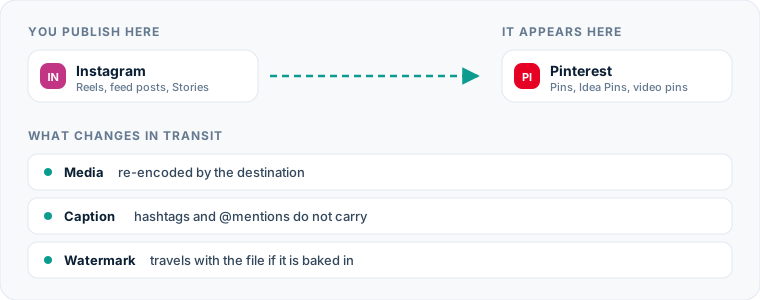
Routing short video content from Instagram to Pinterest allows you to turn short-lived social posts into evergreen search assets without manual file management. While Instagram content peaks in engagement within hours of publishing, Pinterest operates as a visual search engine where content continues to attract views, clicks, and saves for months.
To automatically post Instagram content to Pinterest, connect your Instagram Business or Creator profile as a source inside an automated distribution platform, choose a target Pinterest board as the destination, and allow the system to publish your published Instagram Reels directly as Video Pins.
When set up correctly, every new Reel published on Instagram triggers an API event that packages the original video file, translates the caption into a Pin title and description, attaches a destination link, and places the asset onto the designated Pinterest board.
One source account, one destination. Add the rest of your networks to the same flow.
The Quickest Route from Instagram to Pinterest
The most effective way to cross-post between these networks is through event-driven syndication. Instead of queuing posts in advance across separate social calendars, you publish natively on Instagram. A distribution engine detects the new publication, processes the video file, and sends it directly to Pinterest.
+------------------+ +-------------------+ +--------------------+ | Instagram Reel | —> | Cross-Posting Engine| —> | Pinterest Video Pin| | (Source Platform)| | (File & Meta Parse)| | (Target Board) | +------------------+ +-------------------+ +--------------------+
This workflow eliminates duplicate uploads and ensures your video files retain their original resolution without camera-roll compression. You post once on your primary channel, and your content distributes itself to search-driven discovery channels automatically.
The Manual Method: How You Currently Post to Pinterest
If you perform this transfer manually today, you know how repetitive the steps are. The process relies on physical device management and constant app switching.
Step 1: Exporting the Media File
First, you open Instagram, locate your published Reel, tap the menu icon, and attempt to save the video to your camera roll. If the video uses licensed audio from Instagram’s library, the app strips the sound track upon download, leaving you with a silent file. To preserve the audio, you must find the original unedited video file in your phone gallery or download it using a third-party web tool.
Step 2: Preparing the Asset for Upload
Next, you open the Pinterest app or log into desktop Pinterest. You select the option to create a Pin, search your local gallery for the downloaded video, and wait for the upload progress bar to finish processing the file.
Step 3: Formatting Metadata and Adding Links
Once the file uploads, you copy your Instagram caption and paste it into Pinterest. Because Pinterest separates content into a title field and a description field, you manually edit the text:
- You cut down the main headline to fit the character limits of a Pin title.
- You reformat the description to remove Instagram-specific phrases like “link in bio.”
- You type in a destination web address so the Pin can direct traffic to your website.
- You scroll through your Board library to find the correct board category for publication.
Performing this sequence for a single post takes anywhere from five to ten minutes. If you post daily on Instagram, manual transfers devour hours of labor every month.
The Hidden Costs of Uploading Content by Hand
Manual re-uploading feels free because you are not paying for direct software subscriptions, but it introduces hidden costs that hurt your content strategy over time.
| Aspect | Manual Downloading & Re-uploading | Traditional Schedulers | Automated Mirroring Engines |
|---|---|---|---|
| Workflow Friction | High (5-10 minutes per video) | Medium (Upload to calendar twice) | Zero (Runs in background) |
| Audio Preservation | Unreliable (Often stripped by app) | High (Requires original upload) | Native (Source audio retained) |
| Watermark Risks | High (If saved via app interface) | Low (Uses source asset) | Zero (Pulls directly via API) |
| Destination Links | Manual entry per post | Set during draft scheduling | Configured via automated rules |
| Storage Impact | Bloats local device storage | Cloud storage required | Transits in memory via cloud |
The primary risk of manual transfer is file degradation and watermarking. When you download a Reel directly through the Instagram interface, the platform often burns an animated logo and username watermark onto the frame. When you upload a video containing competitor watermarks to another platform, modern video engines identify the logo and reduce the distribution potential of that post.
Device storage is another hidden expense. HD video files consume local phone memory quickly. Constant downloading, saving, re-uploading, and deleting forces you to manage storage space continuously instead of focusing on creative work.
Finally, manual cross-posting introduces human error. Busy schedules cause creator burnout, leading to skipped cross-posts, missing outbound links, or broken captions.
The Automated Method for Instagram to Pinterest Publishing
Automated distribution replaces manual uploads with direct API communication between networks. Instead of treating every network as a manual upload target, you establish a pipeline where Instagram serves as the primary publisher and Pinterest acts as an automated destination.
Unlike using a standard Instagram scheduling tool to queue content on a single calendar, automated source-to-destination platforms monitor your live feed. The moment a video publishes publicly on your primary account, the automation engine captures the source asset, processes the parameters you specified during setup, and publishes a new Pin.
Tools vary in how they execute this transition. Conventional social management platforms like Buffer, Later, Publer, or Hootsuite require you to draft and schedule posts individually for every selected account. You upload the video once into their editor, select both accounts, and customize the text for each network.
Dedicated distribution engines, such as Postpari or Repurpose.io, work differently. They focus on continuous feed mirroring. Once configured, you never need to log into the cross-posting software to handle daily releases—publishing natively on Instagram triggers the full syndication pipeline automatically.
If you are evaluating software options for your social stack, check out our comparative breakdown of the top cross-posting platforms to see how event-driven automation compares to standard planning tools.
Setting Up Your Automated Syndication Flow
Building an automated pipeline from Instagram to Pinterest takes only a few minutes. Follow these direct steps to connect your accounts and configure your transfer parameters.
1. Connect Account Authorizations
Log into your chosen automation engine and authorize connections to both platforms.
- Instagram Source: Connect your Instagram account. Native cross-posting engines require a Professional (Business or Creator) profile connected to a Facebook Page to access the official Instagram Graph API.
- Pinterest Destination: Authorize your Pinterest account using standard OAuth login. Grant permissions for the automation engine to write content and create Pins on your public boards.
2. Define the Trigger and Routing Rules
Create a new syndication workflow. Set your Instagram account as the primary source and your Pinterest account as the destination.
Select the content type for the trigger: short-form video (Reels). You can choose whether to syndicate every new post immediately or send new items to an approval queue before they go live on Pinterest.
3. Configure Board Mapping and Outbound Links
Pinterest requires every Pin to reside on a specific board. Select a default target board for incoming Instagram Reels. If your software supports tag-based or keyword-based routing, you can set rules to direct specific topics to matching boards based on hashtags in your Instagram caption.
Because Instagram posts lack native outbound links, configure a default link destination (such as your main domain, store link, or blog homepage) that will automatically attach to every Pin generated by the system.
4. Test the Pipeline
Publish a test Reel on Instagram or run a backfill test using previously published content. Once the trigger processes, open Pinterest to verify that the video rendered correctly, the caption converted cleanly, and the destination link works as intended.
What Happens to the Video File During Syndication
When a short-form video moves between these platforms, the syndication tool handles technical file translation in the background to ensure compatibility.
[Instagram Reel: 1080x1920 MP4] │ ▼ [Cloud Transcoder / API Bridge] ├── Checks Aspect Ratio (9:16 target) ├── Strips API Watermarks / Retains Clean Source ├── Preserves Audio Stream (AAC) └── Enforces Platform File Size Limits │ ▼ [Pinterest Video Pin: Native Stream Rendered]
Aspect Ratio and Resolution
Instagram Reels use a 9:16 vertical orientation, typically rendered at 1080x1920 pixels. Pinterest fully supports 9:16 vertical video for Video Pins. The distribution engine transfers the original aspect ratio without adding black bars, cropping essential content, or stretching the frame.
File Container and Compression
Reels are generated in MP4 format using H.264 video compression and AAC audio. Pinterest accepts MP4 and MOV formats. When transferring via direct API connections, the cloud server ingests the raw MP4 stream from Instagram and uploads it directly to Pinterest’s media servers, preserving the original visual fidelity and bitrate.
Audio Track Preservation
Because the transfer occurs at the server level via official API access rather than a mobile screen recording or device download, the original audio track remains fully intact. The background music and original voiceovers match the master asset published on Instagram.
How Captions, Hashtags, and Mentions Convert
Instagram and Pinterest rely on different search models and text formatting rules. Automatically transferring plain text from one environment to the other requires understanding how each network parses text.
INSTAGRAM CAPTION FORMAT PINTEREST PIN FORMAT ┌───────────────────────────────┐ ┌───────────────────────────────┐ │ Clean Headline (First 100 ch) │ -----> │ Pin Title (Max 100 chars) │ ├───────────────────────────────┤ ├───────────────────────────────┤ │ Body Copy & Context │ -----> │ Pin Description (Max 500 ch) │ ├───────────────────────────────┤ ├───────────────────────────────┤ │ @mentions and #hashtags │ -----> │ Stripped or converted to │ │ │ │ plain search keywords │ └───────────────────────────────┘ └───────────────────────────────┘
Caption Truncation and Placement
Instagram permits captions up to 2,200 characters. Pinterest split-indexes text into two distinct fields:
- Pin Title: Up to 100 characters.
- Pin Description: Up to 500 characters visible in search views.
Automated tools handle this text in two ways. They either place the entire Instagram caption into the Pin description field and truncate it at 500 characters, or they pull the first line of the caption to populate the Pin title and push the remainder into the description field.
Hashtags
Hashtags play different roles on these platforms. On Instagram, creators often stack dozens of hashtags (#reels, #fyp, #explore) to capture algorithm feeds. On Pinterest, hashtags act as plain text strings rather than interactive discovery filters.
Having 20 hashtags at the bottom of a Pin description creates visual clutter without providing SEO value. Modern cross-posting workflows allow you to automatically strip hashtags during transfer or convert them into clean search terms.
Account Mentions
An @username handle that tags an account on Instagram will not map to the same account on Pinterest. On Pinterest, an unmapped handle becomes dead text. Advanced syndication settings allow you to remove @ symbols automatically so your descriptions remain clean and readable.
If you want to understand how different networks process social metadata across major platforms, read our core guide to automated social media cross-posting.
Pinterest-Specific Considerations for Cross-Posted Video
Pinterest is not a traditional chat-and-comment social feed; it functions as a visual search engine and shopping engine. To maximize your video performance, adapt your settings to match user behavior on Pinterest.
Outbound Destination URLs
Every Pin on Pinterest serves as a gateway to external web content. While Instagram limits outbound links to your account bio, Pinterest allows every single Video Pin to carry a unique, clickable link.
When configuring your cross-posting pipeline, ensure your system attaches a functional link to every post. Point the URL toward:
- Your primary e-commerce storefront.
- A specific product collection page related to the video.
- A contextual blog post or landing page.
- Your central content hub.
If you use a traditional Pinterest pin scheduler, you enter these links manually per item. When using automated feed syndication, set up a global fallback URL so no video publishes without a link.
Longevity and Search Indexing
Instagram content algorithms prioritize immediate engagement within the first 24 to 48 hours. Pinterest operates on a long-term search index. A Video Pin cross-posted today may receive minimal attention initially, but can peak in traffic six months later as users search for seasonal keywords or specific topics.
Structure your primary captions with descriptive, search-friendly keywords rather than short-lived viral slang. Clear descriptions help Pinterest’s search algorithm categorize your video correctly for long-term discovery.
Common Mistakes on the Instagram to Pinterest Route
Automating your workflow saves time, but setting it up incorrectly can cause formatting errors that hurt performance. Avoid these common mistakes when configuring your pipeline.
1. Relying on Platform Specific Call-to-Actions
Writing “Link in bio to shop!” in your video caption works on Instagram, but makes no sense on Pinterest where the clickable link lives directly beneath the Pin. When scripting video captions that will be cross-posted, use platform-neutral language like “Check the link attached to learn more.”
2. Leaving Default Watermarks on Downloaded Files
If you use a manual process or a low-tier software setup that downloads videos directly from the Instagram application UI, check your final assets for watermarks. Never re-upload content featuring visible competitor logos. Use direct API integration tools that pull clean source video files directly from cloud storage or server APIs.
3. Publishing to a Generic “General” Board
Sending all cross-posted Instagram Reels into a single generic Pinterest board dilutes your search SEO. Create specific boards for specific topics (e.g., “Home Office Setup Ideas” instead of “Stuff”). Use keyword-based routing rules to ensure incoming content lands on relevant, targeted boards.
4. Overpacking Descriptions with Hashtag Blocks
Transferring dense blocks of Instagram hashtags into Pinterest descriptions makes your content look spammy. Limit your source captions to a few highly relevant keywords, or use your cross-posting software’s text transformation tools to strip extra hashtags before the content goes live on Pinterest.
5. Leaving Destination URLs Blank
Publishing Video Pins without destination URLs wastes the primary advantage of Pinterest. Always verify that your automated syndication tool includes a default link rule so every cross-posted video drives actionable traffic back to your website.
What the platforms themselves document
Publishing rules change without notice, and every network is the only authority on its own. These are the pages we check this guide against. If one of them contradicts this page, it is right — tell us.
- Instagram Platform: content publishing — Instagram
- Pinterest for Business — Pinterest
Does Postpari do this? Postpari is built around exactly this shape of flow: Instagram as the source, Pinterest as a connected destination.
Frequently asked questions
Can I automatically post Instagram Reels to Pinterest as Video Pins?
Yes, you can automatically post Instagram Reels to Pinterest by using a cross-posting platform that connects both accounts via API. When configured, every new Reel published on Instagram is fetched by the system and re-published directly to your selected Pinterest board as a Video Pin.
Will cross-posting from Instagram to Pinterest remove the video audio?
No, automated cross-posting platforms preserve the full original audio track of your video during the transfer. Audio is only removed if you manually download a Reel containing licensed music through the Instagram app to your mobile camera roll.
Do Instagram captions fit into Pinterest Pin descriptions?
Instagram allows captions up to 2,200 characters, while Pinterest Pin descriptions top out at 500 characters. Automated cross-posting tools will either place the full text into the description field and truncate it at the limit, or separate the first line into a Pin title and place the remaining text into the description.
Do I need a Pinterest Business account to auto-post from Instagram?
Yes, cross-posting platforms require a Pinterest Business account to access the official Pinterest API for automatic publishing. Converting a personal Pinterest account to a free Business account takes only a few minutes in account settings.
How do destination links work when cross-posting from Instagram to Pinterest?
Because Instagram posts do not contain native outbound destination links, automated distribution tools allow you to specify a default URL rule. The platform automatically attaches your chosen domain, product page, or landing page link to every Pin generated from your Instagram feed.