Pinterest Scheduler and Cross-Posting Guide
Prices and features last checked: August 2026
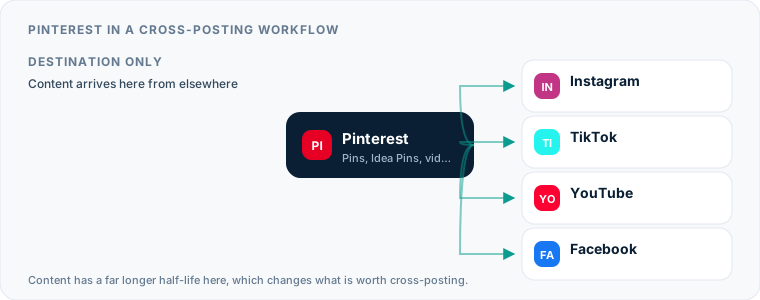
Selecting the right Pinterest scheduler comes down to recognizing that Pinterest is a visual search engine, not a real-time social feed. Unlike platforms where content disappears from feeds within hours, a Pin published today can generate web traffic, product views, and affiliate conversions for months. Automating your Pinterest publishing allows you to maintain a consistent drip of fresh visual content without logging into the platform every day to upload files manually.
Understanding this search-first mechanics changes how you plan your publishing calendar. Pinterest users do not scroll to see what their friends did five minutes ago; they search for practical solutions, design inspiration, recipes, and products. Because the platform relies heavily on visual signals, board organization, and keyword-rich titles, your scheduling setup must support these structured metadata fields rather than just dumping raw video or image files into an empty queue.
Understanding How Content Works on Pinterest Today
Publishing successfully on Pinterest requires treating every asset as an indexed entry point to your brand. Where traditional social feeds prioritize recency, Pinterest prioritizes search intent and visual relevance. A Pin uploaded in October can peak in traffic six months later when seasonal search volume rises.
The platform relies on three distinct content formats, each serving a specific role in your profile’s growth:
- Static Pins: Traditional 2:3 vertical images paired with a destination link, title, and detailed description. These remain the primary driver of outbound website traffic.
- Video Pins: Vertical videos designed to show process, motion, or step-by-step tutorials. Video Pins auto-play in search results and category feeds, capturing high user attention.
- Idea Pins: Originally a separate, story-like multi-page format without direct outbound links, Pinterest has consolidated Idea Pins into standard video and image Pin workflows, making link tagging and video publishing uniform across accounts.
Because search engines favor accounts that regularly add fresh content, uploading ten Pins on Sunday afternoon and publishing nothing for the rest of the week yields weaker long-tail traffic than distributing those ten Pins evenly across seven days. Continuous distribution keeps your target boards active, signaling to Pinterest’s indexer that your profile is an active source of high-quality visuals.
Using Native Tools to Schedule Pinterest Posts for Free
Pinterest provides built-in tools that allow any converted Business account to native-schedule Pins in advance without paying for extra software. This native feature is accessible directly through the web browser builder and the Pinterest mobile app.
Native Feature Capabilities
The built-in Pinterest composer lets you upload standard images or short video files, apply direct link URLs, choose a specific board, add alt text for accessibility, and write search-oriented titles and descriptions. You can select a future date and time for each asset to go live.
Native Scheduling Limitations
While native scheduling works for occasional updates, it creates operational friction if you publish daily across multiple boards. The native builder limits how far in advance you can queue content, restricting your scheduling window to a relatively short rolling period. More importantly, native tools offer zero automation: you still have to manually format every image, draft every description, and pick board targets individually for every single upload. If you publish short-form video across multiple networks, using native builders means repeating the exact same file-upload and text-entry steps on every platform.
What to Look for in a Dedicated Pinterest Scheduler
Moving beyond native tools requires connecting your account to third-party publishing software via Pinterest’s official API. To authorize a third-party tool, your Pinterest account must be converted to a free Business account. Once authorized, the tool interacts with your account’s boards, granting access to publish image and video assets automatically on your behalf.
When picking a Pinterest scheduler, tools generally fall into two operational categories: compose-and-schedule software and automated source-to-destination distribution engines.
| Tool Type | Primary Mechanism | Best Used For | Platform Examples |
|---|---|---|---|
| Compose & Schedule | Manual queue creation with visual calendars and direct draft editing per platform. | Multi-network campaign planning, board-level custom captions, team approval stages. | Buffer, Later, Metricool, Publer, SocialBee, SocialPilot, Hootsuite |
| Source-to-Destination Mirroring | Automated background monitoring; detects new uploads on a primary source and republishes them. | Multi-platform video distribution without re-uploading files or managing daily queues manually. | Postpari, Repurpose.io |
Traditional compose tools like Buffer, Later, and Metricool focus on a central visual calendar where you build individual posts manually. Buffer provides a streamlined free tier suited for simple single-channel queues, while SocialPilot and Hootsuite offer multi-seat team approvals suited for enterprise agencies managing dozens of client brands. Metricool emphasizes unified analytics, and Publer features bulk CSV uploading for high-volume pinners.
By contrast, mirror engines like Postpari eliminate manual queue building entirely by converting short-form videos published on a primary platform into scheduled or instant Pins automatically.
Using Pinterest as a Content Source for Cross-Posting
Using Pinterest as the primary origin point for your broader social media output presents distinct structural challenges compared to starting with short-video feeds like Instagram or TikTok.
Pins are structured primarily around external destination links and static board indexing rather than caption-heavy social conversation. When you publish a Pin, the caption is written for search queries rather than feed engagement. Extracting content from Pinterest to feed platforms often leaves you with missing video files or awkwardly truncated descriptions that include link URLs that native feeds do not turn into clickable links.
Tools that allow you to pull content out of Pinterest, such as Repurpose.io, can extract public Pin assets and route them into cloud storage or secondary networks. However, because Pinterest assets lack original high-bitrate video metadata standard on dedicated video apps, using Pinterest as your primary content engine often forces you to do extra editing work before those assets look natural on networks like Instagram, Threads, or X.
How to Set Up Pinterest Auto Posting from Other Platforms
Reversing the dynamic—using high-engagement video networks as your content engine and routing those assets to Pinterest—is far more efficient. If you regularly record short-form vertical videos for Instagram Reels, setting up Pinterest auto posting converts your existing video library into an automated stream of Video Pins.
When you cross-post short videos from Instagram to Pinterest, your existing video production feeds your Pinterest boards continuously without extra filming or editing.
Automated Mirroring Workflows
Using dedicated distribution engines simplifies this process:
- Connect Your Source Account: Link your main content creation platform (such as your business Instagram account) to the automation service.
- Connect Pinterest: Authorize your Pinterest Business profile and select your default destination board.
- Define Rule Parameters: Configure the integration engine to monitor your source feed. Services like Postpari automatically mirror newly published short videos directly to your target networks, including Pinterest, without requiring manual draft creation for every video.
- Manage Existing Archives: If you have a deep catalog of previous videos, tools featuring backfill capabilities can slowly drip your archive onto your Pinterest boards over time, establishing account activity instantly.
For creators using multi-network suites, tools like Repurpose.io offer image and Story repurposing along with video auto-resizing, while Postpari specializes in hands-off source-to-destination video mirroring across connected profiles, including main and backup accounts.
Routing from TikTok Instead of Instagram
If TikTok is where your videos actually originate, the route changes shape, and so does the tool you should be looking at. Pinterest is happy to accept the file either way, but a video downloaded from the TikTok app arrives with an animated logo and your handle burned into the frame, and Pinterest is a surface where readers browse deliberately rather than scroll past. A competitor’s watermark on a Pin is more conspicuous there than it is in a fast feed.
That makes watermark handling the deciding feature on this particular route rather than a nice-to-have, and it is a genuine difference between products: some publish automatic removal as a feature and some do not. Our walkthrough of the TikTok to Pinterest route covers which architecture fits which workflow, including the case where the honest answer is a tool other than the one this site is run by. If you keep your original export from before you published to TikTok, the question goes away entirely, because that file never had an overlay applied to it.
Aspect Ratios, Formats, and Technical Limits When You Schedule Pins
Pinterest enforces strict visual standard requirements. Content that violates their layout specifications looks misaligned in user feeds, leading users to scroll past your Pins without clicking.
+-------------------------------------------------------------+ | | | RECOMMENDED ASPECT | | RATIO (2:3) | | | | 1000 x 1500 px | | | +-------------------------------------------------------------+
Visual Specifications Overview
- Static Pin Aspect Ratio: Standard static Pins require a 2:3 vertical aspect ratio (1000 x 1500 pixels ideal). Square images occupy less vertical space in search results, while tall images beyond a 1:2.1 ratio run the risk of getting cropped in mobile feeds.
- Video Pin Aspect Ratio: Video Pins work best in 9:16 full vertical or 1:1 square formats. Full 9:16 vertical videos match the native format of short-form video platforms.
- File Limits: Static images should be PNG or JPG files under standard web compression limits. Video assets should be formatted as MP4 or MOV files under reasonable filesize parameters.
- Link Hygiene: Every static Pin must feature a valid target URL. Video Pins can link directly to product pages, articles, or landing pages.
Common Cross-Posting Format Failures
When you schedule pins through cross-posting setups, several formatting errors can ruin your content presentation:
- Visible Competitor Watermarks: Video files exported directly from certain platforms carry branded floating watermarks. While platforms do not publish explicit downranking code, visible watermarks look unpolished and reduce user clicks. Services like Repurpose.io offer automated watermark removal options to clean up assets before distribution.
- Horizontal Video Letterboxing: Uploading standard widescreen 16:9 horizontal video to Pinterest places thick black bars above and below the video, resulting in a tiny preview window in the mobile feed. Always re-crop horizontal content to 9:16 or 1:1 before scheduling.
- Missing Titles: Platforms like Instagram rely purely on captions, lacking dedicated title fields. When cross-posting video captions to Pinterest, ensure your automation tool or Pinterest post scheduler correctly parses the first sentence into a clear Pin title, or maps generic fallback text to prevent blank headers in search listings.
Managing Multiple Accounts with a Pinterest Post Scheduler
Agencies, e-commerce brand holding companies, and multi-niche creators often maintain multiple distinct Pinterest accounts to serve different audience demographics. A home decor brand and an outdoor gear brand require separate boards, visual styles, and destination domains.
Using a single browser window to manage multiple accounts natively requires constantly logging in and out, which quickly leads to publishing errors such as pinning a kitchen renovation image to a camping gear board.
Using a specialized Pinterest publishing tool centralizes multi-account management:
- Account Separation: Workspace-based tools like SocialBee and SocialPilot allow agencies to isolate client accounts into distinct team permissions and client-approval dashboards.
- Per-Account Pricing: Services like Publer and Buffer bill directly per connected channel or account, allowing small businesses to pay only for the exact profile volume they operate.
- Main and Backup Mirroring: Distribution tools like Postpari allow creators to connect multiple destination accounts simultaneously—including main profiles and backup brand accounts—distributing a single source video across every account in parallel.
For organizations building out a comprehensive multi-channel presence, choosing software that handles account routing smoothly prevents cross-account publishing mistakes.
A Hands-Off Pinterest Workflow for Busy Creators
Building a long-term strategy for Pinterest does not mean spending hours organizing queues every morning. The most efficient setup relies on automated systems that handle distribution in the background while you focus entirely on producing core content.
Step 1: Establish Your Core Video Engine
Create your short vertical video content on your primary creation platform. Focus on clear visuals, strong titles, and high-quality audio. Ensure your video subject matter aligns naturally with standard search categories like tutorials, visual demonstrations, or product reviews.
Step 2: Configure Source-to-Destination Mirroring
Rather than manually downloading and re-uploading files, connect your source account to an automated automation platform. Setting up a dedicated workflow to cross post to Pinterest automatically forwards every short video you publish directly to your designated Pinterest target board.
Step 3: Implement Evergreen Backfilling
If you possess a catalog of existing video assets, launch a backfill campaign. Using features like Postpari’s automated backfill drip, your historical video library will post to your Pinterest profile at steady intervals, filling out your boards with zero daily intervention.
Step 4: Combine Automation with Intentional Manual Pinned Assets
While automated video mirroring keeps your profile active with motion content, supplement your feed with targeted static Pins whenever you launch new products, publish blog posts, or start seasonal campaigns. Using a multi-channel setup fits within a broader strategy for social media cross-posting designed to protect your time.
This structured workflow offers a practical setup for small business owners who rely on visual discovery to drive ongoing lead generation. If you are currently evaluating your tech stack, finding the best social media scheduler for your overall publishing stack requires weighing whether your team needs deep visual calendar planning or automated hands-off distribution.
By combining search-optimized content with automated scheduling, you transform Pinterest from a daily operational task into a passive visual marketing engine that works continuously in the background.
What the platforms themselves document
Publishing rules change without notice, and every network is the only authority on its own. These are the pages we check this guide against. If one of them contradicts this page, it is right — tell us.
- Pinterest for Business — Pinterest
Where Postpari fits: Postpari lists Pinterest among the networks it works with. It does not publish a platform-by-plan matrix, so confirm Pinterest is available on the plan you are considering before you rely on it.
Frequently asked questions
Can I schedule Pins for free on Pinterest without using third-party software?
Yes, Pinterest includes a native scheduling tool for all free Business accounts accessible via the web browser composer and mobile app. It allows you to select a publishing date and time, apply board destinations, and write descriptions for static images and short videos. However, it lacks automated video mirroring, bulk editing, and multi-network management features.
What is the ideal aspect ratio when scheduling content to Pinterest?
Static Pins perform best with a vertical 2:3 aspect ratio, ideally 1000 x 1500 pixels. Short-form Video Pins perform best in full 9:16 vertical (1080 x 1920 pixels) or 1:1 square formats. Publishing horizontal 16:9 widescreen videos results in black letterboxing bars and significantly lower visual engagement in mobile feeds.
Does Pinterest allow you to cross-post watermarked videos from TikTok or Instagram?
Pinterest allows you to upload video files containing watermarks, but visible logos from competing platforms make your content look unpolished. Users are less likely to click or save Pins that show clear platform watermarks, so using a tool or workflow that removes watermarks before publishing results in cleaner board presentations.
How far in advance should I schedule my Pinterest posts?
Because Pinterest operates as a search engine, content takes time to be indexed and gain organic search traction. Scheduling your content consistently weeks or months ahead of key seasonal search peaks—such as posting holiday content in early autumn—ensures your Pins build search history right when user queries peak.
Will scheduling Pins through third-party tools reduce my reach compared to posting manually?
No, publishing content through third-party scheduling tools authorized via Pinterest's official API does not inherently lower your reach. Pinterest indexes content based on visual quality, search relevance, board context, and user engagement, regardless of whether the file was uploaded manually or delivered by a scheduling engine.