How to Cross-Post from TikTok to LinkedIn Automatically
Prices and features last checked: August 2026
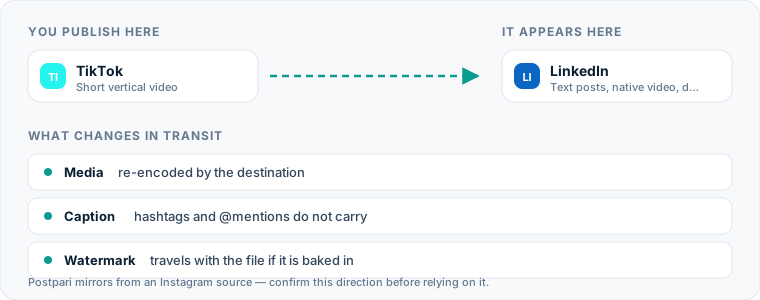
Moving content from TikTok to LinkedIn allows you to extend the reach of your short-form videos to a professional audience without creating every post from scratch. To automatically post TikTok videos to LinkedIn, connect your accounts to an automation service that monitors your published TikTok feed, retrieves the clean video file without watermarks, formats the text caption, and delivers it to your LinkedIn profile or company page.
Setting up an automated pipeline replaces the tedious work of saving videos to your phone, removing logos with third-party web tools, re-uploading MP4 files, and retyping captions. Instead, a single video published on TikTok can appear natively on LinkedIn minutes later.
One source account, one destination. Add the rest of your networks to the same flow.
Fast Comparison: Manual Posting vs. Automated Cross-Posting
| Workflow Step | Manual Method | Automated Workflow |
|---|---|---|
| File retrieval | Manual export or download to the camera roll | Fetched from the source account in the background |
| Watermark handling | Third-party download sites, or re-exporting from your editor | Handled at ingestion, if the tool advertises it |
| Video quality | Re-encoded and compressed on the device | Source file handed on without a device round-trip |
| Caption processing | Manual copy, paste and text editing | Rule-based cleaning and hashtag filtering |
| Attention per post | Every post needs you present | Setup once, then only when something breaks |
Choosing the right approach depends on how frequently you publish and whether you need to adjust your message for a professional audience before it goes live.
The Manual Method: How You Currently Post TikTok Videos to LinkedIn
If you choose to post TikTok to LinkedIn manually, you must handle every file transfer and text modification on your own device. The manual route typically looks like this:
- Publish your video on TikTok: Create and upload your vertical video inside the TikTok app.
- Download the video file: Open the published TikTok post, tap the share menu, and save the video to your camera roll.
- Strip the watermark: Because TikTok adds a bouncing logo overlay to saved videos, you must run the file through a third-party download site or save an unwatermarked version from your editing app prior to publishing.
- Open LinkedIn: Switch to the LinkedIn mobile app or desktop browser.
- Create a new post: Select the media upload option and select the saved MP4 file from your local storage.
- Rebuild your text content: Copy your caption from TikTok, remove platform-specific hashtags like
#fypor#foryou, and retype any username mentions so they reference LinkedIn profiles instead of TikTok handles. - Publish and wait: Wait for LinkedIn to upload, process, and render the video before checking your feed.
While this process works for an occasional post, repeating these seven steps several times a week creates unnecessary friction and eats up valuable time.
Where the Manual Method Costs You More Than You Think
The manual approach to publishing video content across networks causes subtle problems that degrade video quality and waste hours over time.
Multiple Layers of Video Compression
Your editing software compresses the raw file once. Publishing to TikTok compresses it again for the platform’s delivery network. Save that copy back to your phone and upload it to LinkedIn, and LinkedIn compresses an already twice-compressed file a third time. Each pass costs you something visible: artifacts in motion, blurry text overlays, muddy audio.
Context Switching and Interrupted Focus
Manual transfer forces you to stop creative work for administrative work. Every clip means logging into a second app, managing local storage, and checking that the caption survived the copy. The cost is not the minutes; it is that the minutes land in the middle of something else.
Delayed Distribution
When publishing is manual, cross-posting is what gets postponed. You publish on TikTok in the morning, intend to put it on LinkedIn that afternoon, and find it still sitting in your camera roll on Thursday. The video does not get worse, but the moment it belonged to has passed.
Automating the Pipeline from TikTok to LinkedIn
An automated TikTok to LinkedIn workflow replaces manual file handling by connecting both platforms through a service that sits between them. When you post a new clip to TikTok, the tool detects the upload, retrieves the source video, processes your caption according to your rules, and publishes to LinkedIn.
Which tool you pick depends on which account you want to treat as the origin, and the two designs are genuinely different.
A direct TikTok source. Distribution tools such as Repurpose.io connect to your TikTok profile as the input, watch your public feed, and send video on to LinkedIn. If TikTok is where you actually publish first, this is the shape that matches your habit, and it is the honest recommendation for this route.
An Instagram hub. Postpari, the tool this site is run by, works the other way around: its terms describe Instagram as the source account, and it mirrors short video outward from there to TikTok, LinkedIn, Facebook Pages, YouTube Shorts, Threads, X, Bluesky and Pinterest. That means it fits you only if you are willing to make Instagram the place you publish first. If TikTok is your origin and you have no intention of changing that, a direct-source tool is the better answer, and we would rather say so than sell you a workflow you will abandon in a month.
If you already use a dedicated TikTok scheduler or a standalone LinkedIn scheduler, incorporating an automated cross-posting pipeline removes the need to maintain separate content queues for each social network. You can read our broader evaluation of the best cross-posting tools to see how different routing engines manage feed triggers and API connections.
Setting Up Your TikTok to LinkedIn Automated Workflow
Configuring TikTok LinkedIn automation takes only a few minutes. Here is how a standard automated workflow is built using a direct distribution tool:
Step 1: Connect Your TikTok Account
Navigate to your distribution platform’s connections dashboard and select TikTok as your source channel. You will be prompted to authenticate your account and authorize read access to your published video feed.
Step 2: Authorize Your LinkedIn Profile or Page
Add LinkedIn as your destination channel. The authentication dialog will ask whether you want to publish to a LinkedIn Personal Profile or a LinkedIn Organization Page.
Note: LinkedIn authorization tokens expire periodically, so expect to re-authenticate this connection from time to time. A silently expired token is the most common reason a working flow stops.
Step 3: Configure Video and Watermark Options
Set the workflow to fetch the video without routing it through the app’s save button, which is where the overlay gets applied. Tools differ here: some advertise watermark handling as a feature and some pass on whatever file they receive. If yours does not clear overlays, keep your original export from the editing stage and use that as the source of truth.
Step 4: Set Up Caption Cleaning Rules
Define how captions should be transformed when moving between platforms:
- Hashtag Stripping: Automatically filter out TikTok-specific tags like
#fyp,#viral, or#trending. - Custom Prefix/Suffix: Automatically append a standard professional sign-off, contact link, or call-to-action to the bottom of every LinkedIn caption.
- Text Truncation: Ensure long captions fit within LinkedIn text parameters without clipping abruptly.
Step 5: Select Publishing Mode (Auto vs. Draft)
Choose whether posts should publish to LinkedIn instantly upon detection, or accumulate in a draft queue for manual review. If you want to automatically post TikTok to LinkedIn without touching anything, select instant publishing. If you prefer to manually tweak the text for a professional context, select the draft or review mode.
For creators using multi-stage distribution, you can also set up a multi-step chain: send your content through a TikTok to Instagram pipeline first, and then configure a downstream rule for Instagram to LinkedIn publishing.
What Happens to the Video File
Understanding the technical translation of video media ensures your posts look crisp and professional on LinkedIn feeds.
| Stage | What the file is | What happens to it |
|---|---|---|
| TikTok source | Vertical 9:16 MP4, published | The export you saved from the app carries the overlay |
| Automation engine | The same file, fetched | Retrieved without a device round-trip; overlay cleared if the tool does that |
| LinkedIn destination | Native vertical upload | Re-encoded by LinkedIn for feed playback |
Aspect Ratios and Dimensions
TikTok operates exclusively in a vertical 9:16 aspect ratio (typically 1080x1920 pixels). LinkedIn fully supports 9:16 vertical video in its mobile applications, rendering clips full-width inside the feed. On desktop browser views, vertical videos display with slight side-padding or fit within a tall media frame. You do not need to letterbox or crop your 9:16 TikTok videos to a 1:1 square before sending them to LinkedIn.
Resolution and Compression
When automation tools fetch your video from TikTok, they pull the original rendered MP4 file. This bypasses the mobile app screen-capture process, avoiding the lower resolutions and artifacting caused by saving videos directly to phone storage. The automation engine delivers a clean file to LinkedIn’s media upload endpoint, allowing LinkedIn’s video processing engine to encode a crisp stream.
Watermark Removal
Native TikTok app exports include a moving watermark with the TikTok logo and your account handle. Tools that advertise watermark handling avoid this by not using the consumer save path at all. Tools that do not advertise it will forward the overlay along with everything else, so the safest habit is the one that does not depend on any vendor: export a clean master from your editor before you publish anywhere, and treat that file as the one that travels.
Handling Captions, Hashtags, and Mentions
Text that works well on TikTok often needs adjustments before appearing on LinkedIn. Understanding how automation tools transform captions keeps your posts clean.
A caption written for TikTok might read “Check out these 3 productivity tips! @creatorname #fyp #viral #tech”. After a rule-based pass, the version that reaches LinkedIn drops the algorithmic tags and the handle that no longer resolves, keeps the hook, and appends whatever standing sign-off you configured. The transformation is not clever — it is a blocklist and a suffix — but it is the difference between a post that reads as written for LinkedIn and one that reads as pasted into it.
Filtering Out TikTok-Specific Hashtags
TikTok posts rely on broad algorithmic tags like #fyp, #foryou, #tik_tok, and #viral. These tags offer zero search value on LinkedIn and signal to professional readers that the post was copied without editing. Automation engines let you create blocklists that strip specified hashtags before the text reaches LinkedIn.
Tagged Users and Account Handles
Account tags do not cross platform boundaries automatically. Typing @johndoe on TikTok references a TikTok profile. When copied to LinkedIn, that text tag breaks or remains plain text. When you repost TikTok to LinkedIn, automated tools generally render invalid handles as plain text. If tagging specific colleagues or companies on LinkedIn is critical, consider using a draft queue step to select the correct LinkedIn profiles manually.
Caption Length Limits
Both networks allow a caption far longer than the average TikTok description, and LinkedIn’s ceiling is the lower of the two. Because TikTok captions tend to be short, truncation is rarely the problem on this route — the opposite usually is. However, LinkedIn users typically consume longer, narrative-style posts. Using an automated workflow allows you to set up rules that append explanatory text, bullet points, or links to short TikTok captions.
LinkedIn-Specific Platform Considerations
Publishing short-form vertical video to LinkedIn involves platform-specific behaviors that differ from consumer-focused video apps.
Personal Profiles vs. LinkedIn Pages
Automation tools handle personal profiles and corporate organization pages differently:
- Personal Profiles: Video posts reach your immediate professional network and your followers, and they carry your name rather than a brand’s.
- Company Pages: Video posts represent your corporate brand. Third-party automation APIs support publishing to both profiles and pages, but corporate page access requires administrative permissions on the destination organization page.
Native Video vs. External Links
Avoid sharing a TikTok post by pasting its web link into the LinkedIn post box. A link post renders as a preview card rather than a video, so the reader has to leave LinkedIn to watch anything. Cross-posting tools upload the file itself through the API, which means the video plays inside the feed where the reader already is.
Audio Expectations and Closed Captions
A large portion of LinkedIn users browse their feeds with sound turned off, especially during work hours. While TikTok relies heavily on trending music and audio clips, video on LinkedIn relies on clear spoken communication. If your TikTok video features talking-head commentary, ensure your video file includes burned-in open captions or closed captions, making the post accessible to desktop and mobile viewers reading without audio.
Common Mistakes When Cross-Posting This Route
Avoiding typical operational errors ensures your content maintains high presentation standards across both networks.
1. Leaving Visible TikTok Watermarks
Publishing clips featuring the bouncing TikTok logo looks sloppy on a professional network. Always use an automated flow or an unwatermarked source file to keep your video presentation clean.
2. Retaining Consumer-Focused Slang and Trends
Trends, meme audio, and inside jokes that perform well on TikTok can confuse professional audiences on LinkedIn. Ensure the core message of your clip delivers value, education, or industry insight that aligns with professional networking goals.
3. Relying on Link Comments
A common manual workaround on LinkedIn is placing links in the first comment of a post. Fully automated posting workflows send video files and text captions via API, but generally do not support automated self-commenting. Include essential information directly within the post caption rather than relying on automated comment insertion.
4. Neglecting Native Text Structure
TikTok captions are often written as single, dense blocks of text crammed with tags. LinkedIn readers prefer clean spacing, short sentences, and bullet points. Configure your distribution tool’s formatting rules to preserve paragraph breaks and line spaces when transferring text.
Once the pipeline is built, how to post TikTok to LinkedIn stops being a weekly question and short-form video becomes a standing channel into your professional network. To learn more about connecting your complete social stack, read our master guide on social media cross-posting.
What the platforms themselves document
Publishing rules change without notice, and every network is the only authority on its own. These are the pages we check this guide against. If one of them contradicts this page, it is right — tell us.
- LinkedIn Help: sharing video — LinkedIn
- TikTok — no public documentation URL we could verify. Check the rules inside the app rather than trusting a third party on them, including us.
Does Postpari do this? Worth knowing before you sign up: Postpari's Terms of Use describe mirroring from an Instagram source. If TikTok is where you publish first, check with Postpari that your direction is supported before you rely on it.
Frequently asked questions
Can I cross-post videos directly from TikTok to a LinkedIn Company Page?
Usually, though it depends on the tool. Many automation platforms let you choose either a personal LinkedIn profile or a LinkedIn Organization Page as the destination, and publishing to a Page requires administrative access to it at the authorization step. Check the destination list before you subscribe rather than after.
Does automatically posting from TikTok to LinkedIn remove the TikTok watermark?
Only if the tool says it does. Watermark handling is a real difference between products, not something every distribution tool provides, so read the feature list rather than assuming. The method that always works is keeping your original export from before you published, because that file never had a watermark applied to it.
Will my TikTok video caption automatically copy over to LinkedIn?
Yes. Automation workflows capture your original caption text and transmit it alongside the video file. Most tools allow you to strip out specific hashtags or append custom text specifically for LinkedIn readers.
Is vertical video (9:16 aspect ratio) supported natively on LinkedIn?
Yes. LinkedIn natively supports vertical video uploads in a 9:16 aspect ratio. On mobile devices, vertical videos render full-width inside the feed, making TikTok's default video format ideal for LinkedIn viewers.
How fast does a TikTok video post to LinkedIn after being published?
That depends on the tool, and often on the plan you are on. Delivery speed is set by how the service detects a new post, how long the file takes to render, and any posting-speed tier the vendor applies, so treat it as a published specification to check rather than a fixed property of cross-posting.