LinkedIn Scheduler and Cross-Posting Guide
Prices and features last checked: August 2026
Setting up a reliable LinkedIn scheduler allows you to maintain a steady professional presence across company pages and personal profiles without logging into the network every morning. LinkedIn operates under vastly different social norms than consumer platforms, making automated publishing both a major time-saver and a potential risk to your professional reputation if executed carelessly. Cross-posting to LinkedIn requires deliberate caption rewrites and specific format adjustments because generic social content immediately stands out for the wrong reasons on a professional network.
While consumer networks welcome casual fragments, trending audio references, and dense clusters of discovery tags, LinkedIn members expect clear context, readable formatting, and professional relevance. Understanding how the platform ingests scheduled media and how automated tools interact with its publishing interface is essential to building an effective pipeline.
Publishing to LinkedIn in a Multi-Platform World
Publishing content on LinkedIn in a multi-platform strategy requires treating the network as a distinct ecosystem. On Instagram or TikTok, short video commentary often relies on audio trends or casual text overlays. On LinkedIn, that same video requires a structured written post to set the scene, explain the business takeaway, and invite professional discussion.
When you cross post to LinkedIn without editing your copy, audience friction is immediate. Posts that mention “link in bio,” reference platform-specific features like “swipe up,” or include strings of consumer hashtags like #fyp signaled instantly that the creator gave zero thought to the audience. This disconnect degrades your professional brand faster than posting nothing at all.
LinkedIn supports several distinct content formats:
- Text-only updates: Heavily favored for direct, opinionated industry insights and commentary.
- Native video: Vertical and horizontal video clips that play directly in the feed.
- Document slide decks: Uploaded PDF files that the feed renders as swipeable document carousels.
- Single and multi-image posts: Visual cards, infographics, and event photos.
Each format behaves differently depending on whether you upload it directly through the native interface, queue it through a third-party application, or send it automatically through a video mirroring service.
Native Tools Versus a Dedicated LinkedIn Scheduler
LinkedIn includes built-in scheduling capabilities directly inside its desktop interface and mobile applications. For simple content calendars, these native features handle basic queue management without requiring external software subscriptions.
Native Profile and Page Scheduling
The native scheduler allows individual members and page administrators to draft posts, attach media, and select a future publishing date and time. You can schedule standard text posts, images, native videos, and PDF documents. This covers the fundamental needs of a creator who drafts content once a week and wants it distributed on a fixed timetable.
Where Native Scheduling Runs Into Limits
Native scheduling falls apart the moment you expand your strategy beyond LinkedIn alone. The built-in queue operates entirely in isolation. You cannot view your LinkedIn schedule alongside your Instagram or YouTube schedules, nor can you mirror a post to another platform automatically.
Furthermore, native scheduling offers no automated webhooks or distribution workflows. If you publish a short video to Instagram, LinkedIn’s native tools cannot detect that upload or pull it into your queue. Managing multiple networks natively forces you to copy, paste, reformat, and upload the same asset manually into several different browser tabs.
What a Third-Party LinkedIn Scheduler Requires From Your Account
When you evaluate external management platforms, understanding how software interacts with LinkedIn’s application programming interface (API) prevents realistic operational surprises. Every external LinkedIn post scheduler connects to your account through an OAuth authorization process, which grants the tool specific permissions to draft and publish content on your behalf.
OAuth Authentication and API Access
During setup, LinkedIn prompts you to authorize the application. This access token allows the tool to submit text, images, and video to your profile or page. However, these security tokens are not permanent. Security protocols require periodic re-authentication. If your credentials change or token permissions expire, your queued posts will fail until you sign in and re-authorize the software connection.
Before connecting your profiles to external tools, review our breakdown of the best social media scheduler options on the market to understand how different architectures handle API connections.
Differences Between Profiles and Company Pages
LinkedIn enforces different access rules for personal profiles versus organization pages:
- Company Pages: Designed for corporate administration. APIs grant third-party applications broad, stable access to publish videos, text, and images, as well as fetch performance data and manage comments.
- Personal Profiles: Subject to stricter privacy boundaries and API rate limits. Certain enterprise tools restrict profile-level publishing, while compose-and-schedule tools like Buffer, Publer, or Metricool allow profile publishing but require refreshed access tokens more frequently.
If you choose a platform like SocialPilot for multi-user agency workflows or SocialBee for category-based evergreen queues, ensure your team credentials possess administrative access to the target company pages rather than standard employee access.
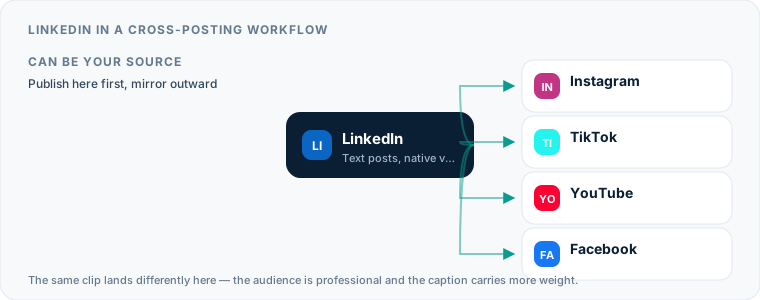
Using LinkedIn as a Cross-Posting Source
Using LinkedIn as your primary content source—where posts originate before moving outward to other networks—is a specialized workflow. Because LinkedIn content is usually text-heavy and structured around professional narratives, translating a LinkedIn post to consumer-focused platforms requires significant adaptation.
The conversion is rarely a copy. A LinkedIn post that works — long-form text, often with a PDF slide deck attached — has to be broken apart to go anywhere else. The text becomes a thread of shortened blocks on X or Bluesky; the slide deck becomes a carousel, with each PDF page exported as an image. Neither destination accepts the original artifact as-is, which is why this direction is usually a manual or semi-automated step rather than a mirror.
Extracting text updates from LinkedIn personal profiles via automated tools is technically restricted by API policy. Most cross-posting engines cannot automatically scrape a personal profile feed to re-publish text updates elsewhere. As a result, creators who want to schedule LinkedIn posts while distributing the same ideas elsewhere usually write their raw text in a central composer or start with a video platform as their primary creation hub.
Treating LinkedIn as a Cross-Posting Destination
Treating LinkedIn as a destination network—where content created on platforms like Instagram automatically arrives—is the most efficient way to scale video distribution. Short vertical videos created for Instagram Reels convert cleanly into professional content when paired with appropriate context.
If you run an automated mirroring pipeline, software like Postpari connects your Instagram account to your LinkedIn page or personal profile. When you publish a short video on Instagram, the service detects the new upload, processes the video file, and re-posts it directly to your LinkedIn destination without manual intervention.
To implement this workflow successfully, review the step-by-step setup in our guide to cross-posting from Instagram to LinkedIn.
When setting up automated destination pipelines, you must adapt your messaging for the platform’s audience:
- Strip out consumer calls to action: Remove references to “link in bio,” “double-tap,” or TikTok-specific challenges.
- Re-structure text into short paragraphs: Dense blocks of text are difficult to scan on mobile screens; use single-sentence line breaks.
- Limit hashtag usage: Use three to five highly specific industry hashtags at most. Overloading a LinkedIn post with twenty generic tags looks like spam.
- Provide immediate value in the first two lines: The feed truncates text after the first few lines, hiding the rest behind a “see more” button. Your opening sentence must hook professional interest immediately.
For detailed strategies on adjusting copy across platforms, read our comprehensive guide to cross-posting captions and formats.
Arriving From TikTok Rather Than Instagram
Instagram is not the only source worth pointing at LinkedIn. If TikTok is where your video actually originates, the route works, but the tooling question changes: a hub-based mirroring service expects a single source account, so a TikTok origin means either moving your first publish or choosing a tool that reads TikTok directly. We walk through both options, and the audio and caption traps specific to that direction, in the guide to cross-posting from TikTok to LinkedIn.
The editorial gap is wider on this route than on the Instagram one. TikTok clips lean on trending audio, on-screen text and format conventions that a professional feed reads differently, and a meaningful share of LinkedIn viewing happens with the sound off. A clip that carries its argument in spoken audio alone arrives as a silent talking head. Burned-in captions fix that, and they have to be added before the file is published to TikTok, not after — by the time an automated route fires, the file is already what it is.
Formats, Media Limits, and Upload Glitches
When media moves across platforms through an automated LinkedIn scheduling tool, subtle technical mismatches can compromise the final post. Understanding formatting constraints prevents failed uploads and broken media cards.
| Content Format | Native LinkedIn Support | Cross-Posting Compatibility | Technical Pitfalls & Limits |
|---|---|---|---|
| Text Updates | Up to 3,000 characters | High direct compatibility | Special character formatting (bold/italic generator text) breaks screen readers. |
| Native Short Video | Vertical (9:16), Square (1:1), Horizontal (16:9) | High via video-mirroring tools | Maximum file sizes apply; third-party APIs can truncate videos exceeding duration caps. |
| PDF Document Decks | Multi-page PDFs render as swipe carousels | Low via standard APIs | Third-party scheduling tools rarely support PDF carousel uploads via API; native upload required. |
| Single / Multi-Images | PNG, JPEG, GIF | Moderate compatibility | Aspect ratios like 4:5 or 1:1 fit feeds best; high-resolution landscape images get cropped tightly on mobile. |
Video Specifications and Crop Behavior
Vertical video (9:16 aspect ratio) plays natively inside the mobile app feed. However, desktop feed views often display vertical video with blurred side pillars. Square (1:1) and vertical (9:16) videos convert smoothly from Instagram, provided your source video file meets resolution standards.
The PDF Carousel Exception
LinkedIn’s swipeable PDF document posts drive high engagement because users can click through slides directly in their feeds. However, almost no third-party API allows external platforms to programmatically post multi-page PDF documents as swipeable carousels. If document carousels form a core part of your brand strategy, schedule those specific assets using LinkedIn’s native web interface rather than relying on an external API queue.
Mention Tag Failures
Account tags do not translate across platform boundaries. If you tag @UserExample on Instagram, that text transfers to LinkedIn as plain text. It will not link to their LinkedIn personal profile or company page. When you automate LinkedIn posts, remove or manually re-tag user handles before your queue fires.
Managing Multiple Profiles and Company Pages
Social media managers and agency operators frequently manage multiple LinkedIn presences at once. A typical workflow involves coordinating an executive’s personal profile alongside an enterprise company page.
Personal Brand Profiles Versus Company Pages
Publishing to personal profiles requires a human touch. Personal reflections, career milestones and direct industry commentary read as though a person wrote them, because one did. Company pages are the right home for official announcements, product releases, hiring notices and corporate whitepapers — material that is supposed to sound institutional.
Founders and consultants managing dual presences should consult our guide on content strategies for personal brands to balance professional brand authority against corporate messaging.
In practice one content operation feeds two different destinations, and the split is editorial rather than technical:
| Executive personal profile | Corporate company page | |
|---|---|---|
| Carries | Industry commentary, behind-the-scenes video, professional opinions | Press releases, product updates, recruitment notices |
| Written as | A person with a view | An organization on the record |
| Fails when | It reads like it came from the comms team | It tries to sound like a person |
Multi-Account Platform Selection
Different scheduling applications handle multi-account structures under distinct pricing models:
- Per-Account Pricing: Services like Publer or Buffer charge a flat fee for each connected channel. If you manage one personal profile and one company page, you pay for two connected slots.
- Bundle and Brand Pricing: Platforms like Metricool package profiles by “brands” (allowing one profile of each network per brand bundle), while agency-focused platforms like SocialPilot include several user seats and multiple client accounts in their baseline tiers.
- Source-to-Destination Mirroring: Automation tools like Postpari allow you to route a single video source to multiple destination accounts on the same network, making it possible to publish a clip to both a personal profile and a backup company page simultaneously.
Building an Automated LinkedIn Workflow That Runs Itself
Building a sustainable distribution pipeline relies on pairing native interface strengths with automated cross-posting engines. Rather than spending hours copying files and writing captions daily, establish a continuous content flow using this four-step strategy.
Step 1: Establish Your Primary Creation Engine
Select one primary network to host your main content creation effort. For short-form video creators, Instagram serves as an ideal source hub. Create, edit, and publish your vertical video reels on your primary account as usual.
Step 2: Configure Automated Video Mirroring
Connect your primary Instagram account to a specialized distribution engine like Postpari. Map your source feed to your destination LinkedIn profile or company page. Once configured, every short video published on Instagram is automatically published to LinkedIn.
If you have a library of existing short video content, use backfill tools to drip older videos onto your LinkedIn destination on a predictable schedule without flooding your followers’ feeds.
Step 3: Layer Native Schedules for Document Decks and Text Posts
For content formats that third-party APIs handle poorly—specifically multi-page PDF slide decks and text posts requiring manual account tags—use LinkedIn’s built-in native scheduler:
- Set aside one operational session per week.
- Save slide decks as optimized PDF files.
- Upload PDFs directly to the LinkedIn native web interface, write custom professional captions, and schedule them to publish on alternate days between your mirrored video drops.
Step 4: Perform Monthly Authentication Audits
API tokens expire, and corporate security policies periodically disconnect external software authorization. Set a monthly calendar reminder to sign into your connected distribution tools, verify that OAuth credentials remain active, check that account connections are clear, and inspect your published feed to ensure formatting and line breaks display correctly.
By pairing automated video mirroring with scheduled native posts, you maintain an active, professionally polished presence on LinkedIn without manual effort every day.
Selecting a LinkedIn Post Scheduler: Pre-Connection Checklist
Connecting a publishing tool to your business network requires evaluating how the software authenticates and maintains its access tokens. Before granting permissions to any publishing app, review these fundamental platform access settings.
Verifying API Authorization Rights
LinkedIn uses OAuth 2.0 to grant publishing software access to your feed without storing your actual account password. When evaluating options across the best social media scheduler tools, confirm whether the software requests profile-level permissions (w_member_social) or Organization Page permissions (w_organization_social). Profile authorization allows direct publishing to your personal feed, whereas Page publishing requires administrative rights on the underlying company page. If a platform asks for broad full-account read and delete access beyond simple media publishing, audit the security permissions carefully before proceeding.
Auditing Workspace and Token Expiration Settings
LinkedIn access tokens expire periodically, requiring re-authentication. Higher-tier platforms like Hootsuite or Publer handle multi-account permissions inside enterprise workspaces, but individual tokens still need manual refresh cycles. Before choosing an automation tool, check how it alerts you to token degradation:
- Admin privileges: Verify that the account owner who authenticates the API holds Super Admin or Content Admin status on the LinkedIn Company Page.
- Token notifications: Ensure the scheduling dashboard sends email warnings when OAuth credentials near expiration, preventing silent publishing failures.
- Multi-seat isolation: If working with an agency tool such as SocialPilot or Metricool, confirm that team members can draft posts without exposing master account login credentials.
When evaluating automated distribution, examine how the software ingests media. If your primary goal is mirroring video content directly from consumer channels, read through detailed Postpari reviews to understand how direct source-to-destination pipeline software manages account authentication without requiring manual daily sign-ins.
Feature Access: Personal Profile Versus Company Page API Capabilities
LinkedIn treats personal profiles and company pages as distinct entities within its API ecosystem. Knowing what each profile type permits via third-party software prevents publishing errors and helps you select the right publishing architecture.
Comparing API Rights Across Account Types
While personal profiles usually drive higher organic engagement and text discussions, company pages offer structured administration, analytics APIs, and team notification options. However, certain media formats—such as PDF document carousels—are historically fragile or unsupported through API posting on both account types, requiring native desktop uploads instead.
| Capability / Post Type | Personal Profile API | Company Page API | Native Platform Upload |
|---|---|---|---|
| Text & Image Posts | Supported | Supported | Supported |
| Native Video Uploads | Supported | Supported | Supported |
| PDF Carousel Decks | Unsupported / Fragile | Unsupported / Fragile | Fully Supported |
| Mention Tagging (@) | Limited to personal connections | Supported for Pages & Users | Fully Supported |
| Direct Video Mirroring Source | Not available as source | Not available as source | N/A |
| Automated Video Destination | Supported via API | Supported via API | N/A |
Choosing the Right Account Type for Your Strategy
If your primary focus is personal thought leadership, publishing through your personal profile builds direct professional connections. However, if you manage corporate messaging or manage agency clients across multiple brands, operating through Company Pages grants multi-user administrative access without sharing personal credentials. When running broader multi-account operations, setting up a system to manage multiple social media accounts helps keep corporate assets isolated while maintaining consistent publishing schedules across all team channels.
Native LinkedIn Scheduling Constraints and Functional Ceilings
LinkedIn offers built-in scheduling tools directly within its desktop and mobile applications. While these native features work well for single text updates or occasional image posts, they create significant operational friction when managing an active multi-channel content engine.
Limitations When You Schedule LinkedIn Posts Natively
Native scheduling restricts your workflow by forcing you to manage content strictly within a single platform queue. Key constraints of the built-in native scheduler include:
- Lack of cross-posting triggers: Native schedules operate in complete isolation. A post scheduled inside LinkedIn cannot automatically queue or mirror to X, Facebook Pages, or Threads.
- Restricted queue views: You cannot view your scheduled LinkedIn posts alongside content queued for other networks, making visual cross-channel campaign planning difficult.
- No automated video mirroring: Native scheduling requires you to manually upload files, write captions, and select dates for every single post. It cannot pull newly published video content from an Instagram source to automatically re-host it on your profile.
- Rigid editing windows: Once a native post is scheduled, modifying media attachments or changing post formats often requires deleting the draft and re-uploading the original media file from scratch.
Overcoming Native Ceilings with Centralized Workflows
To scale content distribution beyond individual manual uploads, native scheduling should be paired with external automation. For example, using a dedicated short form video scheduler allows short vertical clips published elsewhere to automatically copy to LinkedIn without requiring you to manually open the LinkedIn composer for every single video file.
Technical Requirements for Cross-Posted Videos on Professional Feeds
Cross-posting video content from consumer platforms like TikTok, Instagram Reels, or YouTube Shorts onto LinkedIn requires technical adjustments. Professional feeds demand clean visuals and readable context, making raw consumer exports perform poorly if submitted without preparation.
Adjusting Aspect Ratios and Frame Rates
While 9:16 vertical videos play natively on mobile feeds, LinkedIn’s desktop web interface often letterboxes vertical media. Converting vertical assets into 1:1 square or 4:5 vertical crops ensures optimal visual real estate across desktop and mobile screens. Additionally, keep video files under standard API file size limits and maintain a standard frame rate of 30 or 60 frames per second to prevent upload encoding glitches.
Subtitles, Audio, and Watermark Cleanups
A significant portion of professional feed browsing happens with device sound muted. Relying on spoken audio alone reduces visual comprehension in office environments.
- Add burnt-in captions or upload a dedicated SRT subtitle file to ensure text is readable without sound.
- Remove visible consumer watermarks. Video files bearing visible logos from competing consumer apps look out of place on professional feeds and signal zero effort to your business audience.
- Trim platform-specific spoken calls to action. Phrases asking viewers to “tap the link in bio” or “check my TikTok shop” confuse LinkedIn users; edit captions to point viewers toward professional comment threads or profile links instead.
To understand how automated pipelines stream clean video files from source accounts directly to destination profiles without manual file handling, consult our guide on social media cross posting mechanics.
Establishing a Sustainable Posting Cadence for Business Audiences
Professional audiences consume content differently than casual social media feeds. B2B professionals check feeds during work hours, transit times, and mid-day breaks. Finding a realistic posting cadence ensures consistent reach without saturating your audience’s feed.
Balancing Content Formats Across the Business Week
Posting three to five times per week is generally sufficient for personal profiles and company pages. Pushing multiple posts per day often dilutes individual post visibility, as professional feeds prioritize engagement quality over sheer volume.
- Monday: Text-focused industry analysis or weekly priority breakdowns.
- Tuesday & Wednesday: High-value video assets, case studies, or PDF document decks.
- Thursday: Commentary on industry news or curated professional discussions.
- Friday: Refinement posts, personal reflections, or weekend recap discussions.
Configuring Your LinkedIn Scheduler for Multi-Channel Distribution
To maintain consistent coverage without spending hours manually queueing content, connect your distribution channels to an automated queue. When setting up a multi-channel pipeline using tools like Buffer, SocialBee, or Postpari, structure your timing so content lands when your target professional audience is active in their respective time zones. You can map out your exact publishing delays and time-zone offsets using our reposting time calculator to ensure content arrives during business hours regardless of where you originally hit publish.
What the platforms themselves document
Publishing rules change without notice, and every network is the only authority on its own. These are the pages we check this guide against. If one of them contradicts this page, it is right — tell us.
- LinkedIn Help: sharing video — LinkedIn
Where Postpari fits: Postpari lists LinkedIn among the networks it works with. It does not publish a platform-by-plan matrix, so confirm LinkedIn is available on the plan you are considering before you rely on it.
Frequently asked questions
Can you schedule LinkedIn posts for free without buying a third-party tool?
Yes, LinkedIn includes a built-in native scheduler accessible on both desktop browsers and mobile apps. You can schedule text updates, photos, native videos, and PDF document carousels for free. However, native scheduling only works within LinkedIn and cannot automatically mirror posts from or to other networks.
Do auto-posted videos perform differently than manually uploaded videos on LinkedIn?
No, LinkedIn does not alter post reach simply because an item was submitted via an API or native schedule. Content performance depends on audience engagement, video aspect ratio, thumbnail clarity, and caption quality rather than the submission method.
What happens to tagged users when you cross-post a caption to LinkedIn?
User tags from platforms like Instagram or X will not work on LinkedIn. The text will appear as plain unlinked text because profile handles vary across social networks. You must manually edit the post on LinkedIn to re-tag the correct user profile or company page.
Can I schedule a PDF document or slide deck using a third-party social media scheduler?
Most third-party scheduling platforms do not support uploading multi-page PDF document carousels due to LinkedIn API limitations. To publish a swipeable PDF slide deck, you should upload and schedule the document natively through LinkedIn's own website interface.
Why do scheduled posts to personal profiles fail more often than posts to company pages?
LinkedIn enforces different security protocols and API permissions for personal profiles compared to corporate company pages. Personal profile access tokens expire more frequently, requiring you to re-authenticate your third-party scheduling application to restore publishing permissions.
Can I schedule PDF carousel posts on LinkedIn using third-party scheduling tools?
Most third-party tools cannot schedule PDF document carousels due to limitations in LinkedIn's public API. To publish a multi-slide PDF document deck as a swipeable carousel, you must upload the document file natively using LinkedIn's desktop application or web interface.
Why do mention tags fail when cross-posting content to LinkedIn from other social platforms?
Mention tags fail because social networks use proprietary account IDs rather than universal handles. An "@username" tag written for Instagram or X will not resolve to a valid profile on LinkedIn, requiring you to manually edit or replace profile tags when preparing posts for professional feeds.
Does publishing to LinkedIn through a scheduler reduce post reach compared to manual posting?
Using an approved third-party scheduler does not inherently suppress post distribution on LinkedIn feeds. Post performance is driven by media formatting, caption context, and immediate audience engagement rather than whether the post was published manually or via API.