How to Cross-Post from TikTok to Facebook Automatically
Prices and features last checked: August 2026
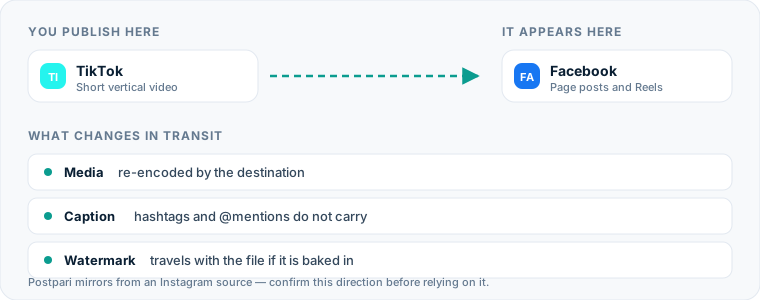
Cross-posting from TikTok to Facebook lets video creators reach Facebook Reels viewers without doubling their daily publishing workload. To post TikTok content to Facebook automatically, you connect your account to a syndication tool that ingests each new post, avoids or clears the platform watermark, processes the caption, and delivers the video to a Facebook Page as a native Reel.
Setting up this pipeline transforms a multi-step manual process into a background task. Instead of saving raw files, transferring them across devices, and retyping descriptions, your published TikTok clips become Facebook Reels within minutes of going live.
One source account, one destination. Add the rest of your networks to the same flow.
Quick Answer: The Fastest Way to Post TikTok Videos to Facebook
To automatically post TikTok to Facebook, you need a distribution workflow running in the background rather than the native app share sheet. Native share buttons inside TikTok do not post direct, native Facebook Reels; they usually generate link posts or require manual file saving.
The standard automated setup uses a middleware platform or cross-posting tool:
- Connect your TikTok account as the source trigger.
- Connect your Facebook Page as the destination target.
- Configure file rules (such as removing watermarks or retaining original resolution).
- Set up caption templates to handle hashtags or platform-specific mentions.
- Turn the workflow on so every new TikTok publication automatically triggers a Facebook Reel publish.
One caveat worth knowing before you shop: some tools read TikTok directly, while others are built around a single hub account and mirror outward from it. Postpari, made by the team that runs this site, is the second kind — it treats Instagram as the source. That is a good fit if Instagram is where you publish first and a poor one if TikTok is, which is the distinction most comparison pages skip.
The Manual Method: How You Transfer Videos Today
If you currently repost TikTok to Facebook by hand, your process involves several tedious steps. While functional for an occasional post, this manual routine quickly creates operational bottlenecks for daily creators.
Step 1: Downloading the Video File
When you save a video directly from the TikTok app to your phone’s camera roll, the platform bakes a bouncing TikTok logo and your handle directly into the video frame. To avoid this, creators usually copy the post link, open a third-party downloader website in a mobile browser, paste the link, clear pop-up ads, and save the unwatermarked MP4 file to their device storage.
Step 2: Transporting and Storing Files
If you edit or manage posts on a desktop computer, you must send the saved MP4 file from your phone to your computer via cloud storage, messaging apps, or AirDrop. This creates duplicate video files across multiple devices and clutters local storage with temporary assets.
Step 3: Manual Upload to Facebook
Once the clean video file is on the target device, you open Facebook Business Suite or the mobile app, navigate to your Facebook Page, start a new Reel draft, upload the video, retype or copy-paste the caption, add new hashtags tailored to Facebook, and hit publish.
Doing this for several clips a week consumes significant time that could be spent creating new content.
Why Manual TikTok to Facebook Mirroring Costs More Than You Realize
The true cost of manual cross-posting is rarely financial; it is paid in operational drag and inconsistent posting schedules.
| Workflow step | Manual process | Automated pipeline |
|---|---|---|
| File retrieval | Mobile download through a third-party web tool | Background ingest from the source account |
| Watermark handling | Link scraping to find a clean copy | Clean file processed before upload |
| Caption transfer | Copy, paste and retype | Rule-based text transformation |
| Publishing trigger | Manual upload, once per network | Fires when the source post goes live |
| Adding a second account | The same labor again, doubled | One setup, delivered in parallel |
When you rely on manual uploads:
- Publishing delay builds up: Videos sit on your camera roll for days before you find time to open Facebook. Delayed posting decouples your brand narrative across platforms.
- Metadata gets lost: Links, mentions, and original post timestamps are lost when transferring files manually.
- Human error increases: It is easy to upload the wrong video version, forget a call to action, or post a watermarked file by mistake.
Understanding how to streamline your workflow is essential for building a scalable strategy, as outlined in our guide to social media cross-posting.
How Automated TikTok to Facebook Workflows Function
Automated cross-posting replaces human file management with webhooks and API connections. When you are working out how to post TikTok to Facebook with automation, it helps to understand the underlying mechanics.
Trigger and Response Architecture
Automated tools monitor your source account for new activity. The basic sequence follows a clear logic:
- Detection: The automation service polls your TikTok feed or receives an instant webhook notification when a new video goes live.
- Fetch: The service retrieves the published video file directly from the cloud server alongside its text caption.
- Transformation: The file is cleaned of watermarks, resized if necessary, and the caption text is parsed according to your pre-set rules.
- Publishing: The tool sends the final asset to the Facebook Graph API, which creates a native Facebook Reel on your specified Facebook Page.
Direct Syndication vs. Hub-Based Syndication
There are two primary ways to set up TikTok Facebook automation:
- Direct route (TikTok as the source): Tools such as Repurpose.io connect to TikTok as an input, pull new uploads, and push them to Facebook. If TikTok is genuinely where you publish first, this is the design that matches how you already work.
- Hub route (Instagram as the source): Other tools, including Postpari — which the team behind this site also runs — treat Instagram as the central source. You publish the short video to Instagram, and it is mirrored out to your Facebook Page, TikTok, YouTube Shorts and the rest in parallel.
The distinction matters more than it looks. A hub tool only helps on this route if you are prepared to move your first publish to Instagram. If TikTok is your origin and you want it to stay that way, pick a tool that can read TikTok directly; the hub design will fight your habits rather than remove work from them.
If your content strategy relies heavily on scheduling tools, you can also manage your calendar using a dedicated TikTok scheduling tool or a specialized Facebook publishing tool.
Setting Up an Automated TikTok to Facebook Flow
Configuring an automated route takes only a few minutes. Once established, the system operates in the background whenever you post.
Step 1: Connect Your Platform Accounts
Log into your chosen automation platform and authorize access to your social profiles:
- Authenticate your TikTok account to grant read permissions for your published posts.
- Authenticate your Facebook account, ensuring you grant access to manage Facebook Pages. (Note that automated publishing APIs push content to Facebook Pages, not personal profiles).
Step 2: Establish the Source-to-Destination Pipeline
Select TikTok as your source channel and choose your Facebook Page as the destination target. If you are comparing services, read our overview of the best cross-posting software to see which platforms fit your existing software stack.
Step 3: Configure Watermark and Caption Rules
Ensure your workflow is set to output clean video assets without platform overlays. Set up caption handling rules, such as appending standard closing text, automatically removing TikTok-specific tags, or adding persistent Facebook calls to action.
Step 4: Test the Connection
Publish a test video on TikTok (or set an existing post to process if your tool supports historical backfill). Check your Facebook Page to verify that the video appears as a native Facebook Reel with correct aspect ratio, clear audio, and readable captions.
For creators using Instagram as their main video hub, you can also review our guides on cross-posting TikTok to Instagram and setting up an Instagram to Facebook cross-posting flow.
What Happens to the Video File Between TikTok and Facebook
Understanding what happens to your media file during transmission ensures your Facebook Reels maintain high visual quality.
A file that travels this route passes through four stages: it is published on TikTok as a vertical MP4, ingested and cleared of the platform overlay, checked for aspect ratio and encoding, then handed to the Facebook Graph API and published as a native Reel. Nothing in that chain re-encodes the video on your phone, which is where most of the visible quality loss in a manual workflow happens.
Resolution and Aspect Ratio
TikTok and Facebook Reels both use a 9:16 vertical aspect ratio (1080x1920 pixels). During automated syndication, high-quality tools retain the native dimensions without stretching or cropping the image. If your source video includes top or bottom borders, those borders transfer as rendered in the source file.
Video Compression and Quality Loss
Re-encoding a video multiple times can degrade picture quality. When you manually download a clip from a web tool, compress it to transfer via chat, and upload it again, visual artifacts appear. Automated API pipelines fetch the original source file from server storage and hand it off directly to Facebook’s ingest servers, minimizing generation loss.
Watermarks and Visual Overlays
While platforms do not publish explicit API penalties for watermarked videos, visible logos from competing networks create a bad viewer experience. Audiences recognize a recycled TikTok logo on a Facebook Reel immediately, and it reads as content that was made for somewhere else. Some repurposing tools clear these overlay graphics during processing; others pass the file through untouched, so confirm which one you are using. Keeping your original export before you publish sidesteps the question entirely.
How Captions, Hashtags, and Mentions Transfer
Captions rarely carry over cleanly between networks without configuration. TikTok and Facebook have different character limits, user tagging systems, and hashtag habits.
User Mentions and Handles
User handles do not cross over between platforms. Tagging @creatorname on TikTok will fail on Facebook because Facebook relies on Page IDs and account tags native to Meta’s system. Automated cross-posting tools typically handle handles in one of three ways:
- Strip the
@symbol entirely to leave plain text. - Remove tagged handles automatically during transfer.
- Replace specific TikTok handles with mapped Facebook Page handles defined in your settings.
Hashtags and Search Optimization
Hashtag usage differs significantly across these two networks:
- TikTok: Creators often use descriptive tags (
#fyp,#viral,#techreview) to guide the recommendation engine. - Facebook: Facebook relies heavily on natural language indexing. Excessive generic hashtags look cluttered on a Facebook Page.
When setting up your automated route, configure your caption settings to strip TikTok-specific tags like #fyp or #foryou before the post hits Facebook.
Text Length Constraints
TikTok allows long descriptions, but Facebook Reel captions perform best when the core hook appears in the first two lines before the “See More” cut-off. Ensure your automation tool keeps the primary text clear and places extra links or disclaimers near the end.
Facebook-Specific Considerations for Short Video
Publishing content onto Facebook involves specific platform rules and account structures that differ from TikTok.
Personal Profiles vs. Facebook Pages
Meta’s official APIs do not permit third-party automation tools to publish directly to personal Facebook profiles. All automated cross-posting platforms route content to Facebook Pages or professional accounts. If your brand relies on a personal profile, you must convert to Professional Mode or establish a dedicated Facebook Page to enable automated workflows.
Audio Licensing and Commercial Sound Tracks
Audio rights are the single largest point of failure when moving videos from TikTok to Facebook.
- TikTok Commercial Library: Sounds licensed within TikTok’s app library are cleared exclusively for use on TikTok.
- Meta Sound Collection: Facebook maintains its own rights system (Rights Manager). If your TikTok video uses a popular copyrighted song selected within the TikTok app, Facebook may mute the audio, block the Reel, or flag the post for copyright infringement upon upload.
To prevent muted videos on Facebook, use original voiceovers, royalty-free audio tracks licensed for multi-platform commercial use, or original sounds created in your editing software prior to upload.
Common Mistakes When Sending TikTok Content to Facebook
Avoiding simple setup errors ensures your automated pipeline runs reliably without manual intervention.
1. Using In-App Native Share Buttons Expecting Automation
Relying on TikTok’s built-in “Share to Facebook” button does not create a native Facebook Reel. It frequently generates a link post that sends viewers out of Facebook and back to TikTok, rather than a video that plays where it was posted. If you want a native Reel on the Page, use a dedicated publishing pipeline instead.
2. Ignoring On-Screen Text Placement (Safe Zones)
TikTok and Facebook Reels display user interface overlays (like view counts, like buttons, and caption boxes) in slightly different screen positions. If you place native TikTok text captions too close to the bottom edge, Facebook’s interface elements will cover them up.
Keep key visual text within the central 9:16 safe area:
- Keep critical text well clear of the bottom edge, where both apps stack caption and profile elements.
- Leave the right-hand margin free of calls to action that might collide with the action icons.
3. Cross-Posting Videos with Embedded Platform Music
As mentioned, using trending in-app audio tracks from TikTok is a primary cause of copyright mutes on Facebook Reels. Always upload clips with embedded original audio, or use royalty-free music tracks cleared for cross-platform distribution.
4. Forgetting to Audit Account Connections
Social network authorization tokens expire periodically for security reasons. If your Facebook Page access expires, your automated pipeline will pause, causing failed uploads. Set a recurring calendar reminder to check your connected accounts inside your cross-posting tool to ensure your continuous publishing flows stay active.
What the platforms themselves document
Publishing rules change without notice, and every network is the only authority on its own. These are the pages we check this guide against. If one of them contradicts this page, it is right — tell us.
- Meta: Pages API — Facebook
- TikTok — no public documentation URL we could verify. Check the rules inside the app rather than trusting a third party on them, including us.
Does Postpari do this? Worth knowing before you sign up: Postpari's Terms of Use describe mirroring from an Instagram source. If TikTok is where you publish first, check with Postpari that your direction is supported before you rely on it.
Frequently asked questions
Can I cross-post from TikTok to a personal Facebook profile automatically?
No, Meta's official API only allows third-party tools to automatically publish content to Facebook Pages or accounts in Professional Mode. Personal Facebook profiles cannot receive automated API uploads.
Will Facebook mute my TikTok video after cross-posting?
Facebook will mute your video if it contains copyrighted music licensed strictly for use inside TikTok. To prevent audio mutes, use original voiceovers, original audio, or royalty-free music cleared for commercial use across all networks.
Does automatically posting TikTok videos to Facebook remove the watermark?
It depends entirely on the tool. Some platforms advertise watermark removal as a feature and others simply mirror whatever file they are given, so check the vendor's own documentation before assuming it. The reliable habit is to keep your original export, since a file that never passed through the TikTok save button has no watermark to remove.
Are TikTok captions transferred to Facebook Reels automatically?
Yes, automated tools pass your original TikTok caption text along to Facebook. Many tools also let you append custom text, strip platform-specific hashtags, or adjust link placements during the transfer.
Does cross-posting TikTok videos to Facebook lower video quality?
Automated API cross-posting preserves original video quality better than downloading and re-uploading manually. Because the service transfers the source MP4 directly to Meta's servers, it avoids the extra compression caused by messaging apps or screen recorders.