Facebook Scheduler and Page Cross-Posting Guide
Prices and features last checked: August 2026
Setting up a reliable Facebook scheduler allows you to publish content to your public Page without logging into Meta’s publishing dashboards every day. To schedule Facebook posts automatically, you must publish to a Facebook Page using Meta Business Suite or an authorized third-party app connected through the Graph API. Personal profiles cannot be automated due to platform privacy policies.
Understanding how Meta separates personal accounts from public Pages is essential before you build an automated queue. Every tool on the market—from free scheduling utilities to enterprise management suites—operates under the exact same API constraints set by Meta.
Modern Publishing with a Facebook Scheduler
Publishing content to Facebook has shifted dramatically over the past few years. In the early days of page management, creators posted directly to a page wall in real time. Today, managing a brand presence requires coordinating multiple media formats, including text updates, multi-image carousels, link shares, and short vertical videos formatted as Facebook Reels.
Using a dedicated Facebook post scheduler changes your daily workflow from reactive manual publishing to structured batching. Instead of interrupting your day to upload a video or write a caption, you prepare your media in advance, sequence it inside an interface, and let the platform handle distribution automatically.
However, Meta strictly enforces where automated content can go. You cannot use a third-party tool to publish directly to a personal Facebook profile, a private timeline, or a personal group wall. Platforms restrict automated access to assets where you hold official administrative control:
- Facebook Business and Brand Pages
- Facebook Public Group updates (where authorized app permissions are granted by group admins)
- Facebook Reels on an official Page
If your goal is to automate personal profile updates, Meta does not offer an official path. Every compliant platform directs automated uploads strictly to Facebook Pages.
Meta Business Suite: The Built-in Facebook Scheduler
Meta provides its own free option for content planning called Meta Business Suite. It serves as both a Facebook page scheduler and an Instagram publishing dashboard, allowing creators to draft, preview, and queue posts across both networks simultaneously without paying for extra software.
What Meta Business Suite Covers for Free
Inside Meta Business Suite, you can plan standard text updates, image posts, link previews, and Reels. It offers a visual calendar view, recommended posting times based on audience activity, and basic draft storage.
For creators who manage a single Facebook Page and one connected Instagram account, Meta’s native platform covers fundamental operational needs:
- Scheduling Facebook Page feed posts and Reels in advance
- Previewing how text cards and link previews render on desktop and mobile screens
- Tagging other public Facebook Pages inside your captions
- Managing incoming comments and direct messages inside a unified inbox
Where Native Scheduling Reaches Its Limits
While Meta Business Suite costs nothing, it locks you entirely into Meta’s ecosystem. It cannot publish content to TikTok, YouTube Shorts, LinkedIn, X, Bluesky, or Threads. If your distribution strategy involves reaching audiences outside Facebook and Instagram, relying on Meta’s native interface forces you to re-upload the same asset manually into every other social network.
Additionally, Meta Business Suite is subject to frequent interface redesigns that shift menu locations, occasional dashboard upload glitches, and strict asset validation rules that reject queueing if a video aspect ratio is slightly off.
Third-Party Facebook Scheduler Integrations: Permissions and Setup
When Meta’s native dashboard is insufficient for a multi-platform strategy, connecting a third-party Facebook publishing tool lets you manage Facebook alongside your other channels. Third-party apps do not log into your Facebook account with a password. Instead, they request access through Meta’s official Graph API via an OAuth security token.
Graph API and Access Levels
To connect any external platform to your Facebook Page, your personal Facebook account must hold administrative control or full content control over that Page inside Meta Business Manager. During initial authorization, Meta prompts you for permissions. You must grant access for the app to:
- Read your list of managed Facebook Pages
- Access Page content and performance insights
- Publish content and video on behalf of the Page
If you manage multiple client accounts or separate brand pages, missing a single permission check during authorization prevents the external tool from detecting your Pages.
Platform Capabilities Across Third-Party Tools
External tools generally fall into two functional categories: compose-and-schedule tools and automated cross-posting platforms.
Compose-and-schedule tools like Buffer and Metricool provide flexible entries for managing accounts from a central calendar interface. Buffer structures its pricing per connected channel, while Metricool bases its tiers on the total number of managed brands. Enterprise management suites like Hootsuite and SocialPilot cater to agencies needing multi-seat team permissions and client approval chains, while SocialBee focuses on categorizing and recycling evergreen content queues. Publer offers broad destination support, including niche options like WordPress and Telegram.
For visual content planners, Later bundles social profiles into management tiers focused on aesthetic calendar arrangements. However, if your strategy relies on taking published vertical video from one primary channel and mirroring it directly to Facebook without setting up manual calendar slots, automated distribution tools provide a different model.
Using Facebook as a Content Source
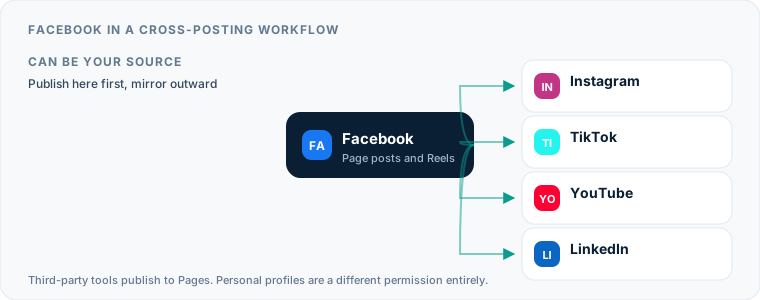
When you build a distribution pipeline, you can treat Facebook as either the origin of your content or the final destination. Using Facebook as a content source means you publish your video or update on Facebook first, then copy it elsewhere.
Historically, creators used Facebook Pages as their central broadcasting hub. However, Meta’s API imposes strict technical restrictions when extracting published media out to external networks. While Meta allows approved tools to send content to Facebook Pages, pulling published Reels or posts directly from Facebook to auto post elsewhere is limited by Meta’s developer policies.
If you want an automated pipeline that distributes short vertical video across all your social channels, starting on Instagram is usually the most reliable technical choice. When you upload your main clip to Instagram, you can use automated mirroring services like Postpari to capture your newly published video and automatically publish it onto your Facebook Page without re-uploading the file. You can read more about setting up this pipeline in our guide to Instagram to Facebook cross-posting.
Using Facebook as a Cross-Posting Destination
For most creators and small businesses, Facebook acts as an essential secondary destination. You might film a short vertical video for TikTok or Instagram, but ignoring Facebook Page Reels means leaving a massive global audience on the table.
When you use Facebook as a destination, your publishing tool converts your incoming file into a Facebook Page post or a Facebook Reel.
Automated tools handle this in distinct ways:
- Automated Video Mirroring: Platforms like Postpari monitor a source account (such as an Instagram profile) for new short-form videos. Once detected, the video is mirrored directly onto your Facebook Page as a Reel. Postpari also offers a backfill feature to drip previously published video archives out to your connected destinations over time.
- Multi-Network Distribution: Tools such as Repurpose.io take uploaded video files or source posts and distribute them across multiple platforms. Repurpose.io offers automatic watermark removal, video resizing, and cloud backup storage, though it carries a higher entry price point among creator-focused tools.
- Manual Compose and Scheduling: Classic schedulers like Buffer, Metricool, or Publer require you to select Facebook alongside your other channels inside a composition window, paste your caption, upload your media, and select a posting date.
If you are comparing different scheduling architectures, review our overview of the best social media scheduler options to see which model matches your production volume.
When the Source Is TikTok
The mirroring tools above assume a source account, and which one you pick decides which of them can help you. A hub-based service like Postpari is built around an Instagram source, so it fits if Instagram is where you publish first. If TikTok is your real origin — you film in the app, publish there, and everything else is downstream — you need a tool that reads TikTok directly, and the setup differs enough to be worth its own walkthrough: see cross-posting from TikTok to Facebook.
Two things bite people on that particular route, and neither is about the video file. The first is destination type: automated publishing reaches a Facebook Page, not a personal profile, so a brand run entirely from a personal account has to convert before any of this works. The second is audio. A track licensed inside the TikTok app is licensed for use inside the TikTok app, and Meta runs its own rights system — which is why a clip built on a trending sound can arrive on your Page muted. Original audio and cleared music are the only reliable way through.
Formats, Limits, and What Breaks on Arrival
Facebook accepts several media formats, but each format comes with technical rules. Sending a file with an incompatible aspect ratio or broken caption syntax can result in cropped media, missing link previews, or failed uploads.
| Content Format | Ideal Aspect Ratio | Max File Size / Length | Key Technical Consideration |
|---|---|---|---|
| Facebook Reel | 9:16 (Vertical) | Short-form; check Meta’s current ceiling | Must be vertical; horizontal videos get letterboxed. |
| Standard Feed Video | 16:9 (Horizontal) or 1:1 (Square) | Long-form permitted | Horizontal long-form belongs in the feed rather than the Reels endpoint. |
| Single Image / Carousel | 1:1 (Square) or 4:5 (Vertical) | Up to 30 MB per image | Carousels accept up to 10 images across most publishing tools. |
| Link Post | 1.91:1 (Horizontal Preview) | N/A (Text + URL) | Facebook automatically generates a preview card from open graph tags. |
Caption Syntax and Profile Mentions
One of the most frequent issues when you cross post to Facebook from another social network is account tagging. Handles are rarely identical across networks. If you write @username in a caption intended for Instagram or X, Facebook will display that exact string as plain text rather than linking to the equivalent Facebook Page.
To fix this, either write your captions without platform-specific handles or use a publishing tool that lets you edit the text for your Facebook Page destination before scheduling.
Aspect Ratios and Visible Watermarks
Publishing a vertical 9:16 video as a standard Facebook Feed post results in heavy letterboxing with black bars on the sides of your video. Always ensure your scheduling platform routes 9:16 short clips specifically to the Facebook Reels API endpoint rather than the generic post queue.
Additionally, re-uploading videos that carry a visible watermark from another platform—such as TikTok’s floating logo—creates an unpolished presentation for your brand. Repurpose.io includes automated watermark removal features, whereas tools like Postpari process clean master video files directly from source uploads. If you want to dive deeper into destination formatting standards, read our foundational guide on social media cross-posting.
Managing Multiple Facebook Pages
If you manage an agency, run multiple distinct brands, or operate regional business locations, handling several Facebook Pages requires choosing a tool built for scale.
Dedicated Agency Tools vs. Profile Bundles
Different platforms handle multi-account management through varied billing structures:
- Per-Brand Pricing: Metricool offers a free plan for a single brand, then scales up based on the number of distinct brand work environments you manage.
- Per-Channel Pricing: Buffer and Publer charge based on each individual account connected. If you manage five Facebook Pages and five Instagram accounts, you pay for ten total connected channels.
- Workspace Bundles: SocialPilot and Hootsuite bundle team seats and profile connections into agency subscriptions, making them cost-effective when managing dozens of client assets under unified admin controls.
- Source-to-Destination Mirroring: Postpari allows you to connect multiple destination accounts on the same platform, enabling you to mirror source content to a main Facebook Page alongside a secondary or backup Page simultaneously.
For small business owners balancing local customer outreach across accounts, selecting the right platform structure prevents unexpected operational costs. Learn more about selecting tools tailored to lean operations in our small business social media guide.
A Workflow for Facebook That Does Not Need Daily Attention
To eliminate the daily chore of manual uploading, build a structured workflow that automates file delivery while maintaining content quality.
Step 1: Batch Your Media Production
Set aside dedicated production blocks to film and edit your short-form vertical videos in high resolution. Save clean master files without burned-in stickers, platform-specific text overlays, or third-party watermarks.
Step 2: Establish Instagram as Your Primary Distribution Source
Upload your finalized vertical clip to Instagram as your main publishing hub. Craft your main caption, select your cover frame, and publish the post.
Step 3: Automate Direct Mirroring to Facebook Reels
Configure an automated distribution tool to monitor your Instagram feed. When a new clip goes live, the service automatically sends the raw video file and caption to your Facebook Page as a Facebook Reel.
Step 4: Schedule Static Announcements via Meta Business Suite
Use Meta’s free native dashboard once a week to line up static text updates, promotional link posts, and store announcements. This handles local business updates without cluttering your short-video distribution pipeline.
By separating vertical video distribution from general page announcements, you maintain a consistent presence on Facebook Reels while keeping your standard Feed updates organized—all without spending hours inside Meta’s admin panels every day.
What the platforms themselves document
Publishing rules change without notice, and every network is the only authority on its own. These are the pages we check this guide against. If one of them contradicts this page, it is right — tell us.
- Meta: Pages API — Facebook
Where Postpari fits: Postpari lists Facebook among the networks it works with. It does not publish a platform-by-plan matrix, so confirm Facebook is available on the plan you are considering before you rely on it.
Frequently asked questions
Can I use a Facebook scheduler to post to a personal profile?
No, Meta restricts automated scheduling through third-party APIs strictly to Facebook Pages and authorized public groups. Platform terms of service and developer rules prohibit scheduling tools from automatically publishing to personal Facebook timelines.
Is Meta Business Suite completely free to use?
Yes, Meta Business Suite is a free native tool provided directly by Meta. It allows you to schedule posts, stories, and Reels across your connected Facebook Pages and Instagram professional accounts without paying subscription fees.
Why did my scheduled Facebook post fail to publish?
Scheduled Facebook posts usually fail because of expired account access tokens, mismatched video aspect ratios, or file sizes exceeding Meta's API limits. Re-authorizing your Facebook Page connection inside your scheduling app typically restores access.
Do web links in captions work on Facebook Reels?
Links included in Facebook Reel captions are generally displayed as plain text rather than clickable hyperlinks. If you need viewers to visit a specific web page, direct them to your Facebook Page bio or include the link in a comment on a standard feed post.
Can I schedule Facebook Reels using third-party tools?
Yes, third-party publishing tools connected to Meta's Graph API can publish short vertical video files directly to your Facebook Page as Reels. Ensure your video file uses a vertical 9:16 aspect ratio so the platform routes it to the Reel feed correctly.