How to Cross-Post from Instagram to Facebook Automatically
Prices and features last checked: August 2026
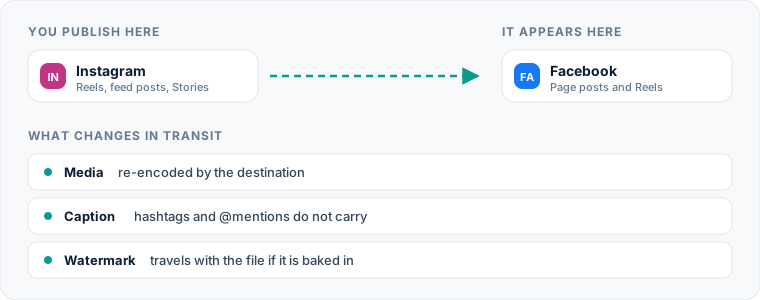
Connecting your Instagram to Facebook pipeline allows short videos to publish automatically across both platforms without manual uploading. Whether you run a single creator brand or manage multiple social accounts, keeping your video presence synchronized across Meta’s ecosystem maximizes audience reach while saving hours of repetitive work.
To automatically post from Instagram to Facebook, you can toggle Meta’s native account center cross-posting options or set up an automated source-to-destination mirroring flow that detects new Instagram Reels and publishes them directly to your Facebook Page.
One source account, one destination. Add the rest of your networks to the same flow.
Quick Answer: How to Route Instagram to Facebook Content
Publishing video content to both networks can be handled in two distinct ways depending on your technical requirements and workflow needs:
- Meta Accounts Center (Native Toggle): Links your Instagram account directly to your Facebook Page within Meta’s ecosystem. Every time you publish a Reel or Story on Instagram, Meta offers a toggle to duplicate that broadcast to your linked Facebook Page.
- Automated Mirroring Tools: Dedicated routing engines like Postpari monitor your primary Instagram account. When a new short video goes live on Instagram, the engine fetches the raw video file and caption, processes text formatting, and publishes the content directly to your Facebook Page via the official Facebook Graph API.
While Meta’s native toggle works for simple personal or single-brand setups, automated mirroring flows offer superior control over video quality, metadata translation, and destination targeting. If you prepare posts ahead of time using an Instagram scheduling tool, establishing an automated distribution rule ensures your content reaches Facebook without manual intervention.
The Manual Method: How You Currently Post Instagram Content to Facebook
The manual process of moving content between these two networks requires a surprising number of individual steps. When creators manually publish a video on Instagram and then move it to Facebook, the routine typically looks like this:
First, you record and edit your video inside a mobile editing app or directly within the Instagram camera interface. You write your caption, select a thumbnail frame, add relevant hashtags, tag local accounts, and hit publish.
Next, to bring that same video over to Facebook manually, you must:
- Open your device’s camera roll to locate the original high-resolution video export.
- If the video was edited directly inside Instagram, download the file from Instagram (which often burns in platform watermarks or removes the original audio track due to rights restrictions).
- Open the Facebook mobile app or Meta Business Suite.
- Switch profiles from your personal Facebook profile to your official Facebook Page.
- Create a new Facebook Reel or feed post and upload the saved video file.
- Re-type or paste the caption you saved from your notes app.
- Manually edit out broken handles (such as
@usernametags that do not exist on Facebook). - Re-select a thumbnail frame and publish the post manually.
If you manage multiple accounts or post daily, executing these eight steps for every video upload consumes significant time each week.
Where the Manual Method Costs You More Than You Think
Relying on manual uploads introduces hidden operational overhead that extends far beyond lost minutes.
Quality Degradation
Downloading a previously published video from Instagram to re-upload it to Facebook triggers double compression. Instagram compresses your video upon initial upload; downloading that file back to your phone and re-uploading it through Meta Business Suite forces Facebook’s encoder to compress an already compressed file. This secondary encoding pass creates visible artifacts, blurry text overlays, and audio distortion.
Context Switching and Interrupted Focus
Stopping what you are doing to manually copy files and text between mobile apps breaks your creative focus. What should be a quick task turns into a multi-app session involving photo library searching, copying text blocks, and re-checking settings.
Execution Errors
Manual cross-posting relies on memory and discipline. When creators get busy, Facebook uploads are often delayed or skipped entirely. Furthermore, copying captions manually frequently leads to broken links, leftover Instagram-specific language (“tap the link in my bio”), and broken @ tags that point to non-existent Facebook handles.
Automated Methods: Meta’s Native Toggle vs. Dedicated Mirroring
Understanding the difference between native Meta controls and external publishing tools helps you select the right mechanism for your brand. While Meta provides built-in sharing features, dedicated distribution platforms offer flexible pipeline controls.
tools like Buffer provide classic compose-and-schedule workflows with visual calendars, while platforms like Hootsuite offer enterprise governance. If your focus is automatic distribution from a single primary feed, source-to-destination engines handle publishing without requiring manual scheduling for every network.
| Feature / Capability | Meta Native Toggle | Compose-and-Schedule Tools (e.g., Buffer, Later) | Automated Mirroring Pipelines (e.g., Postpari, Repurpose.io) |
|---|---|---|---|
| Primary Workflow | Instant duplication at upload | Pre-drafting posts on a visual calendar | Hands-off feed watching and automatic mirroring |
| Target Facebook Type | Facebook Pages & Profiles | Facebook Pages & Groups | Facebook Pages |
| Media Types | Reels, Stories, Posts | Videos, Images, Carousels | Short Video / Reels |
| Historical Backfill | Not supported | Not supported | Drips past feed posts automatically |
| Account Copying | Not supported | Not supported | Copies public Instagram feed (select tiers) |
| Setup Effort | In-app toggle | Draft each post manually per network | One-time channel flow setup |
Meta’s native toggle works directly inside the Instagram interface. However, it lacks advanced control over how text translates between networks.
For creators seeking full automation without manually composing posts for every network, dedicated cross-posting tools act as invisible pipelines. Postpari, for example, watches your Instagram source account and automatically mirrors short video posts over to your connected Facebook Page. Repurpose.io offers similar direct distribution alongside options to back up media files to cloud storage services like Google Drive or Dropbox, though it carries a higher entry price point among creator tools.
If you prefer to organize posts across a calendar before they go live, a traditional Facebook post scheduler like Later or Publer allows you to draft media for multiple networks simultaneously.
Setting Up an Instagram to Facebook Automation Flow
Building an automated pipeline ensures that every short video you upload to Instagram routes immediately to Facebook without extra manual effort. Here is how to configure an automated source-to-destination flow using a cross-posting platform.
Step 1: Connect Your Source Account
Log into your automation platform and connect your primary Instagram account. Make sure the account is set to a Professional or Creator profile, as platform APIs require business permissions to detect new feed uploads automatically.
Step 2: Select Your Facebook Destination
Add your destination Facebook account. Note that Facebook’s official Graph API restricts automated video publishing to Facebook Pages rather than personal profiles. Select the specific Facebook Page associated with your brand or business.
Step 3: Map the Source-to-Destination Pipeline
Draw a direct connection from your Instagram source account to your Facebook Page destination. In tools like Postpari, this establishes an automated rule: whenever a new short video post is published on Instagram, the engine triggers an automated job to fetch and transfer the content.
Step 4: Configure Text and Handling Rules
Specify how the tool should manage text, links, and tags. You can set rules to automatically strip out Instagram-specific hashtags, remove @ mentions, or append fixed calls-to-action that suit Facebook’s link-friendly environment.
Step 5: Enable Historical Backfill (Optional)
If you have an established archive of Instagram Reels that never made it to your Facebook Page, turn on backfill features. The platform will queue your historical short videos and drip them out to your Facebook Page on a customized schedule, populating your Facebook presence without overwhelming your followers.
What Happens to the Video File During Automation
When short video content moves between platforms, maintaining aspect ratio and visual fidelity is vital. Understanding the technical mechanics of video transfer prevents blurry or cropped uploads.
Aspect Ratios and Resolution
Instagram Reels utilize a 9:16 vertical aspect ratio (typically 1080x1920 pixels). Facebook Reels use the exact same dimensions. When an automated engine mirrors a video from Instagram to Facebook, it preserves this vertical canvas without stretching or applying letterboxing black bars.
Codecs and Compression
When you upload directly to Instagram, the video file is converted into H.264 or HEVC format. Dedicated cross-posting software retrieves the original video stream directly via backend API endpoints rather than screen-recording or capturing low-resolution preview files. This raw data stream is transferred to Facebook’s publishing API, ensuring the file undergoes only one native Facebook compression cycle.
Watermarks and On-Screen Elements
If you record and edit your video inside Instagram’s native camera interface and add native stickers or audio tracks, saving that video down through the app mobile interface may burn an Instagram watermark onto the corner of the frame.
Using clean video sources—edited in software like CapCut or Premiere and uploaded fresh to Instagram—ensures your automated pipeline receives a clean, un-watermarked video file to pass along to Facebook.
How Captions, Hashtags, and Mentions Translate Across Networks
Content that looks perfectly formatted on Instagram can look cluttered or broken when sent directly to Facebook without text modification.
Mention Handling (@usernames)
Instagram handles rarely match Facebook Page handles. On Instagram, tagging a collaborator looks like @creatorname. On Facebook, that handle may not exist, resulting in dead plain text or broken links. Automated pipelines often strip unlinked @ tags during transfer or convert them into simple text to prevent confusing your audience.
Hashtag Density
Hashtag usage differs significantly between the two social networks:
- Instagram: Users frequently append 10 to 30 hashtags to assist search categorization and discovery algorithms.
- Facebook: Dense blocks of 20 hashtags look visually messy and offer negligible discovery benefits.
When configuring your distribution flow, consider setting rules to prune large hashtag blocks, keeping only 1 to 3 relevant terms for Facebook.
Link Capabilities
Instagram captions do not support clickable URLs; users must direct followers to a “link in bio.” Facebook captions, by contrast, support live hyperlinking. Automated routing allows you to append static links (such as your website homepage or online store) to the bottom of your Facebook video captions automatically, converting viewers directly into web traffic.
Facebook-Specific Considerations and Account Types
Before deploying an automated workflow, you must account for Facebook’s specific network architecture and account structures.
Facebook Pages vs. Personal Profiles
Facebook strictly divides personal user accounts from public business presence.
- Personal Profiles: Intended for individual connections. Meta’s public API does not permit third-party tools to publish short videos automatically to personal Facebook profiles.
- Facebook Pages: Designed for creators, businesses, public figures, and organizations. Pages fully support automated video publishing via official APIs.
If your primary Facebook presence is currently a personal profile, you must convert it to Professional Mode or establish a dedicated Facebook Page to take advantage of automated cross-posting tools.
Audience Context and Engagement Behaviors
Although Facebook and Instagram share a parent company, their user bases exhibit different consumption patterns. Facebook users frequently leave longer textual comments and share posts directly to their personal timelines. Captions that encourage conversation or ask open-ended questions tend to generate higher comment activity on Facebook Reels compared to fast-paced Instagram feeds.
To learn more about structuring broader multi-network distribution strategies, explore our comprehensive guide to cross-posting on social media.
Common Mistakes When You Cross Post Instagram to Facebook
Avoiding simple setup errors ensures your content maintains a professional appearance across both channels.
1. Enabling Native Toggles and Automation Tools Simultaneously
A frequent mistake creators make is leaving Meta’s native “Share to Facebook” switch toggled on while simultaneously running an automated pipeline like Postpari. This results in duplicate posts appearing on your Facebook Page—one sent by Meta’s native switch and a second sent by the external software. Turn off native sharing inside the Instagram app before launching an automated tool.
2. Leaving “Link in Bio” Text in Facebook Captions
Telling Facebook users to “check the link in bio” lowers conversion rates because Facebook users expect clickable links right inside the caption block. Audit your standard caption templates or use text-replacement rules to swap “link in bio” phrases with direct URLs when routing to Facebook.
3. Attempting to Cross-Post Non-Supported Media Types
While short vertical videos move cleanly from Instagram to Facebook Pages via third-party mirroring, static image carousels and multi-photo posts operate under different API rules. Attempting to force image carousels through a tool designed specifically for video mirroring can result in failed API requests or missing images.
4. Ignoring Aspect Ratio Mismatches
Publishing horizontal (16:9) or square (1:1) videos through a Reel pipeline can lead to unexpected cropping or large black bars on mobile screens. Ensure your primary Instagram video content is created natively in 9:16 vertical format to ensure clean layout across both mobile apps.
For a full comparison of distribution platforms, automation pipelines, and management suites, read our detailed review of the best cross-posting software.
What the platforms themselves document
Publishing rules change without notice, and every network is the only authority on its own. These are the pages we check this guide against. If one of them contradicts this page, it is right — tell us.
- Instagram Platform: content publishing — Instagram
- Meta: Pages API — Facebook
Does Postpari do this? Postpari is built around exactly this shape of flow: Instagram as the source, Facebook as a connected destination.
Frequently asked questions
Can I automatically post Instagram Reels to a personal Facebook profile?
No, Meta's API restrictions prevent third-party tools from automatically publishing video content to personal Facebook profiles. Automated cross-posting tools can only publish short video content to public Facebook Pages or personal profiles switched to Professional Mode.
Will cross-posting video from Instagram ruin the quality on Facebook?
Uploading twice manually using downloaded video files causes double compression and reduces visual clarity. Using an automated pipeline transfers video via official APIs, ensuring the file goes through only one native Facebook compression cycle and maintains sharp 1080p resolution.
How do I stop duplicate posts from showing up on my Facebook Page?
Duplicate posts occur when you have Meta's native "Share to Facebook" toggle turned on inside Instagram while simultaneously using an external cross-posting tool. Turn off the native cross-posting toggle in Instagram's account settings to resolve duplicate uploads.
Do hashtags from my Instagram caption work the same way on Facebook?
While hashtags are functional on Facebook, large blocks of 10 to 30 hashtags look cluttered to Facebook users and provide minimal reach benefits. It is best to prune caption hashtags down to 1 to 3 relevant terms when routing content to Facebook.
Can I automatically copy my past Instagram posts over to Facebook?
Yes, dedicated automation tools like Postpari include backfill features that queue historical short videos from your Instagram source feed and drip them out to your connected Facebook Page over time.