How to Cross-Post from TikTok to Bluesky Automatically
Prices and features last checked: September 2026
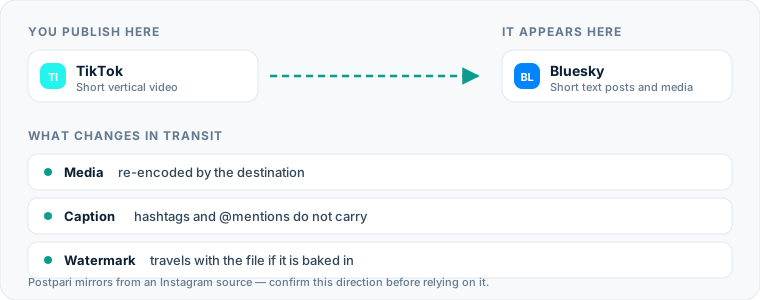
Getting a video from TikTok to Bluesky automatically means setting one feed rule instead of repeating the upload by hand. The rule lives in a cross-posting tool that watches your source feed, pulls the video file, trims the caption to fit Bluesky’s character limit, and publishes the media for you.
By building a structured cross-posting workflow, you retain your original media quality, eliminate manual file downloads, and maintain an active feed on Bluesky while publishing primarily to TikTok.
One source account, one destination. Add the rest of your networks to the same flow.
Quick answer: Moving posts from TikTok to Bluesky
To automatically post TikTok videos to Bluesky, you need an automated distribution system capable of listening for new uploads on a source account and pushing media payload downstream to Bluesky’s open network protocol (AT Protocol).
Because Bluesky handles video files differently than traditional networks and enforces a strict 300-character limit, an automated pipeline must perform three distinct steps:
- Detect a newly published video on your primary feed.
- Fetch the original video file, ideally before native platform watermarks are burned into the frame.
- Adjust the caption text, trimming over-length copy and stripping incompatible user tags before sending the payload through Bluesky’s API.
Depending on the automation tool you choose, you can pull video directly from TikTok or use an intermediary platform as your content anchor. For creators distributing across multiple apps simultaneously, learning the fundamentals of our guide to social media cross-posting helps clarify how source feeds communicate with target accounts.
The manual process: How you publish across both networks today
Publishing the same piece of short-form video to both platforms by hand requires a repetitive, multi-step sequence on your mobile device or desktop computer.
When doing this manually, your workflow typically looks like this:
- Draft, edit, and publish your short video inside the TikTok app.
- Export or download the published video back to your camera roll or local computer folder.
- Open a third-party utility or browser tab to strip the animated TikTok watermark from the video file.
- Launch the Bluesky app or website and navigate to the composer.
- Upload the watermark-free video file to the Bluesky draft area.
- Copy the text caption from TikTok and paste it into Bluesky.
- Manually delete excess characters to fit Bluesky’s 300-character limit.
- Remove platform-specific hashtags like
#fypor#foryouand delete any TikTok-specific@mentionsthat fail to map to valid Bluesky handles. - Wait for the video processing upload bar to complete, then click publish.
If you produce several videos a week, this process quickly becomes a bottleneck that drains time better spent creating new content.
The hidden friction and inefficiency of manual uploads
Manual cross-posting creates operational friction that compounds with every video you produce. While uploading a single video takes only a few minutes, repeating those steps repeatedly leads to cumulative time loss, file management issues, and human error.
| Task Variable | Manual Method | Automated Pipeline |
|---|---|---|
| Hands-on time per post | 5 to 10 minutes | Zero minutes (after setup) |
| Watermark management | Requires third-party download tools | Stripped or bypassed at API level |
| Caption formatting | Manual character counting and editing | Automated rule-based truncation |
| Device storage usage | High (storing duplicate video renders) | Zero (processed in cloud memory) |
| Posting consistency | Dependent on personal availability | Instantaneous upon source upload |
Beyond the basic time investment, manual file transfers flood your local hardware storage with duplicate MP4 files. Mobile devices fill up with intermediate renders, edited clips, and downloaded posts, forcing you to clear local storage constantly.
Manual transfers also invite errors. It is common to accidentally leave a bouncing TikTok watermark on a video posted to Bluesky, paste broken user tags, or forget to cross-post a video entirely during busy publishing schedules.
The automated approach: How software bridges the gap
Automation software eliminates manual friction by replacing manual file transfers with automated webhooks and API calls. When you publish a video on your source channel, the server detects the event, processes the media asset in cloud storage, and generates a new post on your Bluesky account within minutes.
Different software architectures handle this process in distinct ways:
- Direct Repurposing Engines: Services like Repurpose.io connect directly to a TikTok source account, monitor the public feed for new uploads, pull the raw video file without watermarks, and push it directly to target destinations like Bluesky or cloud storage folders.
- Source-to-Destination Mirroring: Platforms such as Postpari run a single flow outward from one central feed, and its own terms describe an Instagram account as that source. Bluesky is fed by the post you were making on Instagram anyway. That is efficient if Instagram is genuinely where you publish first, and the wrong shape if TikTok is — in which case a tool that ingests from TikTok directly, like Repurpose.io, is the honest recommendation for this particular route.
- Centralized Schedulers: Tools like Publer or Buffer allow you to compose posts once and schedule them to publish across multiple networks simultaneously. While these require drafting inside their dashboard rather than posting natively on TikTok first, using a dedicated Bluesky post scheduler gives you granular control over timing across open networks.
To review options for managing multi-account distribution, read our detailed overview of top cross-posting tools.
How to configure your TikTok to Bluesky automation
Setting up an automated bridge between platforms takes only a few minutes. While layout specifics vary by software vendor, the underlying logic remains consistent across tools.
Step 1: Connect your source platform
In your chosen automation tool, authenticate your primary publishing account. If you choose an automation engine that ingests directly from TikTok, log into your account via OAuth permissions. If you use a native social management suite, configure your profile using a specialized dedicated TikTok scheduler integration.
Step 2: Authenticate your Bluesky destination
Because Bluesky operates on the decentralized AT Protocol, authentication differs slightly from traditional networks:
- Obtain your exact Bluesky handle (e.g.,
username.bsky.socialor your custom domain handle). - Generate an App Password inside your Bluesky account settings under Settings > App Passwords.
- Never input your main account password into third-party cross-posting tools. Always use a dedicated App Password, which can be revoked at any time without compromising your primary account security.
Step 3: Configure post transformation rules
Define how the software handles media and text during transit:
- Enable auto-truncation for captions exceeding Bluesky’s character cap.
- Set default hashtag stripping rules to remove platform-specific tags.
- Configure watermark removal toggles if supported by your tool.
Step 4: Run a test workflow
Publish a low-stakes video on your source feed to verify the automation. Check your Bluesky feed to ensure the video rendered cleanly, the audio synced correctly, and the caption formatted properly without truncating mid-word.
Video processing: What happens to the MP4 file
When video content moves across network boundaries, the underlying file undergoes subtle transformations. Understanding these file changes helps prevent playback errors, stretched aspect ratios, or degraded visual fidelity.
Resolution and aspect ratio
TikTok content is predominantly recorded in vertical 9:16 aspect ratio at standard resolutions like 1080x1920 pixels. Bluesky natively supports vertical video uploads within its mobile app and web feed. When an automated service transfers an MP4 container file, it preserves the original 9:16 aspect ratio, ensuring your video renders full-frame without black bars or letterboxing.
Codecs and container formats
Automation tools extract video files as H.264 encoded MP4 files with AAC audio tracks. This standard encoding ensures maximum compatibility across all major operating systems and web browsers. In practice the file that moves along this route is an MP4 container holding an H.264 video stream at 1080x1920 and a stereo AAC audio stream — the same combination both platforms expect, which is why the transfer usually needs no re-encoding at all.
Watermark handling
When you download a video directly from the TikTok app, the platform appends a floating watermark containing its logo and your account handle.
Automation tools avoid this issue using one of two methods:
- API Ingest: The software pulls the raw source video directly from server memory before the watermarked render is generated for local device downloads.
- Post-Processing Filters: Software engines scrub native watermarks by cropping edges or fetching original file manifests stored prior to overlay rendering.
Posting video files without third-party platform watermarks yields a cleaner visual appearance on Bluesky feeds, keeping the focus entirely on your content.
Text conversion: Handling captions, hashtags, and tags
Converting captions written for TikTok into text optimized for Bluesky requires handling differences in platform limitations and user tagging structures.
A long TikTok caption, and what a truncation rule leaves of it on Bluesky:
| Text | |
|---|---|
| Source, on TikTok | Check out this complete breakdown of our design process! 🎨 We spent weeks refining the layout… (several hundred more characters) Tagging @john_doe #fyp #viral #design |
| Destination, on Bluesky | Check out this complete breakdown of our design process! 🎨 We spent weeks refining the layout… |
Everything past the cap is gone, which is why the sentence that matters has to come first.
Navigating character limits
TikTok allows expansive captions, giving creators ample space for detailed descriptions, keywords, and long tag lists. Bluesky enforces a hard limit of 300 characters per post.
When an automated pipeline encounters a long TikTok caption, it handles the character mismatch in one of three ways:
- Hard Truncation: The system cuts off the caption at 297 characters and appends an ellipsis (
...). - First-Line Extraction: The system extracts only the first sentence or line break, dropping remaining paragraphs.
- Custom Template Framing: The tool applies a template rule, stripping long bodies and appending a standardized link back to the source video if requested.
To ensure your captions make sense on Bluesky, put your primary message or call to action in the first 150 characters of your TikTok caption.
Sanitizing mentions and handles
User handles rarely match across different networks. Mentioning @creatorname on TikTok will fail on Bluesky unless that exact handle exists on the network. At best, unmapped tags display as plain text; at worst, they link to an unrelated Bluesky profile. Automated tools scrub unmapped @mentions during transfer to keep captions clean.
Managing hashtags
While hashtags function on Bluesky, user behavior on the platform leans toward natural text search rather than broad hashtag discovery. Automated pipelines can strip low-value tags like #fyp, #foryou, and #viral while retaining specific topical keywords relevant to your video’s niche.
Bluesky platform limits you must account for
Bluesky’s architecture introduces distinct functional requirements that set it apart from traditional centralized networks.
Native video limits
Bluesky applies its own duration and daily upload ceilings to video, and it has revised them more than once as the network has grown, so check the current figures in Bluesky’s own documentation rather than trusting a number you read in an article. Two behaviors matter more for an automated route than the exact limits do: uploads are processed asynchronously, so a clip may sit for a moment before it appears on follower feeds, and a post that trips a ceiling fails at the API rather than queueing — which your tool will report as a failed job, not a delayed one.
Authentication through App Passwords
Because Bluesky uses the decentralized AT Protocol, third-party software connects using specialized App Passwords rather than standard password authentication. You generate one inside your Bluesky settings and paste that into the cross-posting tool, never your login password.
App Passwords provide secure, scoped access to your profile without exposing your primary account credentials. If you stop using a third-party automation service, you can revoke its access instantly from your account settings without resetting your main login password.
If you maintain complex, multi-network distribution strategies, you might also consider alternative pipeline routes, such as using a setup to cross-post from TikTok to Instagram or choosing to route content from Instagram to Bluesky as part of a central distribution node.
Frequent mistakes when cross-posting along this route
Automation saves time, but misconfigured workflows can lead to formatting errors or awkward posts. Avoid these common mistakes when automating content delivery between TikTok and Bluesky.
1. Allowing truncated text mid-word
When captions exceed 300 characters, naive truncation rules can cut words in half or leave trailing punctuation like "Read more at http:". Configure your automation platform to trim text at sentence boundaries or word spaces rather than hard character counts.
2. Including platform-specific calls to action
Captions that ask viewers to “tap the screen twice”, “check the pinned comment”, or “follow for part two” do not translate to Bluesky’s interface layout. Keep your audio commentary and primary text caption clean of app-specific directional cues.
3. Relying on interactive stickers and native features
Interactive elements added inside the native TikTok editor—such as poll stickers, question boxes, quiz overlays, or native sound tags—will render as static, unclickable visual elements on Bluesky video players. Burn essential text overlays directly into the video canvas using an external editor before uploading to your source account.
4. Overlooking custom domain handles
If you use a custom domain handle on Bluesky (e.g., @yourname.com), update your automation settings whenever you change your domain mapping. Failing to update API authorization credentials after modifying your handle breaks the upload connection and causes posts to fail silently.
5. Ignoring file format compatibility
Ensure your exported source files use standard H.264 video streams and stereo AAC audio containers. Non-standard codecs or unusual framerates can cause processing errors during conversion, leading to missing audio or blank video posts on destination accounts.
Configuring a clean automated pipeline ensures your content reaches new audiences on Bluesky reliably, letting you expand your reach without adding hours of manual admin work to your publishing workflow.
What the platforms themselves document
Publishing rules change without notice, and every network is the only authority on its own. These are the pages we check this guide against. If one of them contradicts this page, it is right — tell us.
- Bluesky developer documentation — Bluesky
- TikTok — no public documentation URL we could verify. Check the rules inside the app rather than trusting a third party on them, including us.
Does Postpari do this? Worth knowing before you sign up: Postpari's Terms of Use describe mirroring from an Instagram source. If TikTok is where you publish first, check with Postpari that your direction is supported before you rely on it.
Frequently asked questions
Can I post TikTok videos to Bluesky automatically without a watermark?
Yes. Automation tools process raw source files directly via API connections or server-side downloads before TikTok app watermarks are applied, ensuring a clean video upload on your Bluesky profile.
How does Bluesky handle TikTok captions that exceed character limits?
Bluesky enforces a strict limit of 300 characters per post. Automated cross-posting tools trim captions exceeding this limit using pre-set rules, such as truncating at 297 characters with an ellipsis or cutting text at the first paragraph break.
Do I need to provide my main Bluesky password to cross-posting services?
No. You should never input your main password into third-party tools. Bluesky uses App Passwords, which are specialized authorization keys generated in your settings menu that grant scoped access to posting software without compromising your account.
Will interactive TikTok elements like polls or Q&A stickers work on Bluesky?
No. Native interactive elements added in the TikTok editor become static visual elements on Bluesky and cannot be clicked or interacted with by viewers.
What aspect ratio is best for cross-posting videos to Bluesky?
Standard 9:16 vertical video recorded at 1080x1920 resolution renders cleanly in Bluesky's mobile app and web feed without letterboxing or distortion.