How to Cross-Post from Instagram to Bluesky Automatically
Prices and features last checked: August 2026
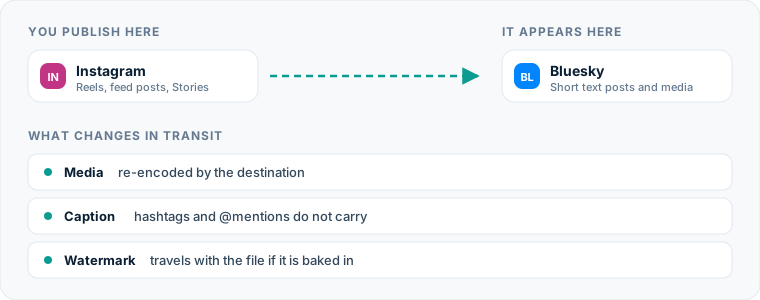
Moving short video content from Instagram to Bluesky manually takes time you could spend creating your next post. When you publish a Reel, audience expectations on alternative social networks mean you need to maintain a presence on newer platforms without multiplying your daily publishing workload.
One source account, one destination. Add the rest of your networks to the same flow.
Quick Answer: Automating Your Content Route
You can automatically post Instagram content to Bluesky by connecting both accounts through an automated content mirroring platform like Postpari. When you publish a video Reel on Instagram, the automation software detects the new upload, processes the video file, extracts the caption text, and posts it directly to your Bluesky account.
This automated route replaces manual downloads, file transfers, and re-captioning. If you already manage your workflow using an Instagram scheduling tool, adding an automated destination flow allows your content to reach decentralized social networks without adding extra publishing tasks to your daily routine.
The Manual Process: Moving Reels to Bluesky by Hand
To understand why automation helps, consider what executing this route manually requires every time you publish a short video on Instagram.
1. Downloading the Original File
First, you must obtain the clean video file. If you created the video directly inside Instagram’s native camera interface, saving it after publishing often burns the Instagram watermark onto the video frame or strips out the original audio track due to legal audio licensing constraints. To get a clean file, you must either keep raw project files on your phone or use external download utilities.
2. Formatting and File Transfer
Once you have saved the file locally on your mobile device, you need to transfer it to whatever device you use for managing your social media accounts. If you work from a desktop computer, this requires cloud storage syncing or file transfer protocol steps before you can prepare the media for upload.
3. Copying and Adjusting Text
Next, you open your Instagram post, copy the caption text, and paste it into Bluesky. Because Instagram permits long-form captions while Bluesky enforces strict character limits, you must inspect the copied text, strip out Instagram-specific callouts, remove incompatible tagging formats, and trim the narrative so it fits within destination character boundaries.
4. Manual Upload and Verification
Finally, you log into your Bluesky account, initiate a new post composition window, attach the video file, wait for client rendering and file processing, paste your modified caption text, and click publish. You repeat this sequence for every short video you release.
Hidden Costs of Manual Cross-Posting
Manual republishing carries costs beyond the immediate minutes spent tapping phone screens. The primary cost is context switching. Interrupting your primary workflow to re-enter text, upload video assets, and re-format captions on alternative networks drains mental focus and creates posting friction.
Over time, manual publishing leads to missed posting windows and abandoned secondary channels. When posting to an additional network requires several discrete physical steps, creators routinely skip publishing on secondary platforms altogether. Building a multi-platform presence requires consistency, and manual execution works directly against maintaining a predictable posting cadence across decentralized platforms. A structured approach to social media cross-posting replaces repetitive task switching with an automated pipeline.
The Automated Method for Instagram to Bluesky Distribution
Automating your distribution relies on a source-to-destination architecture. Rather than requiring you to log into a unified dashboard to compose separate posts for every platform simultaneously, a source-to-destination tool treats your main social account as the primary trigger.
Under this model, your Instagram profile serves as the content source. When you publish a video post or Reel to your Instagram source account, the distribution engine monitors your account feed via official integration APIs. Upon detecting a new public video, the system ingests the raw media file and text payload, applies your predefined formatting rules, and pushes the post out to your designated destination platforms, such as Bluesky.
Several platforms handle multi-account distribution across the web:
- Postpari: Built around direct source-to-destination account flows. It monitors an Instagram source profile for new short videos and mirrors them automatically to connected destinations, including Bluesky, X, Threads, and TikTok. It includes dripping features for backfilling existing archive content to new accounts.
- Repurpose.io: Focuses on automated video repurposing across major platforms, offering automatic video resizing and cloud storage backups. It sits at the higher end of entry-tier pricing for creator tools.
- Buffer: A traditional scheduling platform built around a central visual content calendar. It offers per-channel subscription tiers and a lightweight entry option, though it requires manual scheduling upfront rather than passive source mirroring.
- Publer: Supports a broad array of networks with bulk uploading, link management, and post recycling features charged per connected profile.
- SocialBee: Organized around category-based content queues for evergreen recycling, making it useful for scheduled rotation strategies across business accounts.
Choosing the right software depends on whether you want a traditional compose-and-schedule calendar or a passive pipeline that runs in the background. Evaluating the best cross-posting tools helps identify whether direct account mirroring or calendar scheduling fits your channel architecture best.
Setting Up Your Instagram to Bluesky Automated Workflow
Setting up an automated connection between your Instagram profile and your Bluesky account requires a one-time configuration process. Once established, the background connection handles future video publications automatically.
Step 1: Connect Your Instagram Source Account
Log into your cross-posting platform and authenticate your primary Instagram profile. The tool requires administrative publishing and read permissions to detect when new video posts go live on your channel. Ensure your Instagram account is set to a Business or Creator profile type, as personal profiles restrict API event monitoring.
Step 2: Authenticate Your Bluesky Destination Account
Add Bluesky as a target destination platform within your account dashboard. Because Bluesky uses the open AT Protocol, authentication typically involves connecting your handle alongside an App Password generated inside your Bluesky account settings, rather than your primary account password. Using an App Password maintains secure access while granting your distribution tool permission to publish media on your behalf.
Step 3: Establish the Distribution Flow
Create a new routing flow that explicitly links your Instagram account as the source and your Bluesky profile as the destination. Select the content media types you wish to mirror—specifically short video uploads and Reels.
Step 4: Configure Caption and Media Settings
Define how the automation engine should handle captions, hashtags, and text truncation when transferring posts to Bluesky. Save your settings and execute a test upload or allow the system to ingest your next published Instagram Reel.
| Tool Feature / Characteristic | Postpari | Repurpose.io | Buffer | Publer |
|---|---|---|---|---|
| Primary Publishing Model | Source-to-destination mirroring | Source-to-destination workflow | Calendar scheduling | Queue & calendar scheduling |
| Bluesky Support | Native integration | Native integration | Native integration | Native integration |
| Automation Type | Passive background triggering | Passive background triggering | Manual or scheduled queuing | Manual or scheduled queuing |
| Pricing Structure | Tiered by speed and accounts | Higher entry tier | Per-channel fee model | Per-account fee model |
How Video File Delivery Works on This Route
Understanding how your video assets move between Instagram and Bluesky prevents delivery failures and formatting errors.
Video Format and Resolution Handling
Instagram Reels rely primarily on a 9:16 vertical aspect ratio (1080x1920 pixels). Bluesky supports vertical video playback across its mobile apps and web interface. When an automated tool extracts your Reel file from Instagram, it transmits the video container format (typically MP4 with H.264 video encoding and AAC audio) directly to Bluesky’s video hosting infrastructure.
File Duration and Size Constraints
Platforms maintain distinct limits for direct video attachments:
- Instagram Reels: Supports short video formats up to several minutes in length.
- Bluesky Video Uploads: Imposes maximum clip duration limits and file size ceilings for native video attachments.
If your source Instagram Reel exceeds Bluesky’s duration allowance, an automated distribution tool will handle the clip according to your configured fallback rules—either truncating the clip to fit the maximum duration threshold or skipping the post to avoid incomplete delivery.
Handling Captions, Hashtags, and Handles
Text formatting requires careful attention when routing content from Instagram to Bluesky due to structural differences between the platforms.
Character Length Management
Instagram allows long captions, inviting detailed storytelling and extensive narrative descriptions. Bluesky limits standard posts to 300 characters.
When your automated system processes an Instagram post with a long caption, it must truncate the text to fit Bluesky’s character cap. Premium cross-posting tools trim the text cleanly at the nearest complete word and can append an ellipsis to signal that the text was shortened from a longer original post.
Hashtags and Search Processing
Hashtags behave differently across these platforms:
- Instagram: Creators often append blocks of tags to maximize discoverability within algorithm-driven feeds.
- Bluesky: Supports clickable hashtags, but user culture favors inline tag integration or minimal, highly specific topical tags.
When automating your route, configured rules can strip trailing hashtag blocks to preserve character count for your main narrative text.
User Mentions and Handles
Mentions do not translate directly across platforms. An Instagram handle formatted as @username will point to a completely different user—or an inactive account—if posted unchanged to Bluesky. Bluesky relies on domain-based handles (such as @user.bsky.social or custom domain handles).
Automated routing engines pass raw @ text into the Bluesky post. To prevent tagging unintended accounts, avoid tagging platform-specific handles directly in the body of your Instagram caption if you intend to mirror the post automatically.
Technical Considerations for the Bluesky Network
Publishing content to Bluesky requires understanding its underlying network architecture. Bluesky is built on the AT Protocol, an open, decentralized network framework distinct from proprietary social networks.
Using a dedicated Bluesky post scheduler or automated flow takes advantage of the network’s native API endpoints. Media posted to Bluesky is uploaded directly to the platform’s independent data repositories.
Because Bluesky relies on custom user-curated algorithmic feeds alongside the standard chronological feed, original video uploads with descriptive captions perform better than posts containing external links. Uploading native MP4 video directly through an automated API integration ensures your content remains eligible for custom media feeds across the Bluesky ecosystem.
Common Pitfalls on the Instagram-to-Bluesky Pipeline
Avoiding common mistakes ensures your cross-posted videos maintain high visual quality and readable captions.
1. Watermarked Video Re-uploads
Downloading a published Reel directly from the Instagram mobile app often bakes a visual Instagram logo and creator handle overlay onto the video frame. Re-uploading watermarked files to alternative networks makes content look unoriginal. Ensure your automated flow pulls the original clean video payload before visual watermarks are applied.
2. Ignoring Character Count Truncation
Relying on Instagram captions that place critical calls to action or key links at the end of a long text block will fail on Bluesky. Because Bluesky cuts off text at 300 characters, place important context or primary statements in the first two sentences of your Instagram caption.
3. Broken Account Mentions
Including Instagram-specific handles within your main caption text results in unlinked text or incorrect user tags on Bluesky. Keep platform-specific tags in the comments section of your Instagram post rather than the main caption area, ensuring the core caption transfers cleanly to destination networks.
4. Overloading Hashtags
Carrying over massive Instagram hashtag clouds clutters your Bluesky posts and consumes all available character space. Strip trailing hashtag lists to keep your destination posts clean, readable, and focused on narrative value.
5. Attempting to Mirror Unsupported Media Types
While short video mirroring runs predictably across automated API routes, attempting to mirror complex interactive elements like Instagram Story polls, quiz stickers, or multi-slide carousel images without configuring specific image rules can result in dropped posts or missing media attachments. Stick to standard video Reel posts for consistent source-to-destination mirroring.
What the platforms themselves document
Publishing rules change without notice, and every network is the only authority on its own. These are the pages we check this guide against. If one of them contradicts this page, it is right — tell us.
- Instagram Platform: content publishing — Instagram
- Bluesky developer documentation — Bluesky
Does Postpari do this? Postpari is built around exactly this shape of flow: Instagram as the source, Bluesky as a connected destination.
Frequently asked questions
Can I post Instagram Reels to Bluesky automatically without watermarks?
Yes, automated mirroring tools ingest the raw video payload from your Instagram source post before platform watermarks are applied. This ensures the MP4 file published to Bluesky remains clean and unbranded.
What happens if my Instagram caption is longer than Bluesky's character limit?
When an Instagram caption exceeds Bluesky's 300-character limit, automated cross-posting tools truncate the text cleanly at the character cap. You can position essential information in the first sentence of your Instagram caption so it remains intact on Bluesky.
Does Bluesky support native video uploads from third-party tools?
Yes, Bluesky supports native video uploads via its public API endpoints. Automated integration platforms upload your MP4 file directly to Bluesky's storage infrastructure, making it play natively in Bluesky user feeds.
Do Instagram hashtags work when mirrored to Bluesky?
Bluesky supports clickable hashtags, but its 300-character limit leaves less space for large tag blocks. Configuring your automated route to trim long hashtag lists preserves character space for your actual post text.
Do I need a personal Bluesky password to set up an automated posting route?
No, you do not need to share your main Bluesky password. You can generate a dedicated App Password within your Bluesky account settings, which grants your cross-posting service secure publishing access without exposing your primary login credentials.