How to Cross-Post from YouTube Shorts to TikTok Automatically
Prices and features last checked: October 2026
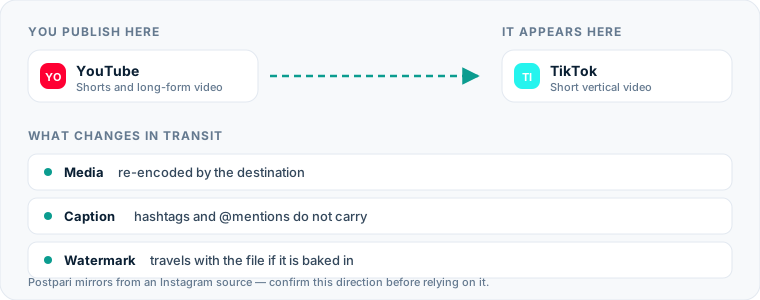
You can move a video from YouTube Shorts to TikTok two ways: upload the same file a second time, or connect a tool that publishes each new Short to your TikTok account for you. Neither network offers a built-in bridge to the other, so automatic posting from YouTube Shorts to TikTok always runs through a third-party tool, and the result is only as good as the file that tool sends.
That last clause is most of this page. TikTok is the network where a clip that visibly came from somewhere else does the most damage to itself, so the question is less “how do I automate this” and more “which copy of my video ends up there.”
One source account, one destination. Add the rest of your networks to the same flow.
Quick answer: how YouTube Shorts to TikTok automation works
A cross-posting tool is connected to your YouTube channel and to your TikTok account. When a new Short appears, the tool takes the video and its title, builds a TikTok post from them, and either publishes it or leaves it waiting for you in TikTok as a draft.
Three decisions determine whether the result looks native or looks recycled:
- Which file is sent. Your own export, or a copy retrieved from YouTube.
- Which text is sent. The title alone, or the title and the description folded together.
- How it lands. Published straight to your profile, or delivered as a draft you finish in the TikTok app.
If you want the wider picture first, our explainer on how cross-posting works across networks covers the model this route is one example of.
The manual method: exactly what you do today
The careful version of the manual route:
- Export the vertical video from your editor and keep the file.
- Upload it to YouTube with a title and description, and publish it as a Short.
- Get the same file onto your phone.
- Open TikTok, tap to create a post, and upload the file from your camera roll.
- Add a sound, text or effects if you want them, and choose a cover.
- Write a TikTok caption and pick the hashtags.
- Check who can comment, Duet and Stitch, then post.
The careless version replaces step 3 with “download the Short from YouTube.” Do not. What YouTube Studio gives back is its own re-encoded copy, and YouTube announced in 2022 that Shorts downloaded from Studio carry a YouTube watermark. On TikTok, a video wearing another platform’s logo tells every viewer it is a hand-me-down before they have heard a word. Our guide to keeping another network’s watermark off your cross-posts explains where each platform stamps its mark and how to avoid it.
Where the manual method costs you more than you think
Posting twice is not hard. Posting twice every time is.
- TikTok quietly becomes optional. The Short is live, the job feels finished, and the TikTok upload moves to “later.” Later has a poor completion rate.
- The phone is a bottleneck. If you edit on a computer, every video has to cross to a phone before it can reach TikTok properly. That transfer is where the watermarked shortcut starts to look attractive.
- The caption is an afterthought. By the second upload you paste the YouTube title, hashtag and all, because you have already written about this video once today.
- Two profiles drift apart. After a few months your TikTok account is a partial archive of your channel, and a new visitor cannot tell whether you still post there.
A rule you set once does not get tired or busy. That is the entire case for automating this route.
The automated method
Tools that can handle this fall into two groups, and it is worth knowing which one you are buying.
| Scheduler | Source-triggered tool | |
|---|---|---|
| Where you publish | Inside the tool | In YouTube, as you do now |
| What starts the TikTok post | A time you choose | A new Short appearing on the channel |
| File TikTok receives | Your original upload | What the tool retrieves from YouTube |
| Work per video | One upload, one compose screen | None after setup |
| Main risk | A new habit to keep | The quality and cleanliness of the retrieved file |
With a scheduler, you upload the video once to the tool and send it to both networks. TikTok gets your original export, which settles the watermark question completely. Our guide to tools that schedule and publish Shorts covers what you give up by leaving YouTube Studio.
With a source-triggered tool, YouTube stays your only publishing screen. This is true “post once” automation, and it depends entirely on the tool being able to hand TikTok a clean file. Ask the vendor two plain questions before paying: is the TikTok copy made from a file pulled from YouTube, and does it arrive without YouTube branding?
Which tool fits this direction, honestly
This site is operated by the team behind Postpari, so read this with that in mind. Postpari is a source-triggered mirroring tool whose Terms of Use describe an Instagram source. A YouTube-first flow is not what those terms describe, so do not sign up expecting this route without checking with Postpari first.
For a workflow that starts on YouTube, Repurpose.io is the more natural candidate. It is built around source-triggered workflows, lists YouTube among its networks, and advertises automatic watermark removal and resizing, the two features this route leans on hardest. It is also the most expensive of the creator-focused tools at entry, so verify on its site that a Short can be the trigger on the plan you want. The verified side-by-side is in our roundup of cross-posting tools and what each one actually automates.
And if TikTok is where the video performs best anyway, consider flipping the route. Publishing on TikTok first and sending TikTok videos to YouTube Shorts has its own watermark problem, but it lets you build the post with TikTok’s native tools.
Setting up the flow from YouTube Shorts to TikTok
- Connect the YouTube channel. Sign in with the Google account that owns or manages it, and confirm the tool selected the right channel if you have more than one.
- Connect TikTok. You approve the connection on TikTok’s own authorization screen. Read the permissions: publishing video is the one that matters.
- Filter for Shorts. If the channel also carries long videos, restrict the flow so only Shorts trigger it.
- Choose direct post or draft. Some tools can publish straight to your profile; some deliver the video to your TikTok inbox as a draft for you to finish. Which is right depends on how much you use TikTok’s own features, covered below.
- Set the caption rule. Title only is the safe default.
- Check the interaction settings. See whether the tool lets you set who can comment, Duet and Stitch, or whether it falls back to something more restrictive than you want.
- Run one test. Publish a Short, then open the TikTok on your profile, with the sound on.
What happens to the video file
Shape. Both networks are built around a vertical 9:16 frame, so a standard Short needs no resizing. YouTube also accepts square video as a Short. On TikTok a square clip floats in the middle of the screen with empty bands above and below, which looks like exactly what it is.
Length. YouTube allows Shorts of up to three minutes, according to its own Help page on creating Shorts. TikTok accepts longer video than that in its app, so length is rarely the obstacle on this route. The limit to check is the tool’s.
Quality. Each platform compresses what it receives. A file that goes from your editor to TikTok is compressed once. A copy that went to YouTube, came back, and then went to TikTok has been through it twice, and small captions burned into the video are the first thing to soften.
Sound. Music added from the audio library inside the YouTube app is licensed for YouTube, and that license does not follow the video out. The safe pattern is to put voiceover and any music you have the rights to into the file itself, in your editor.
Cover. A frame you chose on YouTube does not transfer. Expect an early frame of the video unless the tool lets you pick one, and make the first second presentable.
What happens to the caption, hashtags and mentions
A Short has a title of up to 100 characters and a separate description. A TikTok has one caption. The title is nearly always the right thing to send, because it was written as a hook. The description is usually links and credits, and neither reads well under a TikTok.
What to clean up on the way through:
- Links. A web address in a TikTok caption is plain text nobody can tap. Remove it and refer people to your profile.
- The Shorts hashtag. It does nothing on TikTok and announces the video’s origin. Strip it automatically if the tool allows find-and-replace rules.
- Channel handles. A handle that points to a YouTube channel may belong to a different person on TikTok, or to no one. Mentions that matter need rewriting by hand.
- Search-style titles. A title written to match a YouTube search often reads stiffly as a TikTok caption. If you know a Short is headed to both, write the title the way you would say it out loud.
- Spoken calls to action. “Subscribe” and “link in the description” are recorded into the video, and no caption rule can fix them. Say “follow” and “link on my profile” and one take works everywhere.
TikTok-specific considerations
Sounds are the big trade-off. A large part of how TikTok videos get discovered runs through sounds: viewers tap a sound and browse everything made with it. A video published through a third-party tool arrives with whatever audio is in the file, labeled as your original sound. You cannot attach a trending TikTok sound from outside the app. If sounds are central to how you work, the draft route is the better fit: let the tool deliver the video, then open TikTok, add the sound, and post. It is not fully automatic, but it removes the file transfer, which was the tedious part.
Disclosure toggles live in TikTok. TikTok asks creators to mark branded content and to label realistic AI-generated media using its own settings. Check whether your tool exposes those switches. If it does not, sponsored videos should be posted by hand.
Duet and Stitch are per-post settings. A tool may not apply the same defaults as the app. If other creators responding to your videos is part of your plan, confirm those settings on the first few automated posts.
Pacing expectations differ. A Short found through YouTube search can afford a title card and a slower first beat. TikTok viewers decide faster. You do not need two edits, but a cold open that gets to the point serves both networks. Our TikTok scheduling and cross-posting guide goes further into what the platform expects from a post that started elsewhere.
Common mistakes on this route
- Sending the YouTube copy when the original exists. If you still have the export, that is the file TikTok should get.
- Leaving the flow open to long-form uploads. One horizontal video published to TikTok by accident is enough to teach this lesson; set the filter first.
- Mapping the full description into the caption. Links, credits and disclaimers under a TikTok look like a paste error, because they are one.
- Assuming the dashboard is the truth. “Published” in a tool does not mean the sound survived. Check the profile.
- Automating sponsored videos. Anything with a disclosure requirement deserves a human at the publish button.
- Forgetting the connection can lapse. If TikTok posts stop appearing, reconnect the account before changing anything else.
What the platforms themselves document
Publishing rules change without notice, and every network is the only authority on its own. These are the pages we check this guide against. If one of them contradicts this page, it is right — tell us.
- YouTube Help: create a Short — YouTube
- TikTok — no public documentation URL we could verify. Check the rules inside the app rather than trusting a third party on them, including us.
Does Postpari do this? Worth knowing before you sign up: Postpari's Terms of Use describe mirroring from an Instagram source. If YouTube is where you publish first, check with Postpari that your direction is supported before you rely on it.
Frequently asked questions
Can I post YouTube Shorts to TikTok without a watermark?
Yes, as long as the file comes from the right place. The export from your video editor has no watermark, so upload that file to both networks or to a scheduler. A Short downloaded back from YouTube is the copy that can carry YouTube branding.
Will TikTok mute a Short I repost there?
It can if the audio is music you added from the library inside the YouTube app, because that license covers YouTube and not TikTok. Voiceover and music you added in your own editor, and have the rights to use, travel with the file.
Do hashtags from my YouTube Short carry over to TikTok?
They carry over as text if your tool copies the title or description into the caption. The Shorts hashtag means nothing on TikTok, so remove it and keep the ones that describe the subject of the video.
Can a tool turn a horizontal YouTube video into a vertical TikTok?
A mirroring tool passes the video along in the shape it was published. Tools that advertise automatic resizing can reframe it, but the result is a crop, not an edit. For anything you care about, cut the vertical version yourself.
Should the TikTok copy go out at the same time as the Short?
Either works. Publishing at the same moment is simplest and keeps both profiles in step. A delay makes sense when your TikTok audience is active at a different hour, or when you want to finish the post in the TikTok app first.