How to Cross-Post from TikTok to YouTube Shorts Automatically
Prices and features last checked: October 2026
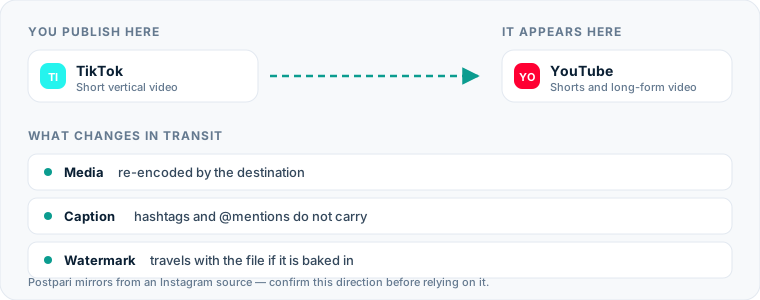
Moving your content from tiktok to youtube shorts automatically gives you a second audience for vertical video without adding hours of repetitive administrative work to your week. Every time you record, edit, and publish a short clip on one network, that same media file can populate your channel on another platform.
Automating this route requires setting up an automated distribution system that monitors your TikTok account for new posts, strips the platform watermark, and uploads the video file directly to YouTube Shorts with an adapted caption.
One source account, one destination. Add the rest of your networks to the same flow.
Quick Answer: How TikTok to YouTube Shorts Automation Works
To post tiktok to youtube shorts without doing manual file management, you need an automated distribution engine or connection tool. When you publish a video on TikTok, the system detects the new post via API, fetches the high-definition video file without the moving watermark, cleans or reformats the text description, and posts it to your connected YouTube channel as a Short.
If you prefer using a centralized social hub where Instagram acts as your primary posting origin, tools like Postpari allow you to post once to Instagram and mirror that content to YouTube Shorts, TikTok, and other platforms simultaneously. If you want TikTok itself to serve as the master trigger, dedicated automation platforms like Repurpose.io ingest your public TikTok posts and push them downstream to YouTube automatically.
The Manual Method: How You Currently Handle Both Platforms
The standard manual process for republishing vertical clips requires several distinct steps on your phone or desktop computer. Most creators who cross post tiktok to youtube shorts manually execute this routine for every single clip:
- Record and edit the video inside the TikTok app, adding native text, effects, and music.
- Publish the video to your TikTok account.
- Open a third-party watermark removal tool or website.
- Copy the public URL of your new TikTok video and paste it into the downloader to obtain a clean MP4 file.
- Save the downloaded MP4 file to your local device storage or camera roll.
- Open YouTube Studio on your desktop browser or mobile application.
- Click the upload button, select the clean MP4 file, and wait for the upload to process.
- Retype or paste your original caption into the YouTube video title field, shortening it to fit YouTube’s 100-character limit.
- Add
#Shortsto the title or description, set audience settings (such as “Not made for kids”), and click publish.
This routine works for a single post, but performing these nine steps multiple times per week creates severe operational drag.
The Hidden Costs of Manual Uploads
The primary cost of manual publishing is not the raw time spent—it is context switching and friction. Downloading a file, running it through a watermark remover, and manually re-entering metadata takes between five and ten minutes per post. For a creator posting twice a day, that represents over five hours of repetitive file handling every month.
Manual workflows introduce several subtle operational failure points:
- Inconsistent publishing schedules: Skipping an upload because you are away from your computer leaves gaps in your channel that a rule would not.
- Metadata degradation: Copying captions across devices leads to broken @mentions, missing video titles, and missing hashtags.
- File clutter and version loss: Your camera roll and local downloads folder quickly fill up with duplicate video files, making file organization difficult.
- Human error on settings: Forgetting to apply essential YouTube flags (like marking content as appropriate for minors) can hold up video processing.
If you are trying to scale your audience across platforms, our complete guide to social media cross-posting details how manual bottlenecks slow down channel growth over time.
Setting Up an Automated Pipeline
To automatically post tiktok to youtube shorts, you set up a continuous source-to-destination pipeline. This architecture relies on webhooks and platform APIs to watch for new activity on your source profile and execute immediate actions on your destination channel.
| Feature / Metric | Manual Workflow | Traditional Social Schedulers | Source-to-Destination Automation |
|---|---|---|---|
| Setup Time | None | Low | Medium (one-time setup) |
| Effort Per Post | 5–10 minutes | 2–4 minutes | 0 minutes |
| Watermark Removal | Requires manual web tools | Manual pre-clearing required | Handled automatically in background |
| Real-Time Triggering | No | No (requires explicit scheduling) | Yes (publishes when source goes live) |
| Caption Retyping | Required | Required per channel | Automated via conversion rules |
When selecting tools to handle this pipeline, you have two primary structural options:
- Direct TikTok Triggers: Platforms like Repurpose.io monitor your TikTok account directly, detect new uploads, strip the watermark, and send the video file directly to YouTube.
- Centralized Hub Mirroring: Platforms like Postpari allow you to publish your primary vertical clip to Instagram, which then automatically mirrors the post to YouTube Shorts, TikTok, and other platforms simultaneously.
If you prefer to organize content in advance rather than posting directly inside social apps, you can review our list of the best cross-posting tools to evaluate visual planners alongside real-time automation engines.
Step-by-Step Setup for Your Automation Route
Building a functional tiktok youtube shorts automation pipeline requires connecting your accounts, configuring ingestion triggers, and mapping output rules.
Connecting Your Accounts
First, authenticate both platform accounts inside your chosen distribution engine:
- Grant access to your TikTok profile so the tool can read your public video feed and retrieve media assets.
- Authenticate your YouTube account via OAuth, choosing the specific YouTube Channel where Shorts should land.
- Grant permissions for reading content feeds, uploading video files, and updating video metadata.
Configuring Platform Triggers
Set your trigger rules to determine what content gets moved across networks:
- Source Action: Select “New Published Video” on your TikTok account as the event that starts the automation.
- Filtering: Choose whether to publish all public TikToks automatically or only clips containing a specific trigger hashtag (such as
#youtubeor#shorts). - Delay / Buffering: Set whether posts should move immediately upon publication or queue up to publish at specific times during the day.
Defining Destination Rules
Configure how the system translates your TikTok post into a YouTube Short:
- Destination Selection: Set the output target to YouTube Shorts.
- Watermark Preference: Ensure the automated watermark removal setting is toggled on so the raw source video is sent to YouTube.
- Default Category and Audience: Set your default YouTube video category (e.g., Entertainment, Education) and mark your global audience safety setting.
What Happens to the Video File During Transfer
Moving a video file from TikTok to YouTube Shorts involves more than copying raw bytes. The two platforms use different media processing pipelines, requiring specific conversions during the transfer.
Aspect Ratio and Resolution
TikTok and YouTube Shorts both run on a 9:16 vertical aspect ratio, typically at a resolution of 1080x1920 pixels. When an automated tool pulls your video from TikTok, it retrieves the base video container. If your original TikTok video was shot horizontally (16:9) or square (1:1) with top and bottom letterboxing inside TikTok, the automation engine transfers that exact file layout. To maintain high visual quality on YouTube Shorts, always record and export your master video natively in 9:16 vertical dimensions.
Watermark Stripping and Encoding
When you download a video directly from the TikTok app, TikTok appends a bouncing watermark containing the account handle alongside an end-card logo. On YouTube that moving logo tells every viewer the clip was made for somewhere else, and a video that looks recycled gets swiped past.
Automated tools bypass the default consumer download button. Instead, they access the un-rendered video file stored on TikTok’s content delivery networks, pulling the clean 1080x1920 MP4 file before the watermark layer is applied.
Duration and Frame Rates
YouTube raised the Shorts ceiling from one minute to three. Its own Help page on creating Shorts now describes Shorts as videos of up to three minutes, which removes what used to be the most common failure on this route: a TikTok that ran a few seconds past a minute and landed on YouTube as a regular video.
TikTok still accepts longer video than that. If you publish a TikTok over three minutes, a pipeline sending it to YouTube will do one of two things:
- Upload it as a regular YouTube video instead of a Short.
- Refuse it, if the tool is set to publish Shorts only.
The limit a third-party tool can publish is not always the same as the limit in the app, so send your longest TikTok through once before you rely on the flow.
Captions, Hashtags, and Account Mentions
Text formatting differs significantly between TikTok and YouTube, making metadata mapping a crucial part of automated cross-posting.
Text Length Discrepancies
TikTok provides an expanded caption field allowing up to 4,000 characters. YouTube Shorts uses the standard YouTube video title field as its primary caption display, which caps text at 100 characters.
When an automated flow pushes a long TikTok caption into YouTube Shorts:
- The system truncates the text at character 100, cutting off sentences mid-word.
- Alternatively, advanced automation flows map the first 100 characters of your TikTok caption to the YouTube video title and paste the full caption into the expanded YouTube video description field.
Hashtags and Metadata
Hashtags work differently across both services:
- TikTok: Creators routinely use five to ten hashtags mixed directly into the text caption.
- YouTube Shorts: YouTube recommends using two or three highly relevant hashtags. Including
#Shortsin the title or description helps YouTube classify legacy or borderline-length videos correctly.
An automated rule set should automatically append #Shorts to the title string during transfer while stripping out platform-specific hashtags like #FYP, #ForYou, or #TikTokViral.
User Handles and Tagged Accounts
Tagging another user on TikTok using @username relies on TikTok’s internal user ID system. When that exact text transfers to YouTube, the @username tag becomes plain text or points to an unrelated YouTube channel with that handle.
If your TikTok captions frequently tag collaborators, use automated cleanup rules to convert or remove platform-specific mentions before the post hits YouTube.
YouTube Shorts-Specific Considerations
Publishing content to YouTube Shorts introduces technical parameters that do not exist on TikTok. Understanding these constraints ensures your automated posts publish without errors.
TikTok Video Constraints:
- Length: Up to 10 Minutes
- Captions: Up to 4,000 Characters
- Audio: Custom / Trending Native Sounds
YouTube Shorts Constraints:
- Length: Strictly <= 60 Seconds
- Captions: 100 Characters (Title) / 5,000 Characters (Description)
- Audio: Original Audio / YouTube Sound Library
Audio Library Licenses and Muting
A common reason reposted videos fail on YouTube Shorts involves audio licensing:
- Commercial Sounds on TikTok: If you build a video using a trending song from TikTok’s commercial sound library, TikTok holds the distribution license for its platform.
- YouTube Copyright System: When that video file transfers to YouTube, Content ID scans the audio track. If YouTube does not hold a matching license for that master recording, your Short may be muted, hit with a copyright claim, or blocked globally.
To prevent copyright issues across your pipeline, use original voiceovers, royalty-free background music, or stock audio files that you license independently outside social app sound libraries.
Monetization and Content Flags
YouTube enforces strict channel monetization and child safety policies across all uploads:
- Made for Kids: Automated tools must specify whether uploaded content is designed for children. Failing to set this flag can pause uploads until manually reviewed in YouTube Studio.
- Shorts Remixing: YouTube allows viewers to create audio or visual clips from published Shorts by default. Automation settings let you decide whether to enable or disable sound remixing globally across all imported clips.
For creators looking for dedicated scheduling workflows built specifically around YouTube’s native metadata structure, using a specialized YouTube Shorts scheduler provides precise control over descriptions, tags, and premiere settings.
If YouTube Is Where You Publish First
This page assumes TikTok is the source. Reverse the direction and the problems change. The watermark to worry about becomes YouTube’s own, since Shorts downloaded from YouTube Studio carry it. TikTok’s sounds can only be attached inside the TikTok app, so a Short that arrives through a tool keeps whatever audio is in the file. And a Short’s title and description have to be folded into TikTok’s single caption. Our guide to posting YouTube Shorts to TikTok automatically covers that direction, including when it makes more sense to have a tool deliver a draft you finish in TikTok than to publish directly.
Common Mistakes When Routing TikTok to YouTube Shorts
Setting up an automated workflow eliminates manual file transfers, but simple setup mistakes can hurt post performance on your target channel. Avoiding these common errors keeps your automated workflow running smoothly.
1. Planning Around the Old One-Minute Limit
Older advice, including earlier versions of this page, says a TikTok must stay under a minute to become a Short. Shorts can now run up to three minutes, so cutting a TikTok down for YouTube’s sake is usually wasted effort. Only a video longer than three minutes is published as a regular YouTube video and misses the Shorts feed.
2. Including Platform-Specific Calls to Action
Captions or video voiceovers containing references like “click the link in my TikTok bio” or “follow my TikTok page for part 2” lower conversion rates on YouTube. Keep your calls to action general—such as “check the link below” or “subscribe for part 2”—so your content sounds natural across every distribution network.
3. Relying on TikTok-Native On-Screen Text
Using TikTok’s built-in text editor to overlay titles onto your video embeds those text elements permanently into the media file. If you ever need to translate captions, adapt text placements, or adjust branding for YouTube Shorts, hardcoded TikTok text limits your flexibility.
Edit your vertical videos inside standalone editing software (like CapCut, Premiere Pro, or DaVinci Resolve) before uploading to TikTok. This ensures your master file looks clean and neutral regardless of where it gets republished.
4. Overlooking Dedicated Account Scheduling Settings
Automation engines post content as soon as new items hit your source feed. However, peak engagement hours on TikTok do not always match optimal audience activity times on YouTube.
If your audience engagement varies significantly between networks, consider routing your posts through a dedicated TikTok scheduling options engine. This allows you to buffer uploads, ensuring content lands on YouTube Shorts when your specific subscriber base is active.
What the platforms themselves document
Publishing rules change without notice, and every network is the only authority on its own. These are the pages we check this guide against. If one of them contradicts this page, it is right — tell us.
- YouTube Help: create a Short — YouTube
- TikTok — no public documentation URL we could verify. Check the rules inside the app rather than trusting a third party on them, including us.
Does Postpari do this? Worth knowing before you sign up: Postpari's Terms of Use describe mirroring from an Instagram source. If TikTok is where you publish first, check with Postpari that your direction is supported before you rely on it.
Frequently asked questions
Can you automatically post TikTok videos to YouTube Shorts without watermarks?
Yes, automated cross-posting platforms extract the raw vertical MP4 file directly from backend delivery servers before TikTok overlays its moving watermark and end-screen logo. This delivers a clean video file directly to YouTube Shorts without requiring manual watermark removal tools.
Is it a problem to post the same video on TikTok and YouTube Shorts?
YouTube does not publish any rule against posting your own video on more than one network. What works against a Short is a visible TikTok watermark, because viewers read it as recycled and swipe away.
What happens if my TikTok video is too long for YouTube Shorts?
YouTube now accepts vertical and square videos of up to three minutes as Shorts. A TikTok longer than that is published as a regular YouTube video rather than appearing in the Shorts feed, or is refused, depending on your tool.
Do hashtags from my TikTok caption automatically work on YouTube Shorts?
While text hashtags transfer over, TikTok captions often contain platform-specific tags like #FYP or #ForYou that carry no search value on YouTube. Additionally, YouTube Shorts titles cut off at 100 characters, so long TikTok hashtag blocks should be truncated or converted into YouTube video descriptions.
Is it better to use an automated distribution tool or cross-post manually?
Automated distribution tools eliminate manual downloads, file conversions, and re-uploads, saving hours of administrative effort every month. Manual uploads are only necessary if you need to manually re-edit video frames or customize separate thumbnail images for each individual network.