How to Cross-Post from Instagram to X Automatically
Prices and features last checked: August 2026
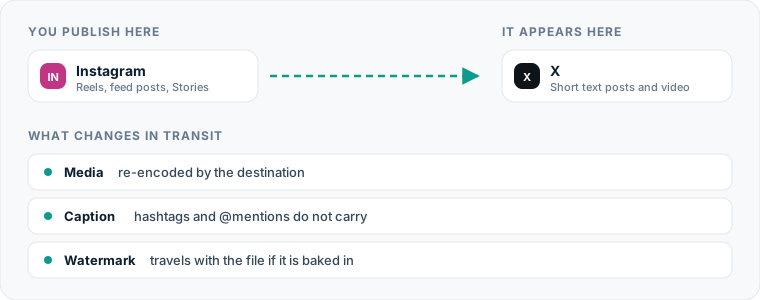
Automatically publishing content from instagram to x eliminates the need to upload video files and retype captions manually every time you publish a Reel. To automatically post Instagram content to X, connect your Instagram account as a source platform inside an automated cross-posting service, route it to your X profile, and let the system mirror newly published short videos directly as native video posts.
The default share toggle inside Instagram does not achieve this. When you use Instagram’s native share-to-X feature, it does not upload your video to X. Instead, it posts a plain text tweet containing a truncated caption and a raw URL pointing back to Instagram. That forces users to leave X to view your content, resulting in low engagement compared to native video uploads.
One source account, one destination. Add the rest of your networks to the same flow.
Hand-posting from Instagram to X: The manual process
Publishing a short video manually from Instagram to X requires several repetitive steps across different applications. If you post multiple times per week, this routine consumes a measurable amount of administrative time.
- Locate or download the source asset. You must either export the finalized video file from your editing software before posting to Instagram, or download the published Reel from your Instagram profile to your local device.
- Transfer the file to your desktop or mobile storage. If you edit on a desktop computer but upload via mobile apps, you must transfer the raw MP4 file via cloud storage or local file transfer.
- Open X and begin a new post. Launch the X mobile app or web interface, log into the target account, and click the post composer button.
- Attach the video file. Upload the video from your media library, waiting for X to process the upload and render the media preview.
- Copy and adapt the caption. Open your original Instagram post draft or copy the caption directly from the live Reel.
- Edit text to fit length limits. Trim the Instagram caption down so it fits within the standard 280-character limit on X, unless you pay for an X Premium subscription that allows extended post lengths.
- Clean up tags and mentions. Remove Instagram-specific handles (
@username) that do not exist on X or belong to different accounts. Strip out large blocks of hashtags that look natural on Instagram but appear spammy on X. - Publish the post. Review the media frame preview, ensure the video plays correctly, and click to publish.
If you produce three to five videos per week, repeating this manual sequence across multiple platforms creates significant operational friction.
Why manual publishing from Instagram to X wastes time and attention
Manual cross-posting creates hidden administrative costs beyond the minutes spent tapping buttons. Context switching between creative tools, media files, and individual social app interfaces disrupts deep work and increases the likelihood of human error.
Asset management quickly becomes cluttered. Manual workflows leave duplicate video files across your camera roll, desktop downloads folder, and cloud storage bins. Over time, identifying the latest edited version of a video asset becomes frustrating.
Timing delays represent another hidden cost. When you publish a Reel on Instagram, you may not have time to immediately open X and complete the manual upload process. If you wait several hours or days to post the same content to X, you lose the advantage of synchronized publishing across your public channels. You can read more about synchronized platform distribution in our foundational guide to cross-posting on social media.
Character limit errors are frequent during manual transfers. Copying an Instagram caption containing 1,500 characters directly into X results in cut-off sentences or red character counter errors. Hurrying to trim text manually often leads to typos, broken links, or forgotten calls to action.
The automated route for Instagram to x cross-posting
Automated source-to-destination workflows solve this problem by eliminating manual file handling entirely. Instead of composing posts individually on each platform, you establish a direct connection between your Instagram profile and your X account.
In a source-to-destination architecture—such as the one used by Postpari—Instagram serves as your primary publishing hub. When you publish a short video post on Instagram, the automation software detects the new post via API webhooks, retrieves the clean video media file, processes the caption text according to your pre-set rules, and uploads the video natively to X.
This approach differs significantly from traditional social media management platforms like Buffer, Later, or Hootsuite. Traditional social management suites use a compose-and-schedule model where you pre-build individual posts inside a visual content calendar for each network. While scheduling platforms excel at distinct channel campaigns, direct mirroring tools remove the scheduling step altogether for video-first creators.
| Feature / Metric | Instagram Native Share | Traditional Scheduler (e.g., Buffer, Later) | Direct Mirroring Tool (e.g., Postpari) |
|---|---|---|---|
| Media Type on X | Plain text link back to Instagram | Native uploaded video | Native uploaded video |
| Manual Effort Per Post | Low (one toggle switch) | Medium (compose per channel) | Zero (fully automated after setup) |
| Trigger Mechanism | Manual toggle inside Instagram app | Scheduled calendar date/time | Automatic trigger on Instagram upload |
| Caption Adaptation | Truncated plain text with URL | Manual editing per platform profile | Automated rules (trim, strip tags) |
| Asset Storage Needed | None | Upload asset to tool storage | Fetched automatically from source |
| Best Workflow Fit | Quick manual links | Fixed campaign calendars | High-volume video automation |
Setting up an Instagram to x post automation step by step
Configuring a continuous automation flow from your Instagram profile to your X account takes only a few minutes. Here is the operational setup process using a direct cross-posting engine:
Step 1: Connect your source profile
Log into your cross-posting platform and navigate to the account connections tab. Connect your public Instagram account as the source profile. You will authenticate through Instagram to grant permission for the service to read your public media posts.
Step 2: Connect your destination profile
Add X (formerly Twitter) to your connected destination networks. Authorize the application to post media, upload video files, and publish text on behalf of your X account.
Step 3: Define the route and direction
Create a new automation rule drawing a line from your Instagram source account to your X destination account. Ensure the directional flow points from Instagram to X. In platforms like Postpari, you can manage multiple destination accounts from a single Instagram source account if you maintain regional or backup channels on X.
Step 4: Configure caption transformation rules
Set parameters for how text should be handled when converting from Instagram to X:
- Select whether to trim captions automatically at 280 characters or truncate at the nearest sentence break.
- Choose whether to append a backlink to the original Instagram post or publish strictly standalone text.
- Decide whether to remove all hashtags or keep only the first two or three.
Step 5: Test and activate the automation
Publish a short test Reel on Instagram or activate the rule on your next scheduled post. The system will detect the new media item, process the video and text, and publish the post directly to X without requiring manual intervention.
If you manage standalone text posts or distinct X campaigns outside of short-form video, you can manage those alongside your automated feed inside a specialized X scheduler tool.
What happens to the video file
Understanding how automated tools handle your video file ensures your media looks clean and professional when it hits the X timeline.
Aspect ratios and cropping
Instagram Reels are published in a vertical 9:16 aspect ratio (typically 1080x1920 pixels). X natively supports vertical video playback on mobile devices, displaying vertical clips inside the feed preview. On desktop browsers, X places black or blurred sidebars around vertical videos or displays a center-cropped preview until the user clicks to expand.
When an automated platform processes your video, it transfers the complete 9:16 vertical file without cropping out critical visual details. To ensure optimal appearance across both platforms, keep text overlays, graphics, and essential visual subjects within the central 1:1 safe zone of the frame.
Media encoding and file quality
Instagram applies aggressive compression algorithms to video uploads. Automated cross-posting platforms extract the highest quality MP4 file available from the source post before X applies its own video compression upon upload.
Because the video file undergoes processing on both networks, starting with clean high-bitrate source material on Instagram yields the best visual results on X. Standard audio encodings (AAC stereo) and video codecs (H.264 MP4) transfer cleanly between both platforms.
Watermark handling
When you manually download a Reel directly from the Instagram application interface, Instagram bakes a visible logo watermark and your handle onto the video file. Automated API-driven platforms avoid this by fetching the clean media file associated with the post record rather than performing a screen capture or standard consumer app download.
Using dedicated cross-posting tools ensures your videos land on X without unwanted third-party watermarks that distract viewers.
What happens to the caption, hashtags and mentions
The primary technical challenge when moving content from Instagram to X is adapting text formats between two platforms with fundamentally different posting mechanics.
Character limits and text truncation
Instagram permits up to 2,200 characters in a post caption, allowing long-form storytelling, multi-paragraph explanations, and extensive lists. X limits standard accounts to 280 characters per post.
When your automated flow triggers, the software checks the length of your Instagram caption. If the text exceeds 280 characters, the automation engine applies your chosen rule:
- Hard truncation: Cuts the text off precisely at character 277 and appends an ellipsis (
...). - Smart truncation: Scans backward from character 277 to find the end of the preceding sentence or clause, preserving grammatical structure.
- First line mode: Extracts only the first sentence or headline from the Instagram caption to use as a short hook on X.
If you maintain an X Premium subscription that unlocks extended character counts, ensure your automated cross-posting service supports long-form text passing without forced truncation.
Hashtag translation
Hashtag usage differs sharply between Instagram and X:
- On Instagram, users frequently append 10 to 30 targeted hashtags at the bottom of captions to assist with algorithmic categorisation.
- On X, using more than two hashtags reduces visual clarity and causes posts to look like automated search spam.
Automated routing engines allow you to apply hashtag filters. You can configure the automation to strip all hashtags automatically during transfer, or retain only the first two hashtags found in the source text.
User handle mapping
Mentions do not automatically translate between platforms. If your Instagram caption tags @creator_jane, the automation will output @creator_jane as plain text on X. If @creator_jane on X belongs to a completely different user—or does not exist—the tag will be ineffective or point to the wrong profile.
Advanced automation systems allow you to strip @mentions completely during translation or set static string replacements for handles you tag regularly.
If you want to prepare captions thoughtfully before sending them through automated pipes, plan your source posts using a dedicated Instagram scheduling tool.
Strategic considerations specific to posting on X
While automated publishing saves hours of technical effort, posting on X requires awareness of the platform’s unique conversational environment.
Feed velocity and posting frequency
X operates at a significantly higher feed velocity than Instagram. On Instagram, publishing three Reels in a single day can overcrowd your followers’ feeds and lower impression counts per post. On X, publishing multiple times per day is normal behavior due to the real-time nature of the home timeline.
Because X handles higher frequency well, you can safely mirror every short video you post on Instagram over to X without overwhelming your audience. If you want to populate a fresh X profile quickly, platforms like Postpari offer backfill features that slowly drip historically published Instagram Reels out to your connected X account over time.
Comment monitoring and engagement
Cross-posting automation handles outbound content distribution, but it does not reply to incoming comments on your behalf. X relies heavily on fast-moving public conversations inside reply threads.
When an automated post goes live on X and receives engagement, open the native X app or web client to answer replies manually. Conversational engagement inside X comment threads helps extend the reach of your video posts beyond your immediate follower graph.
Links inside posts
Instagram does not allow clickable hyperlinks inside standard post captions. Creators typically direct viewers to a link in bio or use automated comment triggers. X, however, supports clickable external URLs directly inside post text.
When configuring your Instagram to X posting rule, you can instruct the automation to append a specific URL—such as your main website, newsletter signup, or store link—to the end of every post published to X.
Common mistakes on this route
Setting up an automated pipeline between Instagram and X is straightforward, but avoiding these operational errors will protect your brand presentation.
Using Instagram’s native “Share to Twitter” toggle
The single most common mistake creators make is relying on Instagram’s built-in account sharing switch. As noted earlier, this feature sends a raw text link to X rather than uploading your actual video file. Followers scrolling through X will see a plain link with no video thumbnail, leading to significantly lower click-through rates.
Leaving thirty hashtags in converted tweets
Allowing a full block of Instagram hashtags to mirror onto X makes your tweets look unformatted and difficult to read. Always set up a filter rule in your cross-posting tool that strips hashtags down to a maximum of two, or removes them entirely.
Overlooking text safe zones in vertical videos
When editing vertical 9:16 videos for Instagram, placing hardcoded subtitles or key visual graphics near the extreme top or bottom edges can cause display issues on X. Desktop and web feeds on X sometimes crop the top and bottom portions of vertical video cards in the timeline preview. Keep captions and primary visual elements centered within the frame.
Ignoring handle mismatches
If your brand name on Instagram is @brand_official but your handle on X is @brand_hq, automated text mirroring that includes your Instagram handle in the caption text will confuse readers on X. Verify that your automation tool handles text substitution or strips self-referential handle tags before publishing.
By configuring a dedicated source-to-destination pipeline, setting clear caption transformation rules, and respecting the formatting requirements of both networks, you can maintain a active video presence on X without adding manual platform management to your daily workload. To evaluate different platform configurations and feature sets, review our detailed guide comparing the best cross-posting tools.
What the platforms themselves document
Publishing rules change without notice, and every network is the only authority on its own. These are the pages we check this guide against. If one of them contradicts this page, it is right — tell us.
- Instagram Platform: content publishing — Instagram
- X API documentation — X
Does Postpari do this? Postpari is built around exactly this shape of flow: Instagram as the source, X as a connected destination.
Frequently asked questions
Does cross-posting from Instagram to X post the actual video file or just a link?
Using dedicated cross-posting automation tools uploads your raw video file directly to X as a native video post. Only Instagram's built-in native share toggle posts a plain text URL link instead of video media.
Will my vertical Instagram Reels look cropped or cut off when automatically posted to X?
X natively supports vertical 9:16 video playback on mobile devices. However, timeline previews on desktop browsers may display sidebars or center-crop preview frames, so it is best to keep core visual content and text overlays centered inside the video frame.
How do automated tools handle Instagram captions that exceed X's 280-character limit?
Automated tools allow you to set text transformation rules before publishing. You can choose to automatically truncate long captions at 280 characters with an ellipsis, trim text intelligently at the last complete sentence, or post only the first line of your Instagram caption.
Do hashtags automatically carry over from Instagram posts to X tweets?
Yes, hashtags transfer as written unless you configure rules inside your automation platform to modify them. Because long blocks of hashtags look cluttered on X, most creators set rules to strip out all hashtags or retain only the first two tags from the Instagram caption.
Can I automatically cross-post old Instagram Reels to a new X account?
Yes, certain cross-posting platforms include a backfill function. This feature allows you to select previously published Instagram video posts and automatically drip them out over time to populate a connected X account without manual uploading.