Postpari vs SocialBee: Which One Fits Your Workflow?
Prices and features last checked: August 2026 · Sources: postpari.com , postpari.com , postpari.com , socialbee.com
BestCrossPosting.com is operated by the team behind Postpari. We benefit when readers sign up, so treat our Postpari recommendations as the recommendations of an interested party — and check our claims against the sources we link. Full disclosure · How we compare products
Deciding between Postpari vs SocialBee comes down to whether your content strategy is built on scheduling a calendar of varied posts or automatically distributing short-form video the moment you upload it. If your strategy relies on queueing up text, image posts, and evergreen articles across categories on a recurring schedule, SocialBee is the right tool; if you produce short-form video on Instagram and simply want it copied everywhere else automatically, Postpari is the better choice.
Both platforms reduce repetitive publishing tasks, but they solve entirely different workflow problems. One acts as an engine for content scheduling and evergreen recycling, while the other acts as an automated distribution mirror for creators who publish natively.
The Short Version: Choosing Between Postpari and SocialBee
Choosing between these platforms is not a matter of which software has more buttons. It depends on where you want to spend your daily energy.
SocialBee is designed for managers, agencies, and creators who draft posts in advance, organize content into structured categories, and maintain a consistent posting queue. It excels at keeping a steady stream of text updates, links, graphics, and video going out to multiple channels on a strict timetable.
Postpari takes a hands-off approach to video distribution. Instead of requiring you to log into a dashboard, upload files, write captions, and set dates, it monitors a source account. When you upload a short video directly to Instagram, Postpari detects the new post and automatically mirrors it outward to your other connected accounts.
If you want absolute control over a complex mix of media types, SocialBee fits the bill. If you find scheduling dashboards tedious and only want your short-form videos to spread across networks without manual intervention, Postpari eliminates the extra steps. For a broader look at how automated distribution fits into modern content workflows, see our overall evaluation of our guide to cross-posting on social media.
| Feature | Postpari | SocialBee |
|---|---|---|
| Starting price | $9/mo | $29/mo |
| Free plan | No | No |
| Free trial | 7 days | 14 days |
| Source-triggered mirroring | Yes | Not verified |
| One post to several destinations | Yes | Yes |
| Schedule posts for a chosen time | Yes | Yes |
| Backfills older posts | Yes | Not verified |
| Several accounts on one network | Yes | Yes |
| Reformats content per platform | Not verified | Not verified |
| Removes source watermark | Not verified | Not verified |
| Visual calendar | Not verified | Yes |
| Analytics | Yes | Yes |
| Approval workflows | Not verified | Not verified |
| Networks listed | 9 | 10 |
Postpari
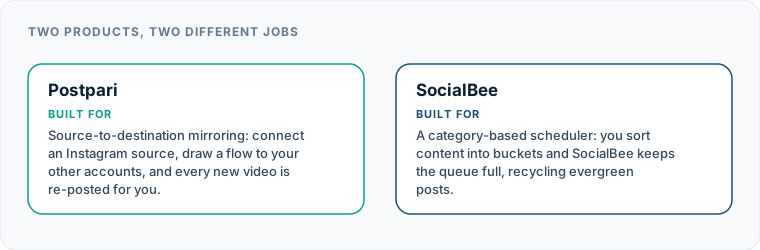
Source-to-destination mirroring: connect an Instagram source, draw a flow to your other accounts, and every new video is re-posted for you.
- From
- $9/mo
- Free plan
- No
- Trial
- 7 days
- Source-triggered mirroring
- Yes
- One post to several destinations
- Yes
- Schedule posts for a chosen time
- Yes
- Backfills older posts
- Yes
- Several accounts on one network
- Yes
- Reformats content per platform
- Not verified
- Removes source watermark
- Not verified
- Visual calendar
- Not verified
- Analytics
- Yes
- Approval workflows
- Not verified
SocialBee
A category-based scheduler: you sort content into buckets and SocialBee keeps the queue full, recycling evergreen posts.
- From
- $29/mo
- Free plan
- No
- Trial
- 14 days
- Source-triggered mirroring
- Not verified
- One post to several destinations
- Yes
- Schedule posts for a chosen time
- Yes
- Backfills older posts
- Not verified
- Several accounts on one network
- Yes
- Reformats content per platform
- Not verified
- Removes source watermark
- Not verified
- Visual calendar
- Yes
- Analytics
- Yes
- Approval workflows
- Not verified
“Not verified” means we could not find the vendor stating it on their own site. It is not a claim that the product cannot do it.
How Postpari vs SocialBee Approach Content Delivery
Understanding the fundamental architecture of both platforms reveals why they serve completely different creators.
SocialBee Engine: [ Content Categories ] ➔ [ Time Slots Queue ] ➔ [ Scheduled Network Broadcast ]
Postpari Mirror Engine: [ Instagram Source Upload ] ➔ [ Automated Trigger ] ➔ [ Instant Destination Mirroring ]
SocialBee: The Evergreen Queue Architecture
SocialBee relies on a category-based queue system. Rather than scheduling every single post individually on a calendar grid, you build distinct buckets of content—such as promotional offers, blog post links, industry tips, and video clips.
Once your categories are filled, you assign specific time slots to each bucket. The platform then draws from these queues and publishes content automatically. When a queue runs out of fresh posts, SocialBee can recycle evergreen content, re-posting older updates to keep your feeds active without requiring continuous manual drafting.
Postpari: Hands-Off Source Mirroring
Postpari discards the calendar dashboard entirely. It functions on a simple source-to-destination pipeline designed for creators who prefer to work natively within their primary app.
You connect your accounts and establish a flow starting from an Instagram source account. Whenever you publish a new short-form video on Instagram, Postpari picks up that upload and pushes it to your connected destination channels—including TikTok, YouTube, Facebook Pages, LinkedIn, Pinterest, Threads, X, and Bluesky. There are no queue slots to configure, no calendars to maintain, and no weekly upload sessions to perform inside a middleman dashboard. You can read more about this direct approach in our detailed Postpari platform analysis.
When SocialBee Is the Clear Winner
SocialBee provides capabilities that a pure video-mirroring tool cannot match. If your operation requires precise content curation or agency management, SocialBee is clearly the superior option.
Managing Mixed Media Formats
Postpari is strictly focused on mirroring short video content. It does not process text-only posts, single images, link previews, or carousels. If your social strategy relies heavily on sharing blog posts, infographics, text threads, and graphic announcements, SocialBee handles these formats with ease.
Evergreen Content Recycling
If you maintain a library of timeless advice, quotes, or evergreen promotional content, SocialBee allows you to set up recurring rules. Posts can be cycled back through the queue after a designated delay, ensuring your profile feeds remain active even during production lulls.
Agency Workspaces and Approvals
SocialBee is built with team governance in mind. It supports organized workspaces, enabling agencies to manage multiple clients separately. Team members can draft posts, while account owners or external clients review and approve content before it reaches the schedule. Postpari offers no visual calendars, client permission structures, or pre-publication approval queues.
If you are weighing agency-focused scheduling platforms, explore our analysis of popular SocialBee alternatives to see how different management tools compare.
Why Postpari Outperforms in Video-First Workflows
While SocialBee shines in traditional content scheduling, Postpari wins decisively when it comes to speed, simplicity, and friction-free distribution for short video creators.
Zero Dashboard Overhead
With traditional schedulers, creating a single video requires multiple manual steps: exporting from an editor, opening a browser dashboard, uploading the file, picking accounts, writing captions, selecting dates, and checking time zones.
Postpari removes that friction entirely. You post your video once on Instagram using native tools, filters, and captions. Postpari handles the rest behind the scenes, replicating that content out to your target platforms. You spend zero minutes operating scheduling software during your workweek.
Multi-Account and Backup Network Mirroring
Building an audience on social media carries platform risk. Postpari allows you to route a single source feed to multiple accounts on the same destination platform. You can mirror your main Instagram account to your primary YouTube Shorts channel as well as a secondary or backup channel simultaneously.
Drip Backfilling and Public Account Copying
When expanding to a new social platform, starting with a blank profile looks unprofessional. Postpari includes a backfill feature that drips previously published videos out to connected destination accounts over time, quickly populating a fresh profile. On higher subscription tiers, Postpari also allows you to copy a public Instagram account that you own or operate, automating distribution across separate brand networks.
Postpari vs SocialBee: Structural Differences in Pricing
The cost structures of these tools reflect their distinct targets. Rather than evaluating absolute prices, which shift over time, it helps to look at how each tool scales its subscription tiers.
+-----------------------------------------------------------------------------------+ | Feature | SocialBee | Postpari | +-----------------------+-------------------------------+---------------------------+ | Primary Focus | Multi-format queue scheduler | Automated video mirroring | | Dashboard Needed? | Yes (daily/weekly planning) | No (set up once) | | Supported Formats | Text, links, images, video | Short-form video | | Content Recycling | Built-in evergreen queues | Backfill previously posted| | Agency Approval Flows | Yes (workspaces & seats) | No | +-----------------------------------------------------------------------------------+
SocialBee does not offer a free tier. Its pricing tiers are structured primarily around the number of social profiles connected and the inclusion of workspace seats for teams. As your account volume grows, or as you add team members for approval workflows, you move into higher price brackets. This approach aligns with traditional social media management platforms like Later or Buffer, which charge based on connected profile bundles or team features.
Postpari structures its tiers around operational capacity and advanced features. Lower plans cover core source-to-destination mirroring for personal creators, while higher tiers introduce faster posting speeds, higher daily fair-use limits per source account, multi-account routing on identical platforms, and public account copying capabilities.
Compared to heavy enterprise engines like Hootsuite or creator distribution tools like Repurpose.io (which carries a higher entry tier price), Postpari offers a focused, utility-based cost structure tailored specifically to high-volume video creators.
Platform Support and Channel Coverage
Both platforms connect to major social networks, but the way they handle publishing to those channels differs based on official platform APIs.
SocialBee connects across standard professional and personal destinations, allowing manual or queued publishing across major networks. It handles text, graphic, and video uploads across all supported channels within its scheduling calendar.
Postpari uses Instagram as its primary source account for video detection. Once a video is detected, it distributes to a wide array of destination networks:
- TikTok (Direct short-video posting)
- YouTube (Published automatically as YouTube Shorts)
- Facebook (Published strictly to Facebook Pages, not personal profiles)
- LinkedIn (Video post publication)
- Pinterest (Video pin creation)
- Threads (Short video distribution)
- X / Twitter (Native video posting)
- Bluesky (Native video posting)
It is important to remember that neither platform allows direct automated posting to personal Facebook profiles due to Meta API restrictions. Facebook publishing on both tools is limited strictly to business or public Pages.
Automation Depth: Hands-Off Mirroring vs Scheduled Queues
The true division between Postpari or SocialBee comes down to push-based automation versus queued batch scheduling.
| Operational Step | SocialBee Workflow | Postpari Workflow |
|---|---|---|
| Content Creation | Drafted in advance via desktop or app | Created and edited inside Instagram |
| Publishing Trigger | Scheduled queue slot reached | Immediate upload detection on source |
| Dashboard Management | Regular monitoring of calendar queues | None required after initial setup |
| Recycling Strategy | Automatic re-queuing of evergreen posts | Drip backfill of past catalog items |
| Multi-Network Strategy | Tailor individual captions per channel | Mirror single video outward globally |
SocialBee requires active management. Even with automated queues, someone must curate content, organize categories, check calendar slots, and verify that queues do not run dry. It provides high control at the expense of manual ongoing effort.
Postpari provides push automation. Once your source-to-destination pathways are mapped, you never open Postpari to push a post. The automation engine listens for new Instagram uploads continuously. When a video goes live on your source account, the system handles the distribution immediately within reasonable fair-use publication limits.
If you want to explore more technical breakdowns of how source-mirroring compares to classic management platforms, read through our comprehensive set of social management tool side-by-side reviews.
Limitations You Should Expect from Both Tools
Neither tool is a silver bullet for every social media task. Understanding their limitations prevents frustrating setup errors.
Media Aspect Ratios and Watermarks
Neither platform will magically turn a horizontal landscape video into a vertical 9:16 clip without cropping or black bars. If you upload a video with a visible platform watermark, that watermark remains visible on your destination channels. While a watermark does not trigger official algorithm penalties, raw visible branding from a competing network can make content look lazy to viewers.
Caption Customization Limits in Pure Automation
Postpari mirrors the caption used on your Instagram source post directly to your destination networks. It does not offer per-channel caption editing or individual platform tagging before publication. If you require unique hashtags, distinct text calls-to-action for LinkedIn versus TikTok, or custom thumbnail selections per network, a manual scheduler like SocialBee or Buffer provides more granular control.
Lack of Engagement Tools
Neither Postpari nor SocialBee functions as a unified social inbox in their standard workflows. Neither tool will aggregate comments, direct messages, or mention notifications across your connected networks into a single screen. You will still need to open native apps to reply to your audience and engage with comments on each platform.
Choosing between SocialBee cross posting and Postpari ultimately depends on your content type. If you are running an agency, publishing blog updates, and scheduling graphic posts across strict queues, SocialBee is built for your process. If you are a video-first creator who wants short clips published everywhere without spending hours in a dashboard, Postpari provides the most direct path from creation to multi-platform distribution.
Which one should you pick?
There is no single winner here, because these tools are not trying to do the same job. Match the row to your own situation.
| If your situation is | Pick | Why |
|---|---|---|
| You have a library of evergreen posts to re-run | SocialBee | Category queues and recycling are what the product is organised around. |
| Your content is new short video every week | Postpari | There is nothing evergreen to re-queue; the work is the repeated upload. |
| You are an agency wanting a workspace per client | SocialBee | Workspaces are built in from the Pro tier. |
| You want the lowest entry price | Postpari | SocialBee has no free plan, and its entry tier costs several times what Postpari does. |
Frequently asked questions
What is the main difference between Postpari and SocialBee?
SocialBee is a queue-based scheduling tool designed for planning mixed content types like text, graphics, and articles across custom visual categories. Postpari is a direct distribution tool that monitors your Instagram account and automatically mirrors new short-form videos to your other social media channels without requiring manual scheduling.
Can SocialBee mirror videos automatically from Instagram like Postpari does?
No. SocialBee requires you to upload media to its dashboard, add it to content categories, and set up calendar queue times. It does not automatically detect and cross-post new uploads published natively on an external Instagram account.
Does Postpari support text posts and link sharing?
No. Postpari is strictly designed for short-form video mirroring from an Instagram source account. If your social strategy relies heavily on sharing text updates, external article links, or image carousels, a multi-format scheduler like SocialBee is a better fit.
Can I post to personal Facebook profiles using either Postpari or SocialBee?
No. Due to official Meta platform API rules, neither tool can automatically publish content to personal Facebook profiles. Automated publishing on both platforms is restricted to official Facebook Pages.
Which tool is better for agencies managing multiple client accounts?
SocialBee is generally better for traditional agencies because it includes structured workspaces, team member seats, and client content approval workflows. Postpari is built primarily for video creators and brand operators who want direct, automated video distribution without approval steps or client review dashboards.