SocialBee Alternatives: What to Switch To, and Why
Prices and features last checked: August 2026 · Sources: postpari.com , postpari.com , postpari.com , repurpose.io , repurpose.io , buffer.com , later.com , later.com , hootsuite.com
BestCrossPosting.com is operated by the team behind Postpari. We benefit when readers sign up, so treat our Postpari recommendations as the recommendations of an interested party — and check our claims against the sources we link. Full disclosure · How we compare products
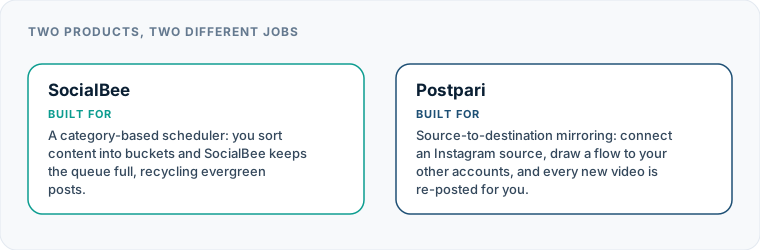
Searching for SocialBee alternatives usually comes down to three friction points: paying a monthly subscription for features you do not touch, struggling to feed an evergreen queue system, or realizing you wanted hands-off video mirroring rather than manual scheduling. If you simply need your posts published to every network without building complex content categories, simpler tools like Buffer, Publer, or Postpari offer lower entry costs and cleaner workflows.
SocialBee is built around a distinct architecture: category-based queuing and evergreen recycling. That structure works well for businesses with hundreds of blog posts, promotional links, or quote cards that can rotate indefinitely. But if your content strategy relies on fresh short-form video, single-use announcements, or real-time commentary, SocialBee’s core structure can feel like unnecessary overhead.
To choose a suitable SocialBee alternative, you need to isolate why the platform stopped fitting your workflow. Different tools solve entirely different bottlenecks, from cutting monthly software costs to eliminating manual uploading altogether.
Why Creators and Businesses Look for SocialBee Alternatives
The friction that leads users away from SocialBee rarely stems from software bugs. Instead, it happens when a business outgrows—or never actually needed—the specific operational model SocialBee builds its dashboard around.
The Evergreen Queue Burden
SocialBee assumes you have content that can be categorized and repeated over time. You create buckets for different content types, set a recurring calendar grid, and let the software draw from those buckets.
When you publish time-sensitive media, short-form video trends, or industry commentary, evergreen queues become a burden. You end up creating single-use categories or bypassing the queue system entirely to schedule posts for specific dates. At that point, you are paying for an architecture you are actively working around.
Subscription Pricing Structure
SocialBee does not offer a free-forever tier. Every user must pay a paid subscription from day one. For solopreneurs, bootstrapped creators, or small teams managing only a handful of profiles, the entry pricing tier can feel high if you only use a fraction of the features.
Furthermore, because SocialBee packages its service with workspace management and agency-oriented capabilities, individual creators often find cheaper options elsewhere. If you are comparing your options across the market, our directory of social media platform alternatives details how different tools structure their pricing.
Account Limits and Multi-Profile Scaling
SocialBee bundles profile connections into set subscription brackets. If your brand operates across multiple platforms—or if you manage main and backup accounts—hitting your account ceiling forces a tier upgrade. If you do not need the extra team seats or advanced features included in higher tiers, paying that jump just to connect two additional profiles feels punitive.
Manual Scheduling vs. Hands-Off Automation
SocialBee is a compose-and-schedule tool. You still have to open the app, upload your asset, format your text, pick your channels, and save the post into a slot. If your primary goal is to upload a video to Instagram once and have it appear on TikTok, YouTube, and Threads automatically, manual scheduling tools are the wrong category entirely.
| Feature | Postpari | Repurpose.io | Buffer | Later | Hootsuite |
|---|---|---|---|---|---|
| Starting price | $9/mo | $35/mo | $5/mo | $18.75/mo | $99/mo |
| Free plan | No | Yes | Yes | No | No |
| Free trial | 7 days | 14 days | 14 days | 14 days | 14 days |
| Source-triggered mirroring | Yes | Yes | Not verified | Not verified | Not verified |
| One post to several destinations | Yes | Yes | Yes | Yes | Yes |
| Schedule posts for a chosen time | Yes | Yes | Yes | Yes | Yes |
| Backfills older posts | Yes | Not verified | Not verified | Not verified | Not verified |
| Several accounts on one network | Yes | Yes | Yes | Yes | Yes |
| Reformats content per platform | Not verified | Yes | Not verified | Not verified | Not verified |
| Removes source watermark | Not verified | Yes | Not verified | Not verified | Not verified |
| Visual calendar | Not verified | Not verified | Yes | Yes | Yes |
| Analytics | Yes | Not verified | Yes | Yes | Yes |
| Approval workflows | Not verified | Not verified | Yes | Not verified | Not verified |
| Networks listed | 9 | 12 | 11 | 8 | Not published |
Postpari
Source-to-destination mirroring: connect an Instagram source, draw a flow to your other accounts, and every new video is re-posted for you.
- From
- $9/mo
- Free plan
- No
- Trial
- 7 days
- Source-triggered mirroring
- Yes
- One post to several destinations
- Yes
- Schedule posts for a chosen time
- Yes
- Backfills older posts
- Yes
- Several accounts on one network
- Yes
- Reformats content per platform
- Not verified
- Removes source watermark
- Not verified
- Visual calendar
- Not verified
- Analytics
- Yes
- Approval workflows
- Not verified
Repurpose.io
Automated content repurposing and distribution: it watches a source, transforms the video for each destination, and publishes it.
- From
- $35/mo
- Free plan
- Yes
- Trial
- 14 days
- Source-triggered mirroring
- Yes
- One post to several destinations
- Yes
- Schedule posts for a chosen time
- Yes
- Backfills older posts
- Not verified
- Several accounts on one network
- Yes
- Reformats content per platform
- Yes
- Removes source watermark
- Yes
- Visual calendar
- Not verified
- Analytics
- Not verified
- Approval workflows
- Not verified
Buffer
A classic publishing tool: you write a post, choose the channels and the time, and Buffer sends it.
- From
- $5/mo
- Free plan
- Yes
- Trial
- 14 days
- Source-triggered mirroring
- Not verified
- One post to several destinations
- Yes
- Schedule posts for a chosen time
- Yes
- Backfills older posts
- Not verified
- Several accounts on one network
- Yes
- Reformats content per platform
- Not verified
- Removes source watermark
- Not verified
- Visual calendar
- Yes
- Analytics
- Yes
- Approval workflows
- Yes
Later
A social media management and influencer marketing suite built around planning, scheduling and performance insight.
- From
- $18.75/mo
- Free plan
- No
- Trial
- 14 days
- Source-triggered mirroring
- Not verified
- One post to several destinations
- Yes
- Schedule posts for a chosen time
- Yes
- Backfills older posts
- Not verified
- Several accounts on one network
- Yes
- Reformats content per platform
- Not verified
- Removes source watermark
- Not verified
- Visual calendar
- Yes
- Analytics
- Yes
- Approval workflows
- Not verified
Hootsuite
A broad social media management platform aimed at organisations: publishing, analytics, engagement and team workflow in one place.
- From
- $99/mo
- Free plan
- No
- Trial
- 14 days
- Source-triggered mirroring
- Not verified
- One post to several destinations
- Yes
- Schedule posts for a chosen time
- Yes
- Backfills older posts
- Not verified
- Several accounts on one network
- Yes
- Reformats content per platform
- Not verified
- Removes source watermark
- Not verified
- Visual calendar
- Yes
- Analytics
- Yes
- Approval workflows
- Not verified
“Not verified” means we could not find the vendor stating it on their own site. It is not a claim that the product cannot do it.
Start with Your Reason, Not with a List
Before signing up for trial accounts across half a dozen SocialBee competitors, identify the exact bottleneck in your current publishing process. Choosing software based on a generic feature checklist often lands you right back where you started: paying for features you do not use.
| Tool | Primary Use Case | Standout Feature | Free Tier Available? |
|---|---|---|---|
| Buffer | Simple multi-channel scheduling | Channel-by-channel pricing model | Yes |
| Metricool | Analytics and visual planning | Free tier covering single-brand profiles | Yes |
| Publer | Broad platform coverage & bulk posts | Supports niche networks like Telegram/Mastodon | Yes |
| SocialPilot | Agency and team profile management | Generous profile caps for multi-client management | No |
| Postpari | Automated short-video mirroring | Hands-off source-to-destination cross-posting | No |
| Repurpose.io | Rule-based asset distribution | Cloud backup and automatic watermark removal | Free allowance |
| Later | Visual feed planning and commerce | Visual grid planner and profile bundles | No |
If your main friction point is price, look at tools that bill per social profile rather than charging a flat entry fee. If your issue is the category system, switch to a straightforward visual calendar. If your problem is the manual work of cross-posting videos, move to an automated distribution engine.
Finding a Cheaper Alternative to SocialBee for Standard Scheduling
If you like the process of drafting, previewing, and scheduling posts across multiple platforms, but you want a cheaper alternative to SocialBee, several scheduling tools offer lower entry barriers or flexible per-account pricing.
Buffer
Buffer remains the default choice for creators who want straightforward, minimal scheduling. Unlike SocialBee’s mandatory flat monthly fee, Buffer uses a per-channel pricing structure alongside a functional free tier.
- Why it costs less: If you only publish to three social profiles, Buffer’s free tier or lower per-channel cost will keep your expenses significantly under SocialBee’s entry price. You only pay for the exact channels you connect.
- Workflow differences: Buffer replaces category queues with a simple calendar view and queue lines per platform. It includes basic analytics and approval workflows on higher team plans, but it stays out of your way if you just want to queue up a week of updates.
- Where it fits: Ideal for single-brand businesses and freelancers who find SocialBee’s category queues confusing and expensive. For a broader market view, see our guide to picking the best social media scheduler.
Metricool
Metricool is built primarily around detailed platform analytics, but its publishing engine is robust enough to serve as a primary scheduling hub.
- Why it costs less: Metricool includes a free tier that supports a complete set of profiles for a single brand. For solo creators operating one main brand across standard platforms, Metricool eliminates software overhead entirely.
- Workflow differences: Instead of managing evergreen queues, you schedule posts directly onto a visual heatmap calendar that shows when your audience is online.
- Where it fits: Best for solo entrepreneurs and data-focused creators who want strong reporting alongside basic cross-posting, without paying entry-level software fees.
Publer
Publer offers some of the broadest platform support among independent scheduling tools, including native publishing to platforms like Telegram, WordPress, and Mastodon alongside traditional networks.
- Why it costs less: Publer offers a free-forever plan for basic use and scales its paid plans based on the number of connected accounts you add, allowing micro-businesses to start small.
- Workflow differences: Publer retains content recycling and bulk CSV uploading features similar to SocialBee, but presents them in a cleaner UI without forcing you into a strict category matrix. It also includes link-in-bio tools.
- Where it fits: A solid option if you rely on bulk uploads or need to reach niche networks that SocialBee does not support.
Switching Tools When Category-Based Scheduling Is the Wrong Fit
SocialBee forces content into categories: quotes, blog posts, promotional links, video clips. You then assign those categories to timeslots. For many modern content creators, this structure adds friction rather than removing it.
When you create content on the fly, film spontaneous videos, or publish reactive updates, categorization feels like busywork.
If you find yourself constantly creating temporary categories or bypassing SocialBee’s queue to select specific dates and times, you are fighting the platform’s core design. You do not need an evergreen engine; you need a standard visual content calendar.
Later
If your content strategy revolves heavily around visual assets—photos, visual previews, and aesthetics—Later offers an experience designed around the media library rather than content categories.
- Visual planning: Later uses a drag-and-drop calendar where you drop media from your library directly onto specific days. You see exact visual previews of your feed layout before publishing.
- Profile bundling: Later packages its plans into profile bundles. While it does not offer a free tier, its entry options cater well to visually driven brands that need link-in-bio management alongside post scheduling.
Top SocialBee Competitors for Scaling Connected Accounts Without High Costs
When you manage social presences for several brands, run an agency, or maintain main and backup profiles for your own accounts, standard scheduling subscriptions get expensive fast. SocialBee caps profile counts strictly at each subscription level.
If your primary goal is managing dozens of social channels without paying enterprise rates, you need software designed for account volume.
SocialPilot
SocialPilot is structured specifically for digital marketing agencies, multi-location businesses, and managers handling numerous client accounts.
- High profile allowances: While SocialPilot does not have a free plan, its entry-level paid tiers include significantly higher account limits and included team seats than SocialBee offers at comparable levels.
- Agency infrastructure: SocialPilot includes client onboarding workflows, central approval management, and bulk scheduling via CSV spreadsheets.
- Where it fits: SocialPilot is one of the strongest SocialBee alternatives for agencies that care about seat counts, white-label reporting, and client management efficiency over evergreen content recycling.
The Best SocialBee Alternatives for Hands-Off Cross-Posting Automation
Manual scheduling tools—including SocialBee, Buffer, and SocialPilot—all require you to manually log into a dashboard, upload files, copy captions, and select dates.
If your actual goal is to eliminate manual publishing entirely, you are looking at the wrong tool category. You do not need a scheduler; you need an automated mirroring engine.
Postpari
Postpari approaches multi-platform publishing from a fundamentally different direction than SocialBee. Instead of serving as a content queue where you upload posts manually, Postpari acts as an automatic pipeline between your social profiles.
+------------------+ +-------------------+ | Instagram Reels | ---> | TikTok | | (Source Account)| ---> | YouTube Shorts | | | ---> | Facebook Page | | Publish once | ---> | LinkedIn | | on mobile app | ---> | Threads / X / etc| +------------------+ +-------------------+ (Mirrored automatically)
- How the flow works: You publish a short video to your primary account (such as Instagram Reels) using your native app. Postpari detects the new post, pulls the video asset and caption, and automatically mirrors it across your secondary connected channels.
- Supported networks: Postpari mirrors short-form video from an Instagram source out to connected destinations including TikTok, YouTube, Facebook Pages, LinkedIn, Pinterest, Threads, X (formerly Twitter), and Bluesky.
- Accounts and backfill: Postpari allows you to connect multiple accounts on the same platform, making it easy to publish to both a primary brand account and a backup account simultaneously. It also offers backfill capabilities to drip older published content out to newly connected destinations over time.
- What it excludes: Postpari does not include a visual calendar, AI text generation, client approval workflows, a unified social inbox, or carousel post mirroring. It focuses strictly on automated short-video distribution.
- Where it fits: If your daily routine consists of editing a video, uploading it to Instagram, and then manually opening three other app dashboards to re-upload the same file, Postpari eliminates those middle steps. You can read our detailed Postpari vs SocialBee comparison for a breakdown of these workflows.
Repurpose.io
Repurpose.io is another candidate in the distribution automation space, built around custom workflow rules for existing content streams.
- Rule-based distribution: Repurpose.io connects content sources (like TikTok, YouTube, or podcast feeds) to secondary destinations. It processes video assets using automated rules you define in advance.
- Key features: The platform offers automatic video resizing, watermark removal, and direct backup of your published assets to cloud services like Google Drive or Dropbox. It supports both instant automation and delayed scheduling modes.
- Where it fits: Repurpose.io offers strong flexibility for multi-source setups, though its entry price sits higher than most dedicated creator tools.
If you are evaluating automated mirroring against traditional schedulers, browse our curated overview of the best cross-posting tools.
Where SocialBee Excels and When You Should Stay
Migrating your content operations to a new software platform takes time. Before canceling your subscription, make sure you aren’t leaving behind features that your business relies on.
SocialBee is a specialized platform. For specific operational models, staying with SocialBee is often better than switching.
When You Should Keep SocialBee
- You rely heavily on evergreen recycling: If your business model relies on maintaining hundreds of evergreen assets—such as real estate listings, evergreen blog articles, or classic podcast episodes—SocialBee’s automated category recycling keeps those assets circulating without manual intervention.
- You need granular category scheduling: If you require strict control over your content mix (e.g., ensuring a blog post publishes at 9 AM, a promotional offer at 2 PM, and an industry quote at 6 PM, repeating every Tuesday), SocialBee’s calendar grid is uniquely suited for that strategy.
- You manage distinct client workspaces: SocialBee structures account management into isolated workspaces, making it straightforward to keep client brand assets, platform credentials, and posting schedules separated.
If these core capabilities form the foundation of your social media operations, moving to a simple scheduler or an automated mirroring tool may feel like a step backward.
However, if you feel burdened by complex queues, pay for connected accounts you barely use, or spend hours manually copying short videos across multiple network apps every week, switching to a focused SocialBee alternative like Buffer, Metricool, or Postpari will simplify your workflow and cut down your software overhead.
Frequently asked questions
What is the best free alternative to SocialBee?
Buffer and Metricool offer the strongest free plans for users leaving SocialBee. Buffer provides a clean scheduling tool with a free plan for basic channel management, while Metricool offers a complete suite of analytics and scheduling for one brand's profile stack without subscription fees.
Is there a cheaper alternative to SocialBee for managing multiple client profiles?
SocialPilot and Publer both offer lower cost structures for managing higher volumes of accounts. SocialPilot provides generous profile caps and included team seats designed for digital agencies, while Publer scales pricing incrementally per connected profile.
Can I automate cross-posting without scheduling posts manually?
Yes. Automation platforms like Postpari and Repurpose.io remove manual scheduling entirely. Instead of uploading files to a central dashboard, you post natively to a source account like Instagram, and the system automatically mirrors that content out to destinations like TikTok, YouTube, and LinkedIn.
Why do some creators stop using category-based social media schedulers?
Category-based schedulers require consistent content production to keep evergreen buckets full. Creators who publish real-time commentary, single-use videos, or fast-moving trends often find managing category slots time-consuming and unnecessary compared to standard calendar views or automatic cross-posting.
Does cross-posting short video content automatically harm video reach?
No social media platform publishes rules penalizing content uploaded via automated tools or cross-posting engines. However, posts may perform worse if they carry visible watermarks from competing platforms, use incorrect aspect ratios, or include captions written specifically for a different audience context.