Repurpose.io Alternatives: What to Switch To, and Why
Prices and features last checked: August 2026 · Sources: postpari.com , postpari.com , postpari.com , buffer.com , later.com , later.com , hootsuite.com , metricool.com
BestCrossPosting.com is operated by the team behind Postpari. We benefit when readers sign up, so treat our Postpari recommendations as the recommendations of an interested party — and check our claims against the sources we link. Full disclosure · How we compare products
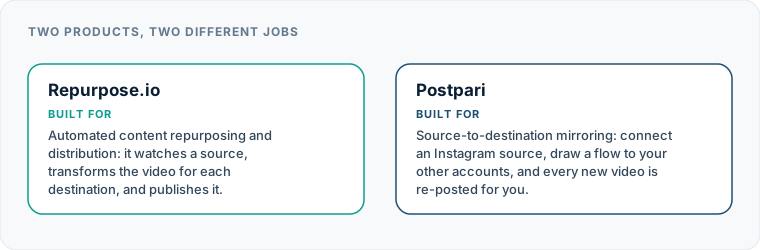
Finding the right Repurpose.io alternatives starts with understanding why your current workflow is no longer working for your publishing pipeline. Repurpose.io is a well-established platform in the creator economy, built primarily to take video and audio assets from one location, apply light transformations, and broadcast them to multiple networks automatically. However, many creators reach a point where the platform no longer fits their operating model.
If you are leaving Repurpose.io because of entry-level pricing or unnecessary feature bloat, your best replacement is either a dedicated automated flow tool like Postpari for hands-off video mirroring, or a traditional post-scheduler like Buffer or Publer if you prefer manual approval calendars.
Why Creators Search for Repurpose.io Alternatives
When creators begin searching for alternatives to Repurpose.io, the motivation usually stems from one of four practical operational friction points rather than complete system failure.
First, the entry price sits noticeably higher than simple scheduling tools. If your publishing routine only requires sending short vertical videos from one primary network to two or three secondary profiles, paying for an enterprise-grade repurposing engine every month is difficult to justify. Repurpose.io sits at the top of the price range among creator-focused automation services at its initial plan level.
Second, feature overlap creates unnecessary complexity. Repurpose.io includes automated asset resizing, watermark removal, audio podcast conversion, image post extraction, and automatic backup routines to cloud providers like Google Drive or Dropbox. If your editing app already handles watermarks and output dimensions before you upload your original short video, you end up paying for processing infrastructure you never use.
Third, profile distribution limits can force creators onto higher tiers before their publishing volume actually requires it. Managing a main account alongside a backup profile or secondary brand channel across multiple platforms often triggers plan upgrades on Repurpose.io that feel steep for single creators.
Fourth, the operational mental model of Repurpose.io can feel confusing. Some creators want a simple set-and-forget bridge that detects a published short video on a primary account and mirrors it directly to destination accounts. Others want a full visual content calendar where they can draft, preview, tweak captions per network, and set explicit delivery times. Repurpose.io occupies an awkward middle ground that can feel too automated for calendar-oriented planners, yet too complex for creators who just want instantaneous channel mirroring.
Identify Your Specific Need Before Picking an Alternative
Before choosing a replacement platform, isolate your primary operational issue. Switching software without identifying the root bottleneck usually results in migrating to a tool with the exact same friction under a different name.
Creators who leave Repurpose.io generally fall into four distinct categories:
- Budget-constrained creators who need the lowest possible overhead to syndicate vertical video across three or four major channels.
- Category-mismatched creators who actually need a visual social media scheduler with calendar previews and per-network text customization rather than an automated syndication engine.
- Multi-profile managers who need to connect secondary accounts, backup channels, or small client profiles without hitting expensive profile cap paywalls.
- Hands-off automation seekers who want direct, source-to-destination posting without logging into a dashboard to manage approval queues or manually trigger releases.
By categorizing your actual requirement, you can navigate the market without paying for features your workflow does not require. You can review our full directory of social media tool alternatives to see how various platforms are classified across these functional categories.
Evaluating Repurpose.io Alternatives When Cost is Your Main Driver
If your primary motivation for switching software is reducing monthly software expenditures, you must look closely at how different software providers structure their pricing tiers. Repurpose.io uses flat monthly or annual plans that cover a fixed bundle of features and output workflows, resulting in a higher cost of entry than per-channel management tools.
If you are looking for a cheaper alternative to Repurpose.io, the market splits into two distinct operational approaches: source-to-destination automation engines and per-channel manual schedulers.
For creators whose strategy relies entirely on short-form video, Postpari provides a targeted alternative. Postpari operates on a dedicated mirroring model: you connect your primary source account—such as Instagram—and draw publishing flows directly to destination accounts like TikTok, YouTube, Facebook Pages, LinkedIn, Pinterest, Threads, X, and Bluesky. Whenever you publish a short video to your Instagram source account, Postpari automatically detects the post and mirrors it across your selected target channels. Because Postpari does not build complex video-rendering servers for watermark removal or long-form podcast slicing, it delivers a direct cross-posting bridge at a lower relative entry tier than Repurpose.io. If you want an in-depth breakdown of how these two workflow models contrast, read our detailed comparison of Postpari and Repurpose.io.
If your budget requires granular control where you only pay for the exact number of channels you use, traditional social media management platforms offer per-profile models:
- Buffer: Buffer allows you to pay exclusively on a per-channel basis. It includes a functional free tier for basic publishing across a limited number of channels, making it an ideal option for creators who only post occasionally and do not require hands-off automatic video mirroring.
- Publer: Publer structures its pricing per connected account and supports an expansive list of networks, including standard social channels alongside platforms like Telegram, Mastodon, and WordPress. Publer includes a free-forever option for small footprints and offers bulk CSV scheduling and link-in-bio tools.
- Metricool: Metricool focuses heavily on analytics and offer a entry plan that covers one complete brand footprint across multiple networks at no cost. It is particularly cost-effective if you need deep performance analytics alongside manual scheduling.
| Tool Name | Core Workflow Model | Ideal For | Key Strengths | Relative Entry Tier Cost |
|---|---|---|---|---|
| Postpari | Direct Source-to-Destination Mirroring | Short-video creators wanting automated cross-posting | Automatic hands-off mirroring from Instagram to 8+ networks, backfill capabilities, main + backup profiles | Low |
| Repurpose.io | Asset Transformation & Syndication | Audio podcasters & long-form video creators | Automatic watermark removal, video aspect ratio resizing, cloud backup (Drive/Dropbox) | High |
| Buffer | Compose & Schedule (Per Channel) | Solopreneurs needing flexible, manual scheduling | Clean visual calendar, per-profile pricing, functional free entry tier | Low |
| Publer | Multi-Channel Scheduling & Recycling | Creators needing wide platform support & CSV imports | Supports niche networks (Mastodon, Telegram, WordPress), post recycling, per-account pricing | Low |
| Metricool | Analytics-Led Scheduling | Creators who prioritize performance tracking | Generous single-brand plan, comprehensive reporting dashboards, visual planning | Low |
| SocialBee | Category-Based Queue Scheduling | Content marketers focused on evergreen content | Content queue categories, post recycling, dedicated agency workspaces | Medium |
| SocialPilot | Agency Multi-Account Management | Small agencies and teams managing client accounts | Includes multiple team seats on standard plans, client management features | Medium |
| Later | Visual Grid Planning | Lifestyle creators & visual brand managers | Instagram grid preview, visual content planning, link-in-bio management | Medium |
When You Are Shopping in the Wrong Category of Social Media Tool
A frequent reason creators grow frustrated with Repurpose.io is that they are using an automated media converter when they actually need a standard publisher. Repurpose.io competitors generally fall into two separate software categories: true automation engines and social media schedulers.
Automation Engines vs. Social Schedulers
An automation engine relies on triggers. You upload media to a primary channel or cloud folder, and the software monitors that source. When new content appears, the system grabs the file, processes it, and publishes it to secondary locations. There is usually no visual monthly calendar, no drafting space, and no unified inbox for comments.
A social scheduler, on the other hand, is built around manual composition and calendar timing. You log into the dashboard, select which networks should receive a post, craft specific captions for each network, pick a date and time on a calendar, and queue the post.
If you leave Repurpose.io because you miss having absolute control over individual post formatting, custom captions per network, and a unified calendar view, you do not need another repurposing engine. You need a dedicated manager. Consult our guide to finding the best social media scheduler to evaluate calendar-focused platforms.
Key traditional scheduling options include:
- Later: Built specifically for visual platforms, Later excels at grid previews for Instagram and visual scheduling. It sells access in profile bundles rather than individual channels and provides link-in-bio tools, though it does not offer a free plan.
- SocialBee: Designed around category queues, SocialBee allows you to assign posts to specific buckets (such as educational tips, promo videos, or blog links) and establish a weekly queue schedule. It is structured around post recycling and category management rather than direct video mirroring.
- SocialPilot: Targeted at growing agencies and multi-brand managers, SocialPilot includes multiple user seats on its standard tiers, making it easier to collaborate with clients or team members without triggering high enterprise costs.
- Hootsuite: Designed for enterprise governance, Hootsuite offers deep security compliance, multi-user approvals, and extensive organizational analytics. Its price point reflects enterprise corporate teams rather than individual video creators.
If your primary objective is simply eliminating the repetitive task of uploading the same short video eight times across different apps, a scheduler adds unnecessary manual work. But if you require custom text, hashtag adjustments, and explicit scheduling for every single channel, migrating to a dedicated scheduler will solve the control issues you faced on Repurpose.io.
Overcoming Account Limits and Profile Multiples
As your social presence expands, managing multiple profiles on the same network becomes a major operational challenge. Creators frequently run a primary brand account alongside a personal account, or maintain a secondary backup channel to protect their reach against sudden account flags or technical lockouts.
Repurpose.io handles account connections by counting overall input and output connections. Once you connect several destination channels alongside multiple source accounts, you quickly hit connection limits that force an upgrade to higher-tier pricing.
If your workflow requires managing multiple profiles on the same network, evaluate how prospective Repurpose.io alternatives handle account scaling:
- Postpari allows creators to connect multiple accounts on the same destination network within its standard workflows. You can set up a primary Instagram account as your content source and draw simultaneous publishing flows to both your main account and a backup account on platforms like TikTok or YouTube. Furthermore, Postpari features a historical backfill tool that allows you to drip previously published Instagram videos out to newly connected destination accounts over time, helping you build up secondary profiles without manual re-uploading. Higher Postpari tiers also support copying public Instagram accounts that you own or manage.
- Publer and Buffer scale linearly by account. If you need to add a second TikTok profile or a second X account, you simply add one more profile seat to your monthly plan, giving you granular control over software overhead.
- SocialPilot includes generous account allowances directly within its baseline plans, making it highly cost-effective if you run five to ten distinct profiles across two or three client brands.
When evaluating a Repurpose.io alternative, calculate the exact number of destination channels and secondary backup accounts you intend to run over the next six months. Choosing a platform that charges heavily for additional profile connections will quickly replicate the pricing pressure that made you leave Repurpose.io.
When You Wanted Hands-Off Automation and Got a Manual Queue
Another common source of friction for Repurpose.io users is the platform’s execution model. Many creators sign up expecting a completely invisible software bridge: post a short video to Instagram, and have it appear on TikTok, YouTube Shorts, and Facebook Pages automatically.
However, depending on how template streams and connection workflows are configured inside Repurpose.io, users often find themselves managing intermediate approval queues, fixing pending workflow errors, or tweaking manual publish triggers within the Repurpose dashboard. Instead of achieving complete hands-off publishing, they end up managing an administrative queue.
If you are looking for true, invisible source-to-destination automation without manual intervention, you must ensure your chosen platform uses event-driven triggering rather than manual draft queues.
In a direct event-driven model—such as the system built into Postpari—the software acts as a listener. You establish your account flows once:
- You designate your primary Instagram account as the content source.
- You map your destination channels (such as TikTok, YouTube, Facebook Pages, Threads, Bluesky, X, LinkedIn, or Pinterest).
- You publish your short vertical video on Instagram using your standard mobile editing and posting routine.
Once published on the source, the software automatically detects the new video, processes the asset, and mirrors it to your connected destination networks based on your flow settings. You never need to log into a secondary web dashboard, approve pending queue items, or manually hit submit.
If your workflow goal is to completely eliminate manual publishing steps across secondary networks, explore our comprehensive roundup of the best cross-posting tools to compare hands-off automation engines against queue-based systems.
What Repurpose.io Does Genuinely Well, and When You Should Stay
While there are valid reasons to search for alternatives to Repurpose.io, the platform remains an industry leader for specific, complex content pipelines. Leaving the platform is not always the right choice, and switching to a simpler tool can sometimes break an existing workflow.
You should stay with Repurpose.io if your operational workflow relies heavily on the following specific capabilities:
1. Built-in Automatic Watermark Removal
If you rely on publishing short videos directly to TikTok or Instagram Reels that contain platform-specific watermarks, Repurpose.io includes automated processing logic designed to strip watermarks before redistributing the asset to other channels. Simpler mirroring bridges like Postpari do not process or alter the underlying video file to remove watermarks; they take the clean video published on your source account and mirror it directly. If your entire workflow depends on uploading watermarked files and relying on your syndication tool to clean them, staying with Repurpose.io is the correct choice. (To maintain maximum visual quality across all networks, the cleanest practice is uploading non-watermarked original files directly from your editing app to your primary account).
2. Automatic Cloud Storage Backups
Repurpose.io functions as an automated backup vault. You can set up workflows that automatically copy every short video, Story, or post published on your social channels and archive the raw video files directly into Google Drive or Dropbox folders. Standard scheduling tools and basic mirroring bridges do not offer cloud storage asset archiving.
3. Long-Form Video and Audio Snippet Repurposing
If you record long-form video podcasts or audio-only episodes, Repurpose.io can automatically convert full-length content into short vertical clips, generate audio waveforms, and format text overlays for short-form social destinations. Purpose-built mirroring tools like Postpari only distribute native short vertical video files directly published to a source profile; they do not slice long-form horizontal videos or convert MP3 audio files into video assets.
4. Automated Image and Stories Repurposing
Repurpose.io supports converting visual Stories and static image posts across selected platform destination flows. If your publishing strategy relies heavily on cross-posting temporary Stories or image carousels across multiple networks automatically, Repurpose.io provides wider format coverage than short-video-focused automation tools.
Making the Final Decision
If you require heavy asset transformation, automated watermark stripping, audio podcast slicing, and cloud archiving, Repurpose.io is built specifically for your needs, and its higher price tag reflects that infrastructure.
However, if your publishing strategy centers on producing high-quality short vertical videos, publishing them to a primary source like Instagram, and getting those videos mirrored automatically across TikTok, YouTube, Facebook Pages, and other platforms without manual software administration or excessive costs, switching to a specialized mirroring engine like Postpari or an affordable scheduler like Buffer or Publer will give you a cleaner, far more cost-effective workflow.
| Feature | Postpari | Buffer | Later | Hootsuite | Metricool |
|---|---|---|---|---|---|
| Starting price | $9/mo | $5/mo | $18.75/mo | $99/mo | Varies by setup |
| Free plan | No | Yes | No | No | Yes |
| Free trial | 7 days | 14 days | 14 days | 14 days | Not advertised |
| Source-triggered mirroring | Yes | Not verified | Not verified | Not verified | Not verified |
| One post to several destinations | Yes | Yes | Yes | Yes | Yes |
| Schedule posts for a chosen time | Yes | Yes | Yes | Yes | Yes |
| Backfills older posts | Yes | Not verified | Not verified | Not verified | Not verified |
| Several accounts on one network | Yes | Yes | Yes | Yes | Yes |
| Reformats content per platform | Not verified | Not verified | Not verified | Not verified | Not verified |
| Removes source watermark | Not verified | Not verified | Not verified | Not verified | Not verified |
| Visual calendar | Not verified | Yes | Yes | Yes | Yes |
| Analytics | Yes | Yes | Yes | Yes | Yes |
| Approval workflows | Not verified | Yes | Not verified | Not verified | Not verified |
| Networks listed | 9 | 11 | 8 | Not published | 11 |
Postpari
Source-to-destination mirroring: connect an Instagram source, draw a flow to your other accounts, and every new video is re-posted for you.
- From
- $9/mo
- Free plan
- No
- Trial
- 7 days
- Source-triggered mirroring
- Yes
- One post to several destinations
- Yes
- Schedule posts for a chosen time
- Yes
- Backfills older posts
- Yes
- Several accounts on one network
- Yes
- Reformats content per platform
- Not verified
- Removes source watermark
- Not verified
- Visual calendar
- Not verified
- Analytics
- Yes
- Approval workflows
- Not verified
Buffer
A classic publishing tool: you write a post, choose the channels and the time, and Buffer sends it.
- From
- $5/mo
- Free plan
- Yes
- Trial
- 14 days
- Source-triggered mirroring
- Not verified
- One post to several destinations
- Yes
- Schedule posts for a chosen time
- Yes
- Backfills older posts
- Not verified
- Several accounts on one network
- Yes
- Reformats content per platform
- Not verified
- Removes source watermark
- Not verified
- Visual calendar
- Yes
- Analytics
- Yes
- Approval workflows
- Yes
Later
A social media management and influencer marketing suite built around planning, scheduling and performance insight.
- From
- $18.75/mo
- Free plan
- No
- Trial
- 14 days
- Source-triggered mirroring
- Not verified
- One post to several destinations
- Yes
- Schedule posts for a chosen time
- Yes
- Backfills older posts
- Not verified
- Several accounts on one network
- Yes
- Reformats content per platform
- Not verified
- Removes source watermark
- Not verified
- Visual calendar
- Yes
- Analytics
- Yes
- Approval workflows
- Not verified
Hootsuite
A broad social media management platform aimed at organisations: publishing, analytics, engagement and team workflow in one place.
- From
- $99/mo
- Free plan
- No
- Trial
- 14 days
- Source-triggered mirroring
- Not verified
- One post to several destinations
- Yes
- Schedule posts for a chosen time
- Yes
- Backfills older posts
- Not verified
- Several accounts on one network
- Yes
- Reformats content per platform
- Not verified
- Removes source watermark
- Not verified
- Visual calendar
- Yes
- Analytics
- Yes
- Approval workflows
- Not verified
Metricool
Analytics-led social media management: measure what happened, plan and schedule what comes next.
- From
- Varies by setup
- Free plan
- Yes
- Trial
- Not advertised
- Source-triggered mirroring
- Not verified
- One post to several destinations
- Yes
- Schedule posts for a chosen time
- Yes
- Backfills older posts
- Not verified
- Several accounts on one network
- Yes
- Reformats content per platform
- Not verified
- Removes source watermark
- Not verified
- Visual calendar
- Yes
- Analytics
- Yes
- Approval workflows
- Not verified
“Not verified” means we could not find the vendor stating it on their own site. It is not a claim that the product cannot do it.
Matching Your Reason for Leaving to the Right Repurpose.io Alternative
When you replace an automation engine, choosing a tool from the wrong operational category leads to immediate frustration. Repurpose.io operates as an event-driven distribution engine: an action on a source platform triggers publishing downstream. Traditional social schedulers operate as queue managers, requiring you to draft, drop, and time every update manually.
To select the right repurpose.io alternative, identify your single biggest operational bottleneck and match it directly against tools designed for that exact architecture.
Feature and Workflow Match Matrix
| Reason for Leaving Repurpose.io | Primary Operational Requirement | Ideal Replacement Tool | Key Functional Trade-off |
|---|---|---|---|
| Want true “set-it-and-forget-it” video mirroring | Hands-off video distribution from Instagram to destination feeds | Postpari | Mirroring applies to short-form video from Instagram sources; no visual calendar |
| Need visual planning, drafting, and social analytics | Calendar grid, caption drafting, and performance reporting | Buffer or Later | Replaces automatic triggering with manual scheduling queues |
| Managing multiple client accounts and agency approval flows | Multi-seat governance, client permission tiers, and team sign-offs | SocialPilot or Hootsuite | Requires higher manual oversight per client account |
| Need broad network reach (Telegram, WordPress, Mastodon) | Multi-destination publishing beyond main video networks | Publer | Relies on bulk CSV uploads and queue-based recycling |
| Need evergreen content recycling queues | Category-based scheduling slots for rotating old posts | SocialBee | Built for static text/link post rotation rather than video mirroring |
If your goal is to publish once on Instagram and let downstream channels update automatically without logging into a dashboard, a dedicated short-form video automation tool fits best. If you need fine-grained control over captions, posting calendars, or client approvals, you should transition to a compose-and-schedule platform.
For creators whose primary frustration is managing multi-platform distribution without manual uploads, exploring direct social media cross-posting engines resolves the core friction without adding administrative overhead.
What You Give Up When You Move to Repurpose.io Competitors
Switching off an established platform always involves trade-offs. While shifting away solves specific pain points like tier pricing or platform glitches, you will lose specific native capabilities when migrating to repurpose.io competitors.
Automated File Archiving
Repurpose.io automatically routes uploaded video files directly to cloud storage accounts like Google Drive or Dropbox as part of its execution path. Most scheduling and cross-posting tools do not double as file backup utilities. When you switch, you must set up separate file storage rules or back up master video files manually before publishing.
Native Image and Story Repurposing
If your workflow relies on redistributing still images, image carousels, or Instagram Stories across channels, moving to pure video-mirroring tools will narrow your output. Specialized short-form video tools focus exclusively on short video feeds. If image repurposing is essential, you will need a traditional calendar tool like Buffer, Publer, or Later.
Automatic Watermark Processing
Repurpose.io strips platform watermarks as part of its automated pipeline. If you migrate to standard scheduling tools, you must store clean, unwatermarked master clips on your local device or cloud storage, then upload those clean assets directly into your new queue.
Trigger-Based Video Flow
Traditional schedulers require manual intervention: you upload a file, write captions for each channel, select a calendar slot, and queue the post. Moving from automated trigger flows back to a calendar management tool increases hands-on administrative time per post. Before moving to a general compose-and-schedule system, evaluate whether your operational model can absorb the extra steps of operating a traditional best social media scheduler.
How to Migrate Active Workflows to a New Repurpose IO Alternatives Setup
Transitioning off an active automation engine requires systematic execution. Deactivating workflows abruptly can result in missed posts, broken account connections, or duplicate uploads across downstream accounts. Follow this sequence when moving to your new repurpose io alternatives setup.
Step 1: Document Your Current Source-to-Destination Map
Catalog every active workflow inside your existing dashboard. Note the trigger source (such as your main Instagram feed), all destination channels (TikTok, YouTube Shorts, Facebook Page, LinkedIn), and any active conditional rules.
Step 2: Audit and Revoke Unused Platform Permissions
Navigate to the account security settings of each connected platform. Revoke old API tokens and third-party access permissions for tools you no longer use. Clean permission settings prevent background API conflicts when establishing connections with your new tool.
Step 3: Establish Your Primary Connections
Connect your source and destination accounts inside your replacement tool. If you choose Postpari, connect your Instagram source profile alongside your destination accounts on TikTok, YouTube, Facebook Page, LinkedIn, Pinterest, Threads, X, or Bluesky. Ensure destination connections target business assets correctly—for example, pointing to a Facebook Page rather than a personal profile.
Step 4: Test Distribution with a Single Clip
Before enabling continuous publishing across all feeds, execute a live test post. Publish a video on your source account and verify how the destination channels render the video, title, and formatting. Confirm that aspect ratios look correct and captions present clean text without cutoffs.
Step 5: Configure Historical Backfill
If your replacement tool supports content backfill, configure it to publish historical posts gradually. Avoid triggering mass publishing spikes, which look unnatural on destination feeds. If you want to systematically recycle evergreen media assets, look into specialized tools designed to republish old social media posts on a controlled schedule.
Auditing Your Stack: When Staying Put Beats Switching Tools
Migrating tools carries real operational costs in setup time, account re-authentication, and workflow testing. Before cancelling your existing setup, run a sober audit of your publishing needs. In several distinct operational scenarios, remaining on Repurpose.io is the pragmatic choice.
You Rely Heavily on Cloud Storage Integrations
If your media management relies on raw video assets automatically backing up to Google Drive or Dropbox immediately after publishing, staying put avoids adding secondary file management tools. Most alternative schedulers do not offer cloud backup as an integrated post-action.
You Frequently Re-Distribute Stories and Static Formats
While video dominates short-form reach, creators who regularly publish graphics, photo carousels, and Instagram Stories across multiple networks benefit from Repurpose.io’s broader format support. Direct short-form video engines will not process still images or carousel posts.
You Prefer Fine-Grained Video Trimming and Custom Captions
If you depend on built-in snippet editors, custom video cropping rules, and unique per-destination text modifications directly within your repurposing engine, Repurpose.io provides built-in tools for those tasks. Pure mirroring tools, by contrast, mirror source content downstream as published, prioritizing speed and automation over granular post-by-post editing.
If your primary goal is simple, automated short-form video mirroring from an Instagram source to destination channels—without needing complex editing suites or multi-user agency permissions—testing dedicated video routing engines makes sense. Reviewing our in-depth Postpari review shows how target-driven mirroring compares against broad management suites.
Pre-Commitment Checklist Before Replacing Your Automation Engine
Before committing to any new automation or scheduling platform, run through this practical checklist to catch operational mismatches before paying for an account.
1. Verify Destination Account Types
Ensure the replacement software supports the exact account types you publish to. For example, Meta API constraints mean many tools—including Postpari—can publish directly to a Facebook Page but cannot publish automatically to a personal Facebook profile. Verify whether your destination targets require Page, Business, or Personal account authentication.
2. Evaluate Video Formatting and Asset Handling
Short-form platforms require specific vertical aspect ratios and video parameters. Confirm that your replacement engine maintains original video quality, handles audio tracks without sync drift, and preserves high-definition uploads across destinations. If vertical video publishing is your main engine, test the platform specifically as a short-form video scheduler to verify file rendering.
3. Review Fair-Use Limits and Volume Caps
Different platforms handle high-volume publishing through varying speed limits and daily caps. Check whether the replacement tool enforces daily posting thresholds per source account or charges per connected social profile. Understanding fair-use caps prevents unexpected queue stalls during high-frequency posting campaigns.
4. Test Multi-Account Handling
If you run multiple profiles on the same network—such as a primary brand account alongside a backup or sub-brand profile—confirm that the software allows duplicate platform connections under a single account.
Running these checks beforehand ensures your replacement tool handles your daily posting volume without disrupting your content distribution rhythm.
Frequently asked questions
What is the main difference between Repurpose.io and Postpari?
Repurpose.io is an asset transformation platform that includes features like video resizing, watermark removal, audio snippet conversion, and cloud storage backups to Google Drive or Dropbox. Postpari is a dedicated source-to-destination mirroring tool designed specifically to detect short videos published on a primary Instagram source account and automatically post them to destination channels like TikTok, YouTube, Facebook Pages, and Bluesky without manual queue management.
Are there free alternatives to Repurpose.io available?
Yes, platforms like Buffer, Publer, and Metricool offer free-forever tiers that support scheduling content across a limited number of social profiles. While these free plans require you to manually draft and schedule your posts rather than using fully automated source-to-destination video mirroring, they offer an effective way to manage multiple accounts without software overhead.
Does cross-posting short video content hurt reach on secondary social networks?
No social media platform publishes algorithms that explicitly penalize cross-posted content simply for appearing on multiple networks. However, posts can perform worse if they contain visible watermarks from competing platforms, incorrect aspect ratios, or caption text tailored specifically to a different platform's features. Uploading clean, unwatermarked vertical videos ensures consistent performance across all destination accounts.
Can I use Repurpose.io alternatives to post short videos to Facebook personal profiles?
No, automated cross-posting and scheduling tools publish video content to Facebook Pages rather than personal Facebook profiles. Meta's official publishing APIs restrict third-party automated tools from publishing short video content directly to personal profiles.
How do per-channel schedulers differ from automated cross-posting engines?
Per-channel schedulers like Buffer, Later, and SocialPilot require you to log into a calendar dashboard, select destination accounts, write custom text, and manually schedule a publishing time for each post. Automated cross-posting engines like Postpari listen to your primary source profile and mirror new short videos directly to secondary destination channels automatically whenever you publish new content.
Will switching away from Repurpose.io stop my automated posting immediately?
Deactivating your Repurpose.io account or disconnecting its API permissions will immediately stop background triggers from firing. Existing scheduled posts queued directly inside destination networks may still go live, but no new posts will mirror automatically until you set up your replacement engine.
Can alternative tools automatically remove TikTok watermarks when re-uploading videos?
Most traditional social media schedulers and cross-posting tools do not strip watermarks on the fly during transfer. To keep downstream videos clean, post your original unwatermarked media file to your primary source platform (like Instagram) or save master video files directly to local storage before publishing.
Can I cross-post videos to a personal Facebook profile using Repurpose.io alternatives?
Due to Meta platform restrictions, almost all automated publishing tools can only distribute content directly to Facebook Pages or connected business assets, not personal Facebook profiles. If your workflow requires posting to a personal profile, you must upload that content manually through the native Facebook app.