Post Planner Alternatives: What to Switch To, and Why
Prices and features last checked: August 2026 · Sources: postpari.com , postpari.com , postpari.com , repurpose.io , repurpose.io , buffer.com , later.com , later.com , hootsuite.com
BestCrossPosting.com is operated by the team behind Postpari. We benefit when readers sign up, so treat our Postpari recommendations as the recommendations of an interested party — and check our claims against the sources we link. Full disclosure · How we compare products
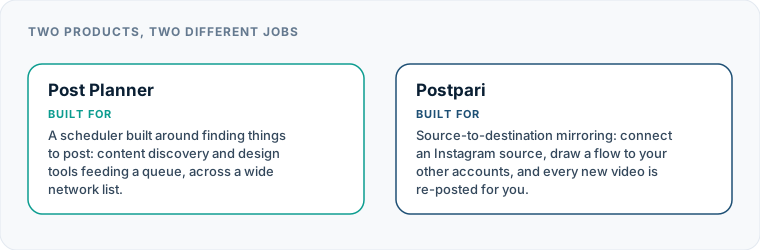
Finding the right post planner alternatives depends on whether you need a simpler social media scheduler, lower pricing, or an automated pipeline that mirrors your content without manual queuing. If you already create your own short videos and simply want them republished across all your channels automatically, automated source-to-destination tools offer a faster solution than traditional content-discovery planners. Switching software makes sense when the features you pay for no longer match how you actually produce and publish social media content.
Many creators and business owners sign up for Post Planner expecting a straightforward way to keep multiple profiles active. Over time, however, many find themselves paying for media curation engine features they do not use, or spending hours manually uploading clips into a scheduling queue that could be automated. Understanding why you are leaving helps you choose a replacement that solves your actual publishing bottlenecks.
Why Content Creators Look for Post Planner Alternatives
Post Planner built its reputation on two main features: finding content to share and scheduling that content into a queued calendar. For brands that do not create original media and rely on curating third-party articles or viral quotes, that model works well. But as social networks have shifted heavily toward original short-form video, many users find that Post Planner no longer fits their daily routine.
Unused Content Discovery and Design Features
If you produce your own videos or graphics, Post Planner’s built-in discovery engine, content recommendation scoring, and Canva integrations become redundant. You are paying for a media research library when all you really need is a reliable destination for finished media files. Paying a subscription that includes content discovery tools you never open is a clear sign that you need a simpler post planner alternative.
Steep Tier Jumps as Profile Counts Grow
Another common point of friction is how Post Planner scales its subscription pricing. The entry tier works for a minimal setup, but adding a few extra social profiles or team seats forces a jump to a significantly more expensive plan. If you manage a secondary brand, a backup account, or several platform profiles, these tier jumps can quickly make the software poor value compared to per-channel or per-brand alternatives.
Queue Maintenance Versus Continuous Automation
Post Planner operates on a traditional queue system: you upload content, set time slots, and assign posts to specific categories. Once the queue runs dry, your profiles go dark until you manually load more content. For creators who post daily on a primary platform like Instagram, repeatedly uploading those same videos into a separate scheduling dashboard is tedious. Many users leave because they want a continuous pipeline that detects new uploads on a primary platform and handles distribution automatically.
| Feature | Postpari | Repurpose.io | Buffer | Later | Hootsuite |
|---|---|---|---|---|---|
| Starting price | $9/mo | $35/mo | $5/mo | $18.75/mo | $99/mo |
| Free plan | No | Yes | Yes | No | No |
| Free trial | 7 days | 14 days | 14 days | 14 days | 14 days |
| Source-triggered mirroring | Yes | Yes | Not verified | Not verified | Not verified |
| One post to several destinations | Yes | Yes | Yes | Yes | Yes |
| Schedule posts for a chosen time | Yes | Yes | Yes | Yes | Yes |
| Backfills older posts | Yes | Not verified | Not verified | Not verified | Not verified |
| Several accounts on one network | Yes | Yes | Yes | Yes | Yes |
| Reformats content per platform | Not verified | Yes | Not verified | Not verified | Not verified |
| Removes source watermark | Not verified | Yes | Not verified | Not verified | Not verified |
| Visual calendar | Not verified | Not verified | Yes | Yes | Yes |
| Analytics | Yes | Not verified | Yes | Yes | Yes |
| Approval workflows | Not verified | Not verified | Yes | Not verified | Not verified |
| Networks listed | 9 | 12 | 11 | 8 | Not published |
Postpari
Source-to-destination mirroring: connect an Instagram source, draw a flow to your other accounts, and every new video is re-posted for you.
- From
- $9/mo
- Free plan
- No
- Trial
- 7 days
- Source-triggered mirroring
- Yes
- One post to several destinations
- Yes
- Schedule posts for a chosen time
- Yes
- Backfills older posts
- Yes
- Several accounts on one network
- Yes
- Reformats content per platform
- Not verified
- Removes source watermark
- Not verified
- Visual calendar
- Not verified
- Analytics
- Yes
- Approval workflows
- Not verified
Repurpose.io
Automated content repurposing and distribution: it watches a source, transforms the video for each destination, and publishes it.
- From
- $35/mo
- Free plan
- Yes
- Trial
- 14 days
- Source-triggered mirroring
- Yes
- One post to several destinations
- Yes
- Schedule posts for a chosen time
- Yes
- Backfills older posts
- Not verified
- Several accounts on one network
- Yes
- Reformats content per platform
- Yes
- Removes source watermark
- Yes
- Visual calendar
- Not verified
- Analytics
- Not verified
- Approval workflows
- Not verified
Buffer
A classic publishing tool: you write a post, choose the channels and the time, and Buffer sends it.
- From
- $5/mo
- Free plan
- Yes
- Trial
- 14 days
- Source-triggered mirroring
- Not verified
- One post to several destinations
- Yes
- Schedule posts for a chosen time
- Yes
- Backfills older posts
- Not verified
- Several accounts on one network
- Yes
- Reformats content per platform
- Not verified
- Removes source watermark
- Not verified
- Visual calendar
- Yes
- Analytics
- Yes
- Approval workflows
- Yes
Later
A social media management and influencer marketing suite built around planning, scheduling and performance insight.
- From
- $18.75/mo
- Free plan
- No
- Trial
- 14 days
- Source-triggered mirroring
- Not verified
- One post to several destinations
- Yes
- Schedule posts for a chosen time
- Yes
- Backfills older posts
- Not verified
- Several accounts on one network
- Yes
- Reformats content per platform
- Not verified
- Removes source watermark
- Not verified
- Visual calendar
- Yes
- Analytics
- Yes
- Approval workflows
- Not verified
Hootsuite
A broad social media management platform aimed at organisations: publishing, analytics, engagement and team workflow in one place.
- From
- $99/mo
- Free plan
- No
- Trial
- 14 days
- Source-triggered mirroring
- Not verified
- One post to several destinations
- Yes
- Schedule posts for a chosen time
- Yes
- Backfills older posts
- Not verified
- Several accounts on one network
- Yes
- Reformats content per platform
- Not verified
- Removes source watermark
- Not verified
- Visual calendar
- Yes
- Analytics
- Yes
- Approval workflows
- Not verified
“Not verified” means we could not find the vendor stating it on their own site. It is not a claim that the product cannot do it.
How to Choose the Best Post Planner Alternatives for Your Strategy
Rather than picking a replacement from a top-ten list, start by identifying the exact operational bottleneck in your current workflow. The market for publishing tools has divided into distinct specialized software categories, each built for a different type of user.
To examine how the broader market splits across these categories, you can review our index of social media management software alternatives.
+------------------------+----------------------------------+--------------------------------------+ | Tool Category | Primary Mechanism | Ideal For | +------------------------+----------------------------------+--------------------------------------+ | Curation & Recycling | Category queues & content discovery| Content curators, blog syndication | | Visual Schedulers | Media calendars & grid planning | Visual brands, visual storefronts | | Multi-Channel Schedulers| Manual drag-and-drop calendars | Agencies, multi-brand managers | | Automated Cross-Posters| Source-to-destination mirroring | Original video and short-form creators| +------------------------+----------------------------------+--------------------------------------+
Before committing to a new subscription, ask yourself three questions:
- Do you need a dashboard to write captions and pick post times, or do you just want your published content copied elsewhere?
- Are you paying per social account, per brand, or per team user seat?
- Do you need advanced features like approval workflows and social inboxes, or just publishing reliability?
Evaluating Cheaper Alternatives to Post Planner
If subscription cost is your main reason for leaving Post Planner, your best move is to switch to a platform with a pricing structure matched to your team size and account volume. Post Planner’s middle-tier price jumps often penalize users who only need to add one or two additional accounts.
Buffer for Pay-Per-Channel Scalability
Buffer remains a strong cheaper alternative to post planner for small setups because of its per-channel pricing model. Instead of forcing you into a higher plan tier with fixed account buckets, Buffer lets you pay a small fee per connected channel. It includes a functional visual calendar, channel-specific caption adjustments, and simple performance analytics. Buffer also offers a permanent free tier for basic needs, making it economical if you only manage three or four active channels.
Metricool for Multi-Channel Brand Management
Metricool takes a brand-centric approach to pricing rather than charging per individual profile. Its free tier accommodates a single brand across multiple platform profiles, making it an affordable alternative if you manage one business across several networks. Beyond basic scheduling, Metricool provides analytics-led management and post performance monitoring, giving you full reporting without requiring an enterprise budget.
Publer for Flexible Account Scaling
Publer offers a wide network list, supporting platforms like Mastodon, Telegram, and WordPress alongside standard social networks. It uses a flexible pricing model based on the exact number of connected accounts you use. Publer includes bulk CSV scheduling, link-in-bio management, post recycling, and a free-forever tier. It is a practical choice if you need to schedule content across non-standard channels without paying for high-tier agency software.
When You Need Different Categories of Social Media Schedulers
Sometimes the problem is not the price tag, but the type of tool you are using. Post Planner sits squarely in the content curation and evergreen recycling category. If your strategy relies on visual branding, multi-network coordination, or agency client management, switching to a different tool category will yield better results.
If you are looking for a straightforward manual planning workflow, check out our guide to the best social media scheduler options on the market.
Visual Planners: Later
If your focus is aesthetic grid layout, visual media organization, and link-in-bio marketing, Later is a dedicated visual planning tool. Sold in profile bundles, Later emphasizes visual preview grids and asset organization. It lacks a permanent free plan, but for businesses focused on visual brand standards, its drag-and-drop calendar provides a far better workspace than Post Planner’s text-centric queue.
Enterprise and Agency Platforms: SocialPilot and Hootsuite
If you manage social presence for clients, Post Planner lacks the administrative governance required for professional workflows.
- SocialPilot is built for growing agencies, bundling several user seats and dozens of client profiles into its baseline plans. It provides team approval workflows, client management tools, and bulk content scheduling without forcing per-user seat penalties.
- Hootsuite caters to larger enterprise organizations where regulatory compliance, internal permissioning, complex approval workflows, and extensive reporting are critical. It is significantly more expensive at entry, but provides the governance features that small-business schedulers lack.
Switching Tools When Account and Profile Caps Hold You Back
Running into strict profile limits is a frustrating barrier for growing creators. Many platforms force you into a top-tier agency subscription just because you manage a main account and a backup account on the same network, or because you need to publish to multiple platform pages.
When evaluating best post planner alternatives, pay close attention to how each vendor handles account caps and profile types.
Managing Multiple Accounts on the Same Platform
If you manage multiple accounts on a single network—such as an main brand profile alongside an alternate or backup account—standard schedulers often charge steep upgrades for the extra connections. Tools like SocialPilot and Publer are structured to handle multiple accounts smoothly.
Similarly, Postpari allows you to connect multiple accounts on the same platform, enabling creators to run a main profile and a secondary backup profile side by side. For business workflows, Postpari handles Facebook publishing directly to a designated Page rather than a personal profile, ensuring your professional presence remains separated from personal accounts.
Avoiding Seat Expansion Traps
Many platforms charge steep fees when you add team members, even if those team members only need to view the publishing queue. If account limits are your primary issue, choosing tools like SocialPilot (which includes multiple seats by default) or tools that focus entirely on automated distribution without seat fees will protect your software budget as your business grows.
Replacing Manual Queues with Automatic Source-to-Destination Mirroring
For creators who produce original content, the biggest operational flaw of Post Planner is its reliance on manual queuing. You record a short video, upload it to Instagram, and then have to log into Post Planner, re-upload the same video, write the caption again, and pick a scheduled time for your other accounts. This double-handling of media is a major waste of time.
If your core strategy is syndicating original short-form video, explore our full review of the best cross-posting tools designed for automated workflows.
Source-to-Destination Cross-Posting
Automated mirroring replaces the manual calendar queue with a direct pipeline. Instead of logging into a scheduling dashboard, you publish your content directly on your primary platform (such as Instagram). The cross-posting software detects your new upload and automatically republishes it across your destination channels.
+-----------------------+ +------------------+ +-----------------------+ | Primary Source | ---> | Automated Engine| ---> | Destination Channels | | (e.g., Instagram) | | (e.g., Postpari)| | TikTok, YouTube, X, | +-----------------------+ +------------------+ | Threads, Bluesky, | | Facebook Page, etc. | +-----------------------+
This model provides several distinct operational advantages:
- Zero Dashboard Time: You never open a scheduling calendar to post your routine daily content.
- Instant Syndication: Your videos publish to secondary channels immediately or according to continuous mirroring rules.
- Multi-Network Reach: Content moves from your primary account to platforms including TikTok, YouTube, Facebook Pages, LinkedIn, Pinterest, Threads, X, and Bluesky without manual intervention.
Automated Tool Comparison: Postpari and Repurpose.io
When looking at automated post planner competitors, two dedicated platforms lead the space for source-to-destination distribution:
- Postpari: Designed specifically for pure source-to-destination mirroring. You establish a flow connecting your source account (such as Instagram) to your target networks. When you post a new video on Instagram, Postpari picks it up and republishes it across your target profiles automatically. It offers backfill capabilities to drip older published videos to newly connected destinations over time, subject to fair-use daily mirroring limits.
- Repurpose.io: A powerful distribution engine built for complex media manipulation. Repurpose.io advertises automatic video resizing, watermark removal, audio podcast conversion, and automatic backups to cloud storage like Google Drive or Dropbox. It handles image and Stories repurposing and offers both instant distribution and scheduled queues. However, Repurpose.io has a higher entry cost than most creator-focused tools.
To see how direct mirroring compares to traditional queue planners, read our detailed Postpari vs Post Planner comparison.
What Post Planner Does Right and When You Should Keep It
Switching software takes effort, and Post Planner is still the correct choice for specific operational models. You should keep Post Planner if your daily workflow depends on its core strengths:
1. You Depend on Built-In Content Discovery
If you do not produce original video or image assets and instead rely on finding trending articles, RSS feeds, and viral images to keep your feeds active, Post Planner’s discovery engine is genuinely useful. Replacing it with a standard scheduler or an automated mirror will leave you without a content sourcing system.
2. You Use Category-Based Evergreen Content Recycling
Post Planner allows you to create specific content buckets (e.g., “Motivational Quotes” on Monday, “Blog Links” on Wednesday) and recycle that media indefinitely. If your marketing strategy relies heavily on re-sharing evergreen blog posts and text quotes on a loop, Post Planner handles this out of the box.
3. You Rely on In-App Graphic Creation
If your workflow involves opening Post Planner, using its Canva integration to design a quick tip graphic, and immediately queuing it into your calendar, staying with Post Planner makes sense. Schedulers that lack integrated media editors or automated mirroring tools will require extra steps to design and upload your files.
However, if you are tired of manually feeding a queue, paying for unused discovery engines, or struggling with account limits, moving to a targeted alternatives to post planner will save you time and lower your monthly software bills.
Frequently asked questions
What is the main reason creators switch away from Post Planner?
Creators typically switch because they generate their own original content and no longer need Post Planner's built-in content discovery tools. Paying for an asset-finding engine and manually uploading videos into a queue becomes inefficient compared to automated cross-posting.
Are there cheaper post planner alternatives for small businesses?
Yes, platforms like Buffer and Metricool offer lower entry costs for small setups. Buffer charges a flexible per-channel rate with a functional free tier, while Metricool offers a free plan that manages an entire brand across multiple networks without high subscription tiers.
What is the difference between a social media scheduler and automated cross-posting?
A social media scheduler requires you to log into a dashboard, upload media files, write captions, and assign posting times manually. Automated cross-posting connects your primary account directly to destination accounts, automatically republishing new posts without requiring manual dashboard uploads.
Can automated cross-posting tools handle multiple profiles on the same network?
Yes, dedicated automation tools like Postpari allow you to connect multiple accounts on the same platform, such as managing both a primary brand profile and a backup profile. It also publishes Facebook content directly to professional Facebook Pages rather than personal accounts.
When is it better to stay with Post Planner instead of switching?
Staying with Post Planner is the right call if your strategy relies on curating third-party articles, using built-in Canva integrations to design graphics, or endlessly recycling evergreen text and quote posts through category-based queue buckets.