Buffer Alternatives: What to Switch To, and Why
Prices and features last checked: August 2026 · Sources: postpari.com , postpari.com , postpari.com , repurpose.io , repurpose.io , later.com , later.com , hootsuite.com , metricool.com
BestCrossPosting.com is operated by the team behind Postpari. We benefit when readers sign up, so treat our Postpari recommendations as the recommendations of an interested party — and check our claims against the sources we link. Full disclosure · How we compare products
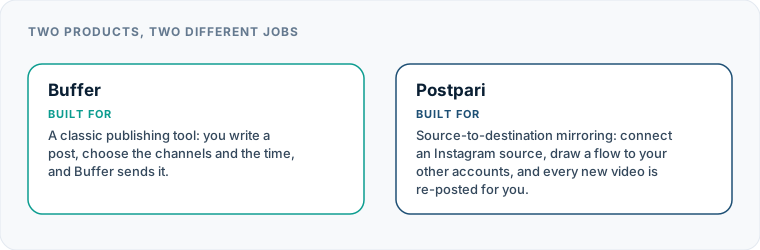
Finding the right Buffer alternatives depends entirely on why you are planning to leave standard social media scheduling behind. If your channel lineup is expanding, per-account fees escalate rapidly, and manual queuing becomes a daily chore, switching to a dedicated auto-publishing system or a flat-rate brand manager will save you hours every week.
Buffer pioneered the simple draft-and-queue model for social publishing. For years, its clean interface and straightforward post queues made it the default choice for solo creators and small businesses. However, publishing workflows have changed. Content creators and marketers increasingly rely on high-volume short video distribution, continuous multi-platform posting, and automated syndication. When you find yourself logging into an app every single day just to drag the exact same video file into five separate platform queues, the traditional scheduling model turns into a manual bottleneck.
Evaluating a Buffer alternative requires matching your specific operational headache to the right class of tool. Whether you are hitting account limits, paying too much for additional channels, or spending hours on manual re-uploading, alternative platforms offer focused solutions designed around modern posting workflows.
Why Creators and Businesses Look for Alternatives to Buffer
While Buffer remains a popular choice for straightforward scheduling, users frequently reach a tipping point where the software no longer aligns with their operational realities. Identifying your primary point of friction helps determine which platform should take its place.
Per-Channel Pricing Escalation
Buffer charges a recurring fee per connected social channel. When you manage a single brand across three core platforms, the monthly outlay remains modest. However, modern social strategy often requires presence across a wide spectrum of networks, including Instagram, TikTok, YouTube, Facebook, LinkedIn, Threads, Pinterest, X, and Bluesky.
As you expand your reach, adding extra channels instantly multiplies your monthly bill—even if you are publishing the exact same content across every endpoint. For creators managing multiple brands or separate main and backup accounts, per-channel pricing becomes prohibitively expensive.
The Queue Overhead Problem
Buffer is built around manual assembly. You write a caption, attach media, select specific accounts, adjust time slots, and place the post into a queue. Doing this once for a unique announcement makes sense. Doing this eight times a day for a single short video does not.
If your content strategy revolves around publishing short vertical video reels or clips, spending hours loading queues across different networks is an inefficient use of time. Creators leaving Buffer often realize they do not want a better queue; they want automation that eliminates the queue entirely.
Free Plan Ceilings
The free tier offered by Buffer is useful for test drives, but it comes with strict structural ceilings. Once you reach the maximum allowed channels or queued posts per profile, the platform prompts you to upgrade. If your publishing volume grows even slightly, you are pushed into paid tiers where per-channel billing takes effect immediately.
Outgrowing Basic Scheduling
Some users leave Buffer not because it costs too much, but because their organizational needs outgrow basic post queueing. Teams managing dozens of client accounts often require agency workspaces, white-label options, client approvals, deep comparative analytics, or complex content recycling systems that Buffer was never built to handle.
| Feature | Postpari | Repurpose.io | Later | Hootsuite | Metricool |
|---|---|---|---|---|---|
| Starting price | $9/mo | $35/mo | $18.75/mo | $99/mo | Varies by setup |
| Free plan | No | Yes | No | No | Yes |
| Free trial | 7 days | 14 days | 14 days | 14 days | Not advertised |
| Source-triggered mirroring | Yes | Yes | Not verified | Not verified | Not verified |
| One post to several destinations | Yes | Yes | Yes | Yes | Yes |
| Schedule posts for a chosen time | Yes | Yes | Yes | Yes | Yes |
| Backfills older posts | Yes | Not verified | Not verified | Not verified | Not verified |
| Several accounts on one network | Yes | Yes | Yes | Yes | Yes |
| Reformats content per platform | Not verified | Yes | Not verified | Not verified | Not verified |
| Removes source watermark | Not verified | Yes | Not verified | Not verified | Not verified |
| Visual calendar | Not verified | Not verified | Yes | Yes | Yes |
| Analytics | Yes | Not verified | Yes | Yes | Yes |
| Approval workflows | Not verified | Not verified | Not verified | Not verified | Not verified |
| Networks listed | 9 | 12 | 8 | Not published | 11 |
Postpari
Source-to-destination mirroring: connect an Instagram source, draw a flow to your other accounts, and every new video is re-posted for you.
- From
- $9/mo
- Free plan
- No
- Trial
- 7 days
- Source-triggered mirroring
- Yes
- One post to several destinations
- Yes
- Schedule posts for a chosen time
- Yes
- Backfills older posts
- Yes
- Several accounts on one network
- Yes
- Reformats content per platform
- Not verified
- Removes source watermark
- Not verified
- Visual calendar
- Not verified
- Analytics
- Yes
- Approval workflows
- Not verified
Repurpose.io
Automated content repurposing and distribution: it watches a source, transforms the video for each destination, and publishes it.
- From
- $35/mo
- Free plan
- Yes
- Trial
- 14 days
- Source-triggered mirroring
- Yes
- One post to several destinations
- Yes
- Schedule posts for a chosen time
- Yes
- Backfills older posts
- Not verified
- Several accounts on one network
- Yes
- Reformats content per platform
- Yes
- Removes source watermark
- Yes
- Visual calendar
- Not verified
- Analytics
- Not verified
- Approval workflows
- Not verified
Later
A social media management and influencer marketing suite built around planning, scheduling and performance insight.
- From
- $18.75/mo
- Free plan
- No
- Trial
- 14 days
- Source-triggered mirroring
- Not verified
- One post to several destinations
- Yes
- Schedule posts for a chosen time
- Yes
- Backfills older posts
- Not verified
- Several accounts on one network
- Yes
- Reformats content per platform
- Not verified
- Removes source watermark
- Not verified
- Visual calendar
- Yes
- Analytics
- Yes
- Approval workflows
- Not verified
Hootsuite
A broad social media management platform aimed at organisations: publishing, analytics, engagement and team workflow in one place.
- From
- $99/mo
- Free plan
- No
- Trial
- 14 days
- Source-triggered mirroring
- Not verified
- One post to several destinations
- Yes
- Schedule posts for a chosen time
- Yes
- Backfills older posts
- Not verified
- Several accounts on one network
- Yes
- Reformats content per platform
- Not verified
- Removes source watermark
- Not verified
- Visual calendar
- Yes
- Analytics
- Yes
- Approval workflows
- Not verified
Metricool
Analytics-led social media management: measure what happened, plan and schedule what comes next.
- From
- Varies by setup
- Free plan
- Yes
- Trial
- Not advertised
- Source-triggered mirroring
- Not verified
- One post to several destinations
- Yes
- Schedule posts for a chosen time
- Yes
- Backfills older posts
- Not verified
- Several accounts on one network
- Yes
- Reformats content per platform
- Not verified
- Removes source watermark
- Not verified
- Visual calendar
- Yes
- Analytics
- Yes
- Approval workflows
- Not verified
“Not verified” means we could not find the vendor stating it on their own site. It is not a claim that the product cannot do it.
Choosing the Right Buffer Alternatives Based on Your Specific Needs
Instead of sifting through generic lists of best Buffer alternatives, start by analyzing your specific workflow bottleneck. Social media management tools have diverged into specialized categories, and choosing the wrong tool category will leave you just as frustrated as you were before.
Your Workflow Bottleneck ───► Preferred Tool Category ─────────────────────────────────────────────────────────────────── High per-channel costs ───► Brand-based or flat-rate tools Manual post copying ───► Source-to-destination automation engines Multi-client management ───► Agency-focused workspaces & approvals Evergreen content decay ───► Category-based recycling schedulers
Before committing to a new subscription, ask yourself three basic questions:
- Are you publishing unique content per platform, or identical content everywhere? If every platform gets a tailored caption and standalone strategy, look for traditional schedulers with brand-focused pricing. If you publish short video clips across every platform, look for hands-off syndication engines.
- How many accounts do you manage? If you manage dozens of accounts across multiple client brands, individual channel billing will break your software budget. Seek out platforms built for agency scale.
- Do you need approvals and reporting, or raw publishing speed? Internal brand teams need approval workflows and clean PDF reports for stakeholders. Independent creators and lean teams generally prefer fast publishing and minimal click overhead.
For a broader overview of how different systems structure their features, you can read our master guide to the best cross-posting tools.
Evaluating Cheaper Alternatives to Buffer When Costs Scale Up
If your main motivation for leaving is financial, look for Buffer competitors that charge by brand bundles or offer lower costs per connected account. A cheaper alternative to Buffer should lower your software expenses while maintaining or expanding your total account capacity.
Metricool: Brand-Based Tiers for Multi-Network Users
Metricool approaches pricing differently than Buffer. Rather than billing for every individual social account you connect, Metricool structures its pricing around full brand profiles. A single brand bundle allows you to connect a set of social accounts representing that brand across multiple platforms.
This model is particularly advantageous for businesses operating across six or seven networks under a single brand identity. Instead of paying six or seven individual channel fees, you pay for the overall brand container. Metricool also provides an analytics-led dashboard and a free tier for a single brand, making it an attractive option for budget-conscious creators who want comprehensive analytics alongside scheduling.
Publer: High Account Volume and Multi-Network Coverage
Publer stands out for supporting an extensive list of connected networks, including major platforms like Instagram, TikTok, Facebook, and YouTube, alongside secondary or niche networks like Telegram, WordPress, and Mastodon.
For users seeking alternatives to Buffer that lower per-account expansion costs, Publer offers flexible account packages, bulk publishing via CSV, content recycling features, and built-in link-in-bio tools. It maintains a permanent free tier for basic usage and provides affordable step-up tiers that make scaling your account volume far less costly than Buffer.
| Feature / Focus | Buffer | Metricool | Publer | Postpari | Repurpose.io |
|---|---|---|---|---|---|
| Primary Model | Manual Queue | Analytics & Scheduling | Bulk Scheduling | Automated Mirroring | Automated Repurposing |
| Pricing Structure | Per channel | Per brand bundle | Per account (low entry) | Plan tiers by sync speed | High entry tier |
| Free Tier Available | Yes | Yes (1 brand) | Yes | Variable by plan | Free allowance / trial |
| Auto-Mirroring | No | No | No | Yes (Instagram source) | Yes (Multi-source) |
| Recycling / Backfill | No | No | Yes | Yes (Backfill drip) | Yes |
| Best For | Simple queues | Multi-network brands | Wide platform support | Hands-off video sync | Advanced media workflows |
If you want to evaluate overall software options across the market, browse our comprehensive directory of social media software alternatives.
Buffer Competitors in Other Tool Categories
When simple queueing no longer satisfies your operational requirements, it is time to look at specialized categories designed for enterprise management, visual planning, or agency workflows.
Enterprise Governance: Hootsuite
For large organizations, Hootsuite offers enterprise-grade social media management focused heavily on corporate governance, team permissions, security compliance, and comprehensive reporting.
Unlike Buffer’s lightweight model, Hootsuite is priced per user seat and target scale, catering to corporations that require complex approval chains, social listening, and unified customer inbox management. It is vastly over-engineered for solopreneurs, but for enterprise teams, the compliance tools justify the higher price point.
Agency Workspaces: SocialPilot and SocialBee
Agency operations managing high client volumes often find Buffer’s interface cumbersome when switching between multiple client accounts.
- SocialPilot: Built specifically for agency environments, SocialPilot includes multiple team seats at entry-level paid tiers and allows management of numerous client profiles. It streamlines team collaboration, content approvals, and client onboarding without charging steep per-seat penalties.
- SocialBee: Focused on content categorization and evergreen recycling, SocialBee allows managers to organize posts into distinct categories (such as educational, promotional, or blog updates) and set up automated posting schedules per category. It is ideal for businesses that rely on recycling evergreen content and need dedicated workspaces. Neither SocialPilot nor SocialBee provides a permanent free plan.
Visual First Planning: Later
For visual-heavy brands operating primarily on Instagram, Pinterest, and TikTok, Later offers a planning environment centered around visual feed curation.
Sold in pre-configured bundles of social profiles, Later features a drag-and-drop visual calendar, visual media library management, influencer collaboration tools, and custom link-in-bio pages. It does not offer a free tier, but its visual layout tools make it a direct competitor for Instagram-focused marketers who dislike Buffer’s list-style queue views.
If you are trying to find the ideal traditional queue planner, read our complete breakdown of the best social media scheduler.
Scaling Beyond Restrictive Account Limits
As your social presence grows, operating a single account per platform is often insufficient. High-growth creators frequently run primary accounts alongside secondary backup accounts, regional channels, or niche handles.
Single-Account Setup (Traditional) [ Content ] ───► [ Single Instagram Queue ]
Multi-Account Scale (Advanced) ┌───► [ Main Instagram Account ] [ Short Video ] ─┼───► [ Backup Instagram Account ] ├───► [ Secondary TikTok Handle ] └───► [ Dedicated Brand Page ]
Managing multiple accounts on the same platform presents major pricing hurdles in traditional scheduling software. Under Buffer’s model, adding a backup Instagram account or a second TikTok handle incurs an immediate per-channel monthly fee, effectively penalizing you for building redundancy into your business.
Tools built for multi-account scaling allow you to attach main and backup profiles. Platforms like Publer and SocialPilot let you attach additional profiles at low incremental costs, while automation systems like Postpari support linking multiple destination accounts on the same network—allowing a single video to automatically populate both your primary channel and your backup handle without duplicate effort.
Why You Might Want Hands-Off Automation Instead of a Manual Queue
The most significant shift in social media publishing is the transition from scheduling to automation.
Scheduling requires you to manually log into an app, select your channels, paste captions, attach media files, and pick posting times. Automation means you publish your video naturally on your primary channel, and background software instantly mirrors that content across all your secondary networks without manual intervention.
Manual Scheduling Workflow (Buffer Model) Create Video ──► Open App ──► Select Channels ──► Upload File ──► Draft Captions ──► Set Time Slots ──► Queue
Automated Mirroring Workflow (Postpari Model) Publish Video on Instagram ──► Background Sync Engine ──► Automatically Reposted Everywhere
Postpari: Instagram-First Content Mirroring
If your primary objective is to publish a short video once on Instagram and have it automatically mirror across your entire social media footprint, Postpari is designed specifically for that workflow.
Instead of managing manual queues, Postpari utilizes source-to-destination distribution flows:
- Source Account: Connect your main Instagram account as the content source.
- Destinations: Connect your target destination networks, including TikTok, YouTube, Facebook (Pages only), LinkedIn, Pinterest, Threads, X, and Bluesky.
- Automated Flow: Draw a publishing flow from your Instagram source to your connected destinations. Whenever you post a new short video on Instagram, Postpari automatically re-posts that video to your destination accounts.
- Account Multiplicity: Supports multiple destination accounts on the same network, allowing you to automatically post to both your primary profile and a backup profile simultaneously.
- Backfill Capabilities: Includes a backfill feature that drips previously published Instagram posts out to new connected destination accounts over time.
- Account Copying: Higher plan tiers permit copying public Instagram accounts that you do not own, making content curation across networks straightforward.
Postpari enforces fair-use daily publishing limits per source account to keep distribution natural. It is essential to understand what Postpari is not: it does not contain a visual content calendar, team approval workflows, a unified social inbox, AI caption writers, link-in-bio tools, hashtag research tools, per-destination caption editing, or support for still image and carousel mirroring.
For a detailed evaluation of how automated mirroring contrasts with traditional calendar scheduling, read our side-by-side Postpari vs Buffer comparison.
Repurpose.io: Advanced Multi-Source Workflows
For creators who require media conversion, cloud platform integrations, or multi-source routing, Repurpose.io provides automated media distribution.
Repurpose.io features automated video resizing, automatic watermark removal, automatic backups to cloud storage platforms like Google Drive or Dropbox, and support for both instant publishing and scheduled delivery. It also handles image and Stories repurposing across different platforms.
Because of its extensive conversion feature set, Repurpose.io carries the highest entry subscription price among creator-focused distribution tools, but it serves as a powerful solution for complex media workflows.
What Buffer Does Well and When Staying Beats Looking for Buffer Alternatives
While exploring alternatives to Buffer is worthwhile if you are hitting pricing walls or queue fatigue, Buffer remains an exceptional tool for specific user profiles. Leaving Buffer is not always necessary, and switching platforms takes time and effort.
STAY WITH BUFFER IF: ├── You only post to 2–3 social channels ├── You prefer a simple, clutter-free calendar ├── You write custom, platform-specific captions for every post └── You rely on basic team approvals without complex agency needs
SWITCH TO AN ALTERNATIVE IF: ├── Per-channel fees are blowing up your software budget ├── You copy/paste the exact same short video to 5+ channels daily ├── You manage high client account volumes or need brand bundles └── You want background auto-mirroring instead of manual queuing
Clean and Intuitive Interface
Buffer offers one of the cleanest, least cluttered user interfaces in the social media management space. If you dislike cluttered dashboards filled with complex analytics widgets, agency workspaces, and social listening feeds, Buffer’s minimalist layout remains a breath of fresh air.
Dedicated Calendar and Draft Approvals
If your publishing routine relies on writing unique, platform-tailored captions for every post, viewing your month on a visual calendar, and routing drafts through a team member for approval before publication, Buffer handles that sequence exceptionally well.
Reliable Basics for Small Footprints
If you operate just two or three social accounts, post a few times a week, and value simplicity over automated distribution, staying with Buffer is completely reasonable. The free plan offers genuine utility for micro-sized footprints, and the platform’s long history ensures reliable posting to standard API endpoints.
However, if you feel constrained by per-channel fees, tired of manually managing daily post queues, or ready to automate your short-video distribution across eight different networks at once, upgrading to a specialized alternative will eliminate friction from your daily publishing routine.
Frequently asked questions
What is the main reason people leave Buffer?
Most users leave Buffer due to its per-channel pricing model, which increases subscription costs every time an additional social account is connected. Others leave because they need fully automated cross-posting rather than manually adding content to a queue.
Is there a completely free alternative to Buffer?
Yes, platforms like Metricool and Publer offer free-forever tiers with generous baseline features. Metricool allows managing one full brand profile across multiple networks for free, while Publer offers a basic free tier for small account volumes.
How does automated content mirroring differ from scheduling in Buffer?
Scheduling in Buffer requires you to manually upload media, write captions, and select time slots for every post. Automated mirroring connects your accounts in the background so that posting a video on a source account like Instagram automatically re-posts it across your other connected channels without manual work.
Can I manage multiple accounts on the same platform using Buffer alternatives?
Yes, many alternative platforms allow you to connect multiple profiles on the same network, such as primary and backup accounts. Specialized automation tools like Postpari permit drawing flows to multiple destination accounts on a single network simultaneously.
Will switching away from Buffer hurt my social media reach?
No, platforms do not penalize content simply because it was published via an external tool API. However, publishing low-quality re-uploads with visible watermarks from competitor platforms or incorrect aspect ratios can hurt viewer retention and post performance.